Workflow Design & Diagnosis
Which steps AI should own, what to do when the work starts going wrong, and how to say what it actually does.
Two teams adopted the same AI assistant for the same job: contract review.
The first team mapped the work step by step. AI extracted the clauses, flagged departures from the company playbook, and drafted the redline, which is the marked-up version showing the changes they want. A lawyer approved every change. Review time dropped by about half, and the quality held.
The second team pointed AI at the whole process. It drafted well, so they let it approve low-risk clauses unsupervised. Within a month an approved clause created an obligation nobody caught, and the team pulled the tool entirely.
Same product. Same process. Same model. The difference was which steps each team chose to hand over.
Now a smaller failure you have probably had yourself. An answer came back disappointing, and you either decided the tool could not do it or changed words at random until something worked.
These look like opposite problems. They are the same mistake in two directions. The second team read a good draft as proof that the step was safe to hand over. You read a bad output as proof that the task was impossible.
The output is not the verdict.
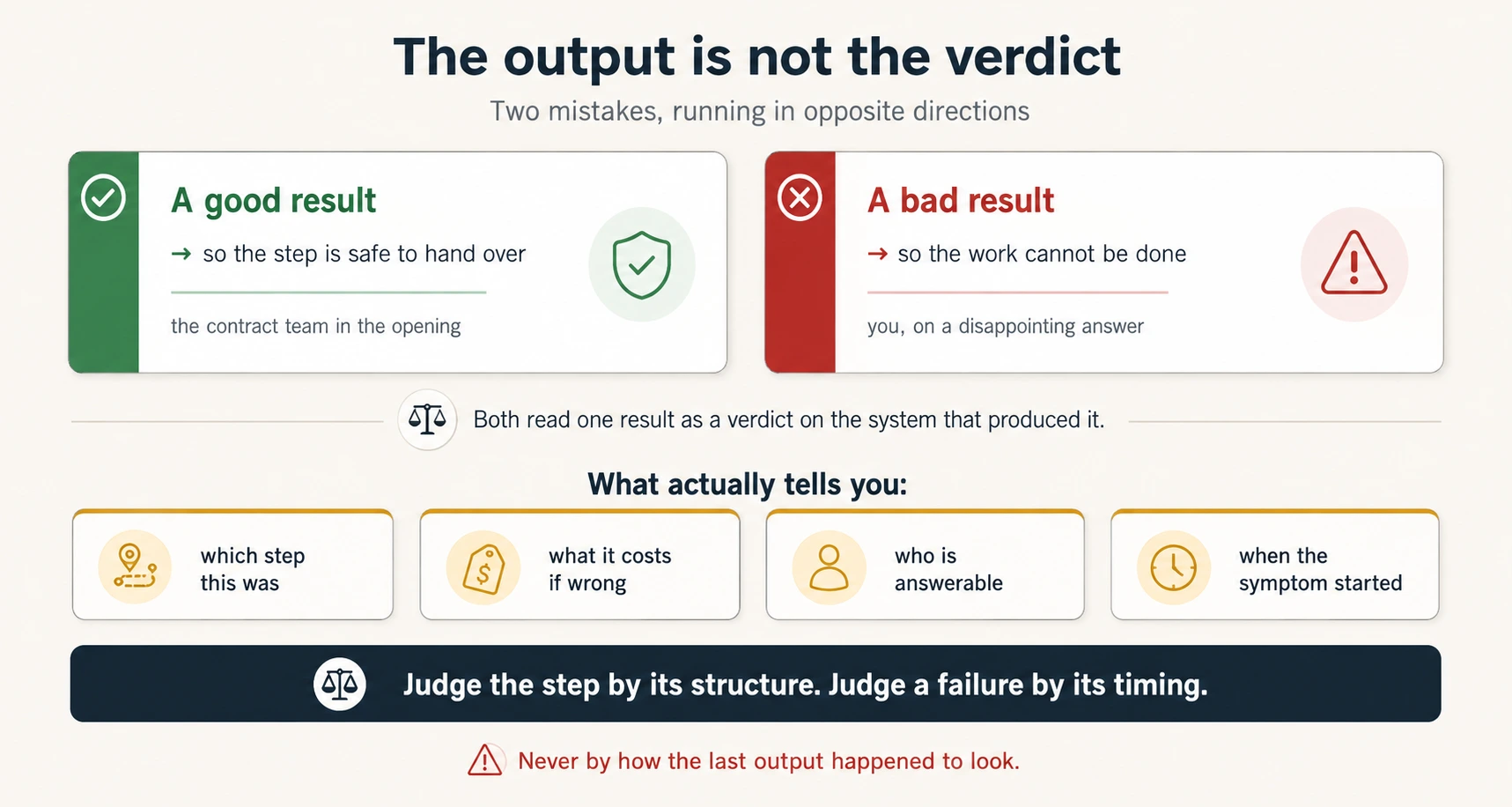
What tells you instead is the structure underneath: which step this was, what an error costs, who answers for it, and when the symptom appeared.
Reading time: about 55 minutes, plus about 40 for the two graded exercises and the project at the end.
Quick glossary
Skip this now. Every term is explained again where the course uses it.
- step: one named piece of a workflow, with one owner.
- Project: a saved workspace holding the files and instructions for one kind of work.
- knowledge base: the files a Project can read.
- standing instruction: a rule that applies to every run inside a Project.
- Skill: a saved procedure the assistant follows the same way every time.
- code execution: the assistant writes and runs code, then reports what it computed.
- context: everything the model can see for this work: your prompt, the files, and the conversation.
- context window: the limit on how much context a model can hold at once.
- delegation map: the workflow step by step, with an owner and a reason for each step.
- reversibility, stakes, accountability: the three criteria that decide who owns a step.
- AI-appropriate: a step AI may own, because it can be undone and somebody judges it.
- human-retained: a step a person owns outright.
- collaborative: AI produces, a named person judges.
- window test: can everything this step needs be put in front of the model?
- synthesis: gathering considerations and shaping them into options.
- judgment step: a step that runs on information you cannot supply.
- task definition: a request turned into five settled answers: what, for whom, how often, from what data, in what format.
- over-delegation: giving AI more than the risk of the step allows.
- halo delegation: handing a step to AI because the step before it went well.
- unstaffed gate: a collaborative step whose review is no longer really done.
- map owner: the person answerable for whether the map still describes the real workflow.
- scheduled read: a review of the map on a fixed date.
- escalation signal: other people depending on your tool.
- under-specification: output wrong from the first answer, because the prompt never carried what it needed.
- context overload: output that gets worse as a session grows.
- wrong feature or model: the step went to the wrong tool, so the error is one repeatable kind.
- tier: a model version, from fast and cheap to slower and more capable.
- stale configuration: output that slowly gets worse because a saved instruction, file, or Skill is out of date.
- expectation mismatch: a task that asks for something the tool cannot do.
- diagnostic sequence: prompt, session length, feature and model, configuration, then the task. Cheapest first.
- rule, reference, or procedure: the test for where a fix belongs.
- promotion: moving a fix out of a chat and into configuration.
- ideate, prototype, feedback, refine: the four steps of the build loop.
- artifact: a small working web page the assistant builds inside the chat.
- friction: a small repeated cost you have stopped noticing.
- baseline: the measurement taken before you change anything.
- parallel run: running the old and new workflow together for a few cycles.
Six questions, in the order you will need them:
| Stage | The question that decides it |
|---|---|
| Design | What are the actual requirements, and which numbers must be computed? |
| Map | For this step: can it be undone, what does an error cost, who answers? |
| Build | Does this still fit in a prompt-and-iterate loop, or has it outgrown it? |
| Diagnose | When did the symptom first appear? |
| Persist | Is this fix a rule, a reference, or a procedure? |
| Communicate | What does it do, and where exactly is the human gate? |
Read AI Fluency first. It teaches delegation on your own work. This course takes the same skill to a workflow a team runs, where a wrong split lands on somebody else.
You should also have met Projects and standing instructions in the ChatGPT & Claude Quick Reference, Skills in Skills & Connectors, and code execution in Code You Never Write. This course uses all three and teaches none of them. The Quick glossary above defines each.
One question it does not answer: whether AI may touch this work, or this data, at all. That is Governance, Risk & Responsible Use, the next Foundations course. This course assumes the answer is yes.
📚 Teaching Aid
Click through the slides once before you read. Afterwards, use them to teach this material to somebody else. Explaining a delegation map out loud shows which steps you had not really understood.
View Full Presentation for Workflow Design & Diagnosis
Try it before you read it
Two minutes, and it will misbehave in a way the rest of the course explains.
Pick a real workflow you or your team runs regularly. An expense approval. A weekly report. A customer complaint. Anything with more than three steps and one decision.
Open an AI assistant and paste this, filling in your workflow:
Here is a workflow my team runs every week: [list the steps in order, roughly, in your own words].
Redesign it with AI inside. For each step, tell me whether AI should do it, and what the new workflow looks like.
Read what comes back and look for one thing.
Find the step in your workflow that cannot be undone. The payment that goes out. The message that reaches the customer. The record written to a system other people read.
Now look at what the assistant said about that step.
It handed the step to AI, or was vague about who owns it. Then you have watched a confident redesign go wrong in the place that matters most.
It flagged the step and kept it human. Good. Now ask it why:
Why did you keep that step human? What specifically about it made you decide that, and how sure are you?
You will get a reasonable answer built from what that kind of step usually looks like, not from anything about your organization. It does not know what an error there costs you, whether your regulator cares, or who signs it off. It guessed well.
Either way the missing information is the same. You never told it which step cannot be undone, what an error would cost, or who has to answer for it. It worked with the only thing it could see: which steps look mechanical.
Preview: the questions this course answers
Eighteen questions, in order. Each link jumps to its answer.
| # | Question | Answered in | Objective |
|---|---|---|---|
| 1 | What changes when a habit becomes a team workflow? | Concept 1 | D4.4 |
| 2 | How do I turn a messy document into requirements? | Concept 2 | D4.1 |
| 3 | When must a number be computed, not written? | Concept 3 | D4.2 |
| 4 | Which steps can be given everything they need? | Concept 4 | D4.2 |
| 5 | What three criteria decide who owns a step? | Concept 5 | D4.4 |
| 6 | Why do unrelated workflows produce the same pattern? | Concept 6 | D4.4 |
| 7 | What are the three ways a map goes wrong? | Concept 7 | D4.4 |
| 8 | Who keeps the map true as the workflow moves? | Concept 8 | additive |
| 9 | What does a build loop look like? | Concept 9 | D4.3 |
| 10 | When has something outgrown prompt-and-iterate? | Concept 10 | D4.3 |
| 11 | How do I tell four causes of bad output apart? | Concept 11 | D7.1 |
| 12 | What order should I check things in? | Concept 12 | D7.1 |
| 13 | How do I turn "not quite right" into an instruction? | Concept 13 | D7.2 |
| 14 | Where does a fix belong so it lasts? | Concept 14 | D7.2 |
| 15 | How do I find friction I stopped noticing? | Concept 15 | D7.3 |
| 16 | What do I measure, and when do I stop? | Concept 16 | D7.3 |
| 17 | What do we do after a bad output gets out? | Concept 17 | additive |
| 18 | How do I describe it without overstating it? | Concept 18 | D4.5 |
For teachers using this table
Before. Ask the group to answer three of these cold, in writing, before anyone reads. The wrong answers are your lesson plan. Questions 6, 7, and 11 produce the best ones.
During. Each numbered concept closes one row. If a session runs short, the rows you did not reach are what to assign rather than what to skip.
After. Any question a learner cannot answer without scrolling up marks the section that did not land.
The Objective column maps each row to the CCAO-F exam blueprint. D4 is Workflow Integration and Solution Design. D7 is Troubleshooting and Optimization. Rows marked additive are not blueprint objectives. See Certifications.
Part 1: Design the work before you place the tool
1. The unit of value is the step, not the session
"I use AI" and "our workflow uses AI" are different things.
The first is a personal habit. It lives in your head, it varies by mood, and it disappears when you are on leave. The second is a repeatable process a team runs, where AI performs named steps every time, the same way, whoever is at the keyboard.
Only the second one grows in value. Only the second one can be wrong in a way that keeps being wrong.
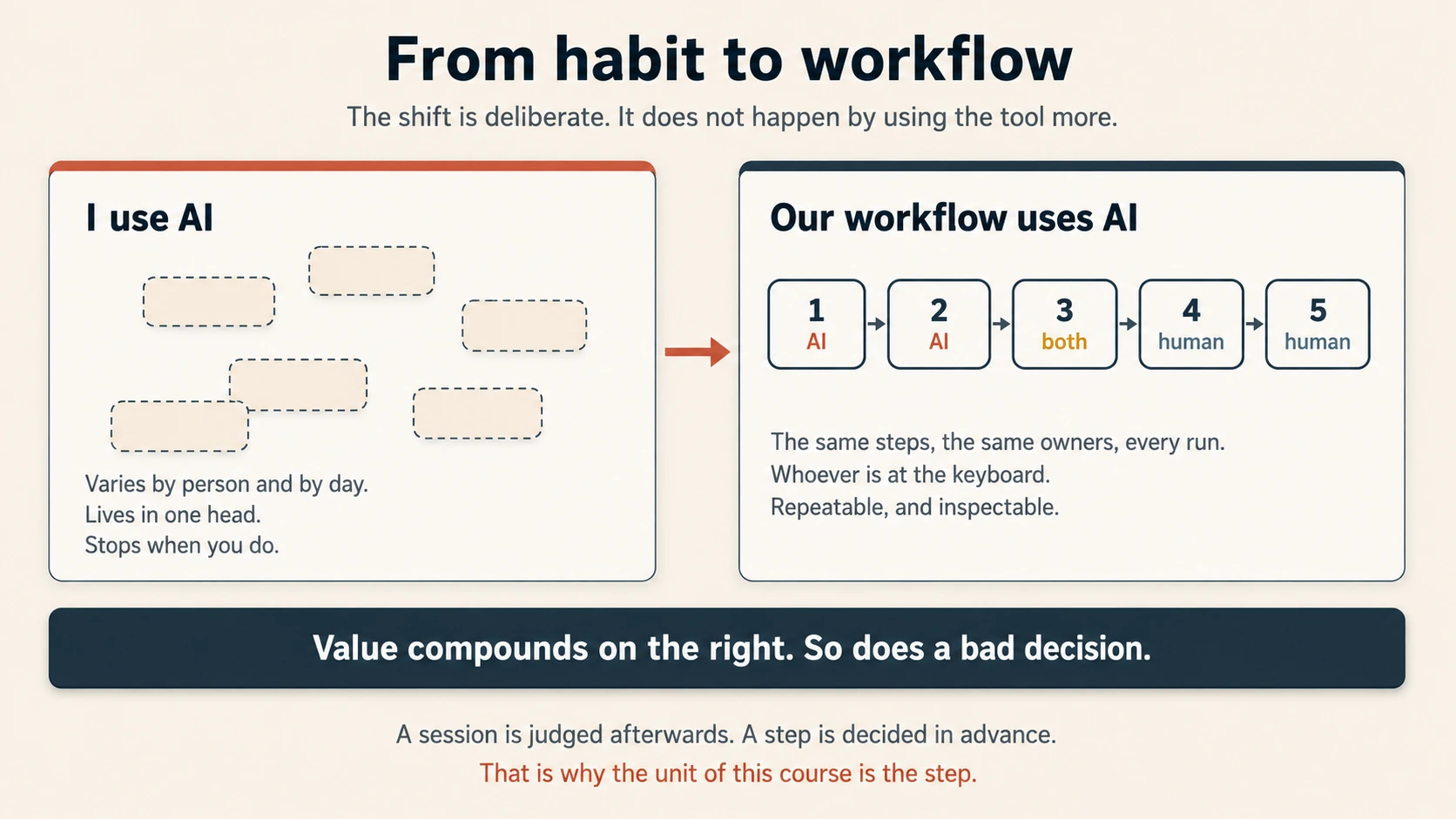
A step is one named piece of a workflow, with one owner. You judge a session afterwards, by whether you liked the result. You decide about a step in advance, on grounds that do not change when the output happens to look good.
2. Extract the requirements, then attack them
Real work rarely starts from a clean brief. It starts from a forty-page document, a thread of half-formed emails, and something somebody said in a meeting.
That has to become requirements first: specific, traceable, testable. AI is strong at this, and it is the right first use in almost any redesign.
Sometimes there is no document, only a sentence somebody said in passing. "We need better reporting" is not a requirement. Nobody can build it, and nobody can say afterwards whether it was met.
The same translation fixes it. A task definition is a business need turned into five settled answers: what is produced, for whom, how often, from what data, and in what format. Each answer is something you can check. Each one still missing is a clarifying question you owe somebody, not a blank for the model to fill.
Here is how the request reached me, in the words I was given: [paste it].
Turn it into a task definition. What exactly is produced, who is it for, how often does it run, what data does it draw on, and what format does it arrive in? Where I have not told you, say so instead of filling it in.
Asked to define a task, a model will define one, and the slots you never specified close at likely-looking defaults.
Ask for structure, not a summary. A summary tells you what the document says. A structure gives you rows other people can work from. The example below uses an RFP, a request for proposal, the document a buyer sends out asking suppliers to bid.
From the attached RFP and the email thread, extract every distinct requirement we are being asked to address. For each one give me a short label, the exact section it comes from, whether our thread already answers it, and whether it is ambiguous enough to need a clarifying question. Return it as a table.
The source column is what lets somebody who was not in the room check the list.
Then attack it. The requirements that cost teams the bid are rarely stated plainly. They sit in a small clause, behind a scoring rule, or in a sentence two people would read differently. Extraction finds what was written. It does not find what was meant.
Review the requirements you extracted. Which are ambiguous as written? Which could two people on our team interpret differently? Which imply a requirement the document states only indirectly?
This moves checking forward, from the output stage to the requirements stage, where it is far cheaper. An unclear requirement caught here costs one clarifying question. Caught after the work is built, it costs the work.
"The report should be delivered promptly after month end" reads like a requirement. It is not one. Two days and two weeks are both prompt to somebody, so two teams build two different processes and both believe they were told to.
The test is whether you can write a check for it. If you cannot say what evidence would prove it met, it is not decided yet.
Why this is a Project rather than a one-off chat
Requirements extraction is recurring work with a stable background. Past winning proposals belong in the knowledge base. The extraction format belongs in the standing instructions. The formatting procedure belongs in a Skill.
The knowledge base and the standing instructions are set on the Project. A Skill sits at the account level, so it works everywhere and one edit changes it for every Project.
Put those three in the right places and the next RFP costs one sentence instead of one setup. Concept 14 tells the three homes apart.
3. A plan is only as good as the numbers under it
Planning work mixes two things that AI handles very differently.
Synthesis means gathering the considerations and shaping them into options. AI does this well, holding many factors at once without losing the thread.
Calculation is different, and not because models cannot add. They can. The problem is that you cannot tell from the page whether they did. A written figure and a calculated one look the same.
So the rule is about consequence, not ability:
If a result matters, compute it. Never write it.
Have the numbers produced by code execution rather than written into a sentence. Code execution means the assistant writes and runs a small piece of code, then reports what it computed. This is the fourth output format beside inline text, artifacts, and structured data, and calls the result code-executed. One limit travels with it. The run is exact, but the assistant wrote the code, and the code can still pick the wrong column. Check what was computed, not only that it was. A staffing plan built on a guessed utilization rate is a guess in a table. The same plan built on the real timesheet data traces line by line to a calculation somebody can re-run.
Using code execution on the attached ticket data, calculate quarterly volume growth and average tickets resolved per analyst. Then, from those figures, recommend the headcount needed to hold our current resolution time next quarter, and show the assumptions.
That prompt separates computation from recommendation, in that order. It also asks for the assumptions, which lets somebody disagree with the recommendation without redoing the arithmetic.
It is also a diagnostic habit. When numbers come back slightly wrong, the cause is usually not the prompt. It is that a calculation was asked for in prose.
4. Where AI insight actually changes a plan
Not every planning step gains equally. Getting it wrong produces a plan that is confidently useless.
An operations lead asked for a whole capacity plan in one request: analyze the ticket data, work out the growth trend, and recommend next quarter's headcount. What came back was well structured and recommended hiring three analysts.
The team was under a hiring freeze announced internally two weeks earlier.
Nothing there is about data quality. The trend analysis was fine, and the recommendation followed from it. The plan was useless because one step needed an input the machine could not reach: a decision made in a meeting, not in the dataset.
Synthesis steps run on information you can supply, so they hand over well.
A judgment step is one that runs on information you cannot supply, or would not. Risk appetite. A hiring freeze. Whether this client will accept one more delay. These stay human because the inputs are unavailable, not because judgment is sacred. A model with missing inputs does not stop. It fills the gap with what such a decision usually looks like, at the same confidence as the part it really computed.
So the useful question is not "can AI do this?" It is the window test, which asks whether everything the step needs can be put in front of the model.
The window here is the model's context, which means everything it can see for this work. Your prompt, the files you supply, and the conversation so far. The context window is the limit on how much of that it can hold at once. That limit is also why a long session loses its early instructions, which is the failure in Concept 11.
Could I put everything this step needs into the window? If not, the step is mine.
A step whose inputs all fit still has to survive the three criteria in Part 2.
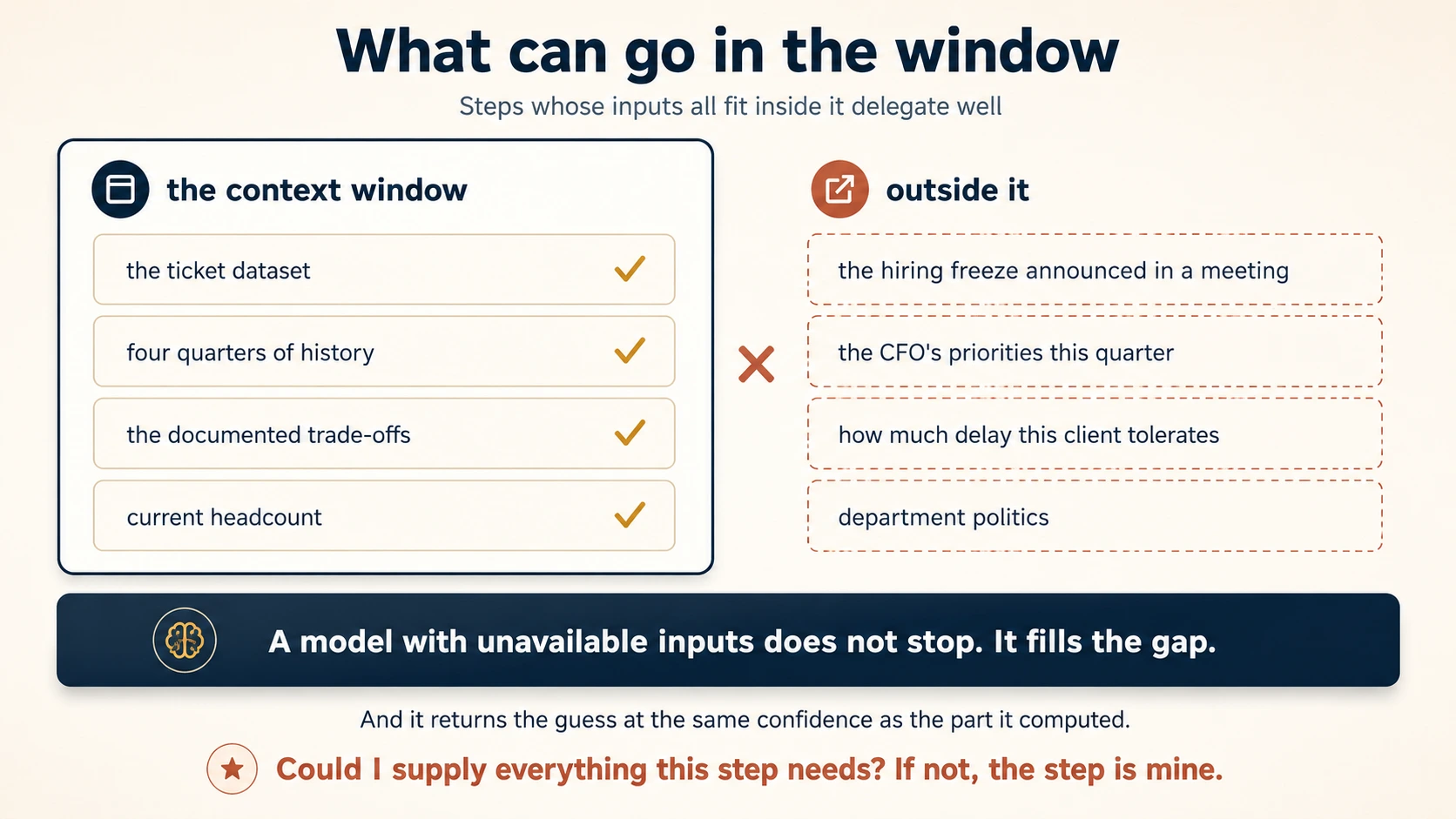
Run that on the capacity plan. The trend and the options can be supplied. The hiring decision cannot.
The test also catches the work people call "needing a human touch." A condolence note to a long-standing client. A hard conversation with somebody's manager. What they need cannot be put in the window either.
Research is a synthesis step, so run the window test on it too.
A model's knowledge stops at a date. Everything after that is outside the window, and asking for it produces the hiring-freeze failure again. Not a refusal, but a confident answer built from what such a fact usually looks like.
So split research questions before you ask them:
| The question is about | Where the answer must come from | What you ask for |
|---|---|---|
| A stable concept or method | The model's own knowledge is fine | The explanation, and the reasoning behind it |
| Anything current, priced, or dated | An external source you can open | The answer and the link, so you can check it |
Two features do that second row. Web search in chat covers the quick lookup, a price or a date. Research is a deeper pass built from many sources, and it sits on the paid plans. Both hand back links, which is the whole reason to use either.
The research version of the same rule:
For anything current, ask for a source you can open. Never a confident answer.
Part 2: The delegation map
Every step takes three decisions, and mixing them is what builds a map that looks reasonable and is wrong.
1. Eligibility. May AI touch this at all? Two gates. May this data enter this tool? Can everything the step needs be supplied? A no at either ends the question, however mechanical the step looks. The first gate is Governance, Risk & Responsible Use. The second is the window test from Concept 4.
2. Ownership. Who owns the step? Three criteria decide it, and Concepts 5 to 7 work through them.
3. Implementation. What carries it? Decided last, and only for steps that got past the first two:
| What the step is | What carries it | Why |
|---|---|---|
| A repeatable procedure with fixed steps | A Skill | It runs the same way for everyone |
| Rules and reference the step always needs | Project knowledge | Available every run without pasting |
| A calculation the output depends on | Code execution | Computed rather than generated |
| A standing constraint on every output | Standing instruction | Applies without anyone remembering it |
| A step a person owns | A named review gate | A person, a moment, and a thing checked |
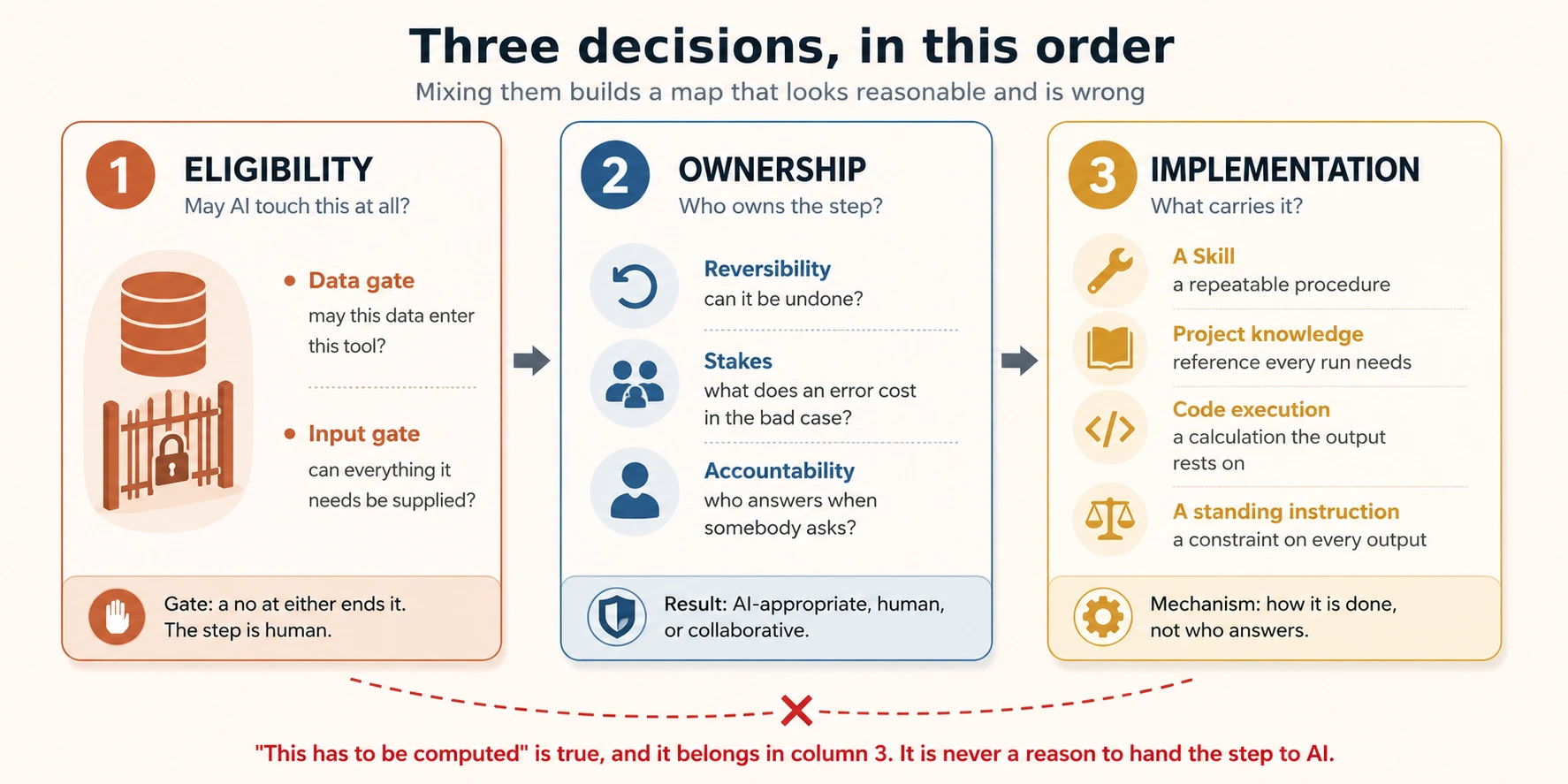
Keep the third decision out of the second. "This has to be computed" is true and it belongs in the implementation column. It is not a reason to hand the step to AI, and using it as one is how a high-stakes calculation ends up unreviewed.
The first four rows say one thing four ways. A configured Skill runs the same way every time, and prompting from memory does not. Configuration is what makes a step work for the colleague who takes it over.
Teams skim that last row. A step you keep with a person is not finished when you write "human" next to it. It needs a named person, a named moment, and a named thing they are checking. "A human looks at it" is how the gate in Concept 7 goes unstaffed.
5. Three criteria decide every step
Before you redesign a workflow around AI, write the steps down in order. Then classify each one as AI-appropriate, which means AI may own it, human-retained, which means a person owns it outright, or collaborative, which means AI produces and a named person judges.
Ownership is decided by three criteria, and only these three: reversibility, stakes, accountability. Each one is a question about the step, not about the model.
Reversibility. Can the step be undone if AI gets it wrong? A draft can be rewritten. A sent email cannot be unsent. Steps that can be undone tolerate delegation, because the cost of an error is a redo, not the error.
Stakes. What does a mistake at this step cost? Not on average, and not usually. In the bad case. A misfiled label costs a minute. A wrong penalty figure costs whatever the penalty is.
Accountability. Who is answerable for this step's outcome? Somebody answers for every step, so that question alone would keep every step human. The sharper question is whether this step is the call they answer for, or an input they judge before it acts on anything. A step that produces an input somebody judges can be handed over, because the accountability sits at the judging. A step that is itself the decision cannot, because nothing after it is left to carry it. Either way accountability never moves onto the machine, because the machine cannot be asked.
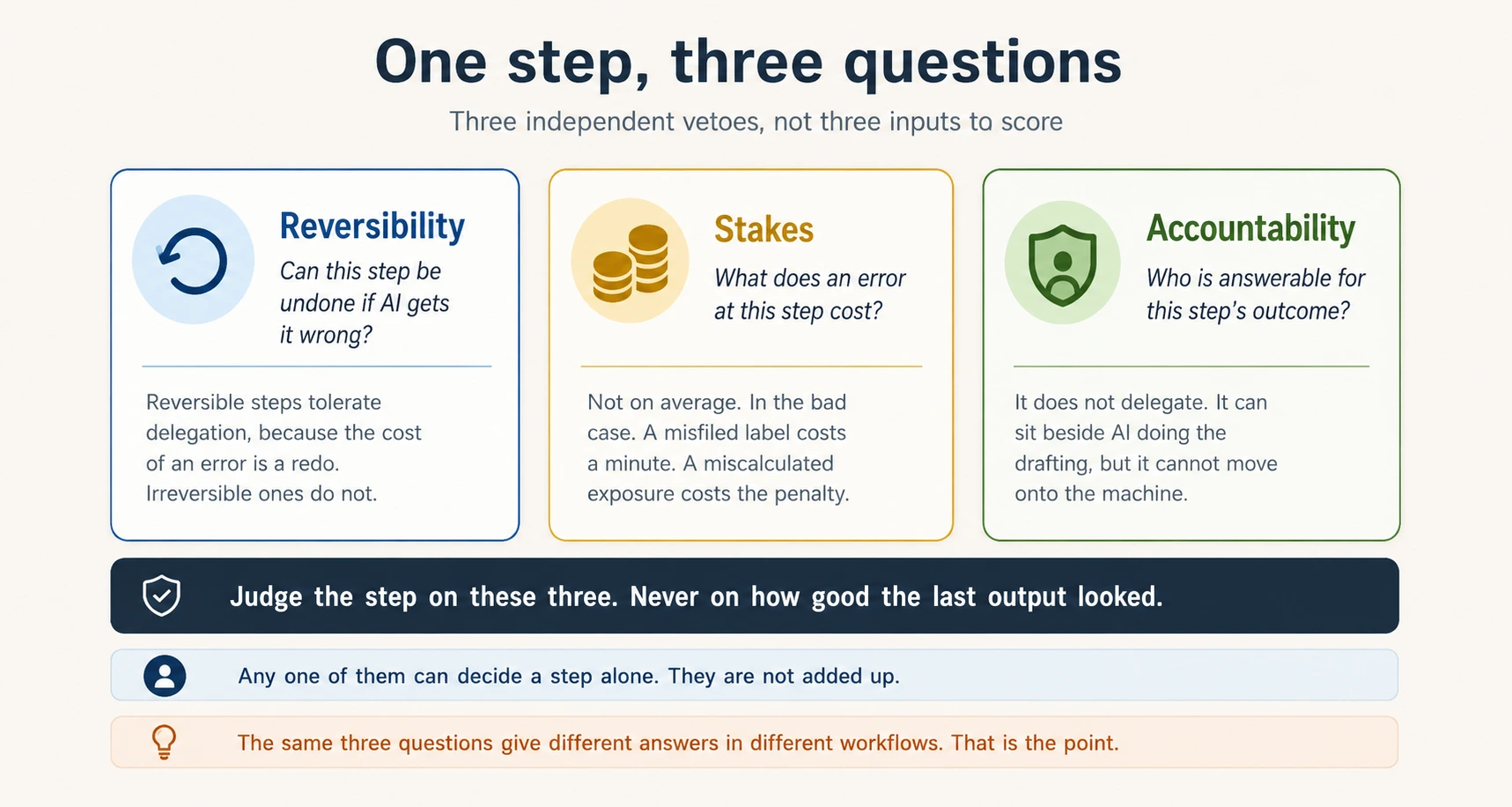
How well AI performed on this step in your test run is not a criterion. Concept 7 is why.
You are not adding the criteria up, and you are not waiting for three yeses.
Usually one of the three decides the step and the other two agree with it. Name that one. In the contract map below, "sign and send" is decided by reversibility and "approve each change" by accountability. Naming the criterion that carried the row makes your classification checkable by somebody who was not there.
Where the three disagree, the strictest one wins. A step that can be undone and costs little, but is still the decision somebody answers for, stays human.
You may also meet a four-criterion version, which adds whether the work needs human creativity or empathy. That version answers a different question: whether a whole use case belongs with AI at all. It sits closer to the Eligibility decision in Part 2, which comes before ownership. For deciding who owns a step, it stays three.
6. Two workflows, same criteria, different answers
Contract review is the workflow most business teams map first.
Contract review
| Workflow step | Owner | Criterion that decided it | Carried by |
|---|---|---|---|
| Extract clauses from the contract | AI | Reversible, low stakes | Skill |
| Flag departures from the company playbook | AI | Reversible, and errors surface at the redline | Skill |
| Draft the redline and the rationale | Collaborative | High stakes, so a human judges each edit | Skill + gate |
| Compute financial exposure of a penalty clause | AI | Reversible, and checked at the approval gate below | Code execution |
| Approve or reject each change | Human | This step is the decision somebody answers for | Named reviewer |
| Sign and send | Human | Irreversible and externally binding | Named signer |
The penalty-exposure row is the one people get wrong. Being arithmetic does not make a step low-stakes. That figure feeds the approval decision, and if it is wrong the approval is wrong. What makes it safe to hand over is that the result can be undone and lands in front of a human at the very next row. Take that gate away and the step stops being AI-appropriate, even though the arithmetic has not changed.
That is why the two columns stay apart. "Must be computed" belongs under Carried by. It never belongs under Criterion.
The playbook row is the one people copy wrongly. Flagging departures from a written policy is AI-appropriate here because somebody reads the flags at the very next row, where a wrong flag shows up as a wrong redline. Move the same step into a workflow where nothing after it reads the flags, and it becomes collaborative instead. Checking expenses against a travel policy is usually that second shape.
The step did not change. What changed is whether anybody is standing after it.
AI is doing real work in the middle of that table, including the redline draft, which is the real legal writing. The human owns the decisions and the actions that cannot be undone. Everything else moved.
Now the same criteria on work unrelated to law.
Onboarding documents
| Workflow step | Owner | Criterion that decided it | Carried by |
|---|---|---|---|
| Pull new-hire details from the HR system export | AI | Reversible, and checked at the confirmation step | Code execution |
| Draft the offer letter from the approved template | AI | Reversible draft, low stakes until it is sent | Skill |
| Personalise the welcome note | Collaborative | The manager's voice cannot be supplied | Named reviewer |
| Confirm compensation matches the approved req | Human | This step is the check, nothing follows it | Named reviewer |
| Send the signed offer | Human | Irreversible and externally binding | Named signer |
The pattern is the same, and the work is unrelated. Mechanical steps and draft steps went to AI in both maps. The step that confirms a figure and the step that cannot be undone stayed human in both. Nobody decided that by taste. The criteria decided it, twice, in two different fields.
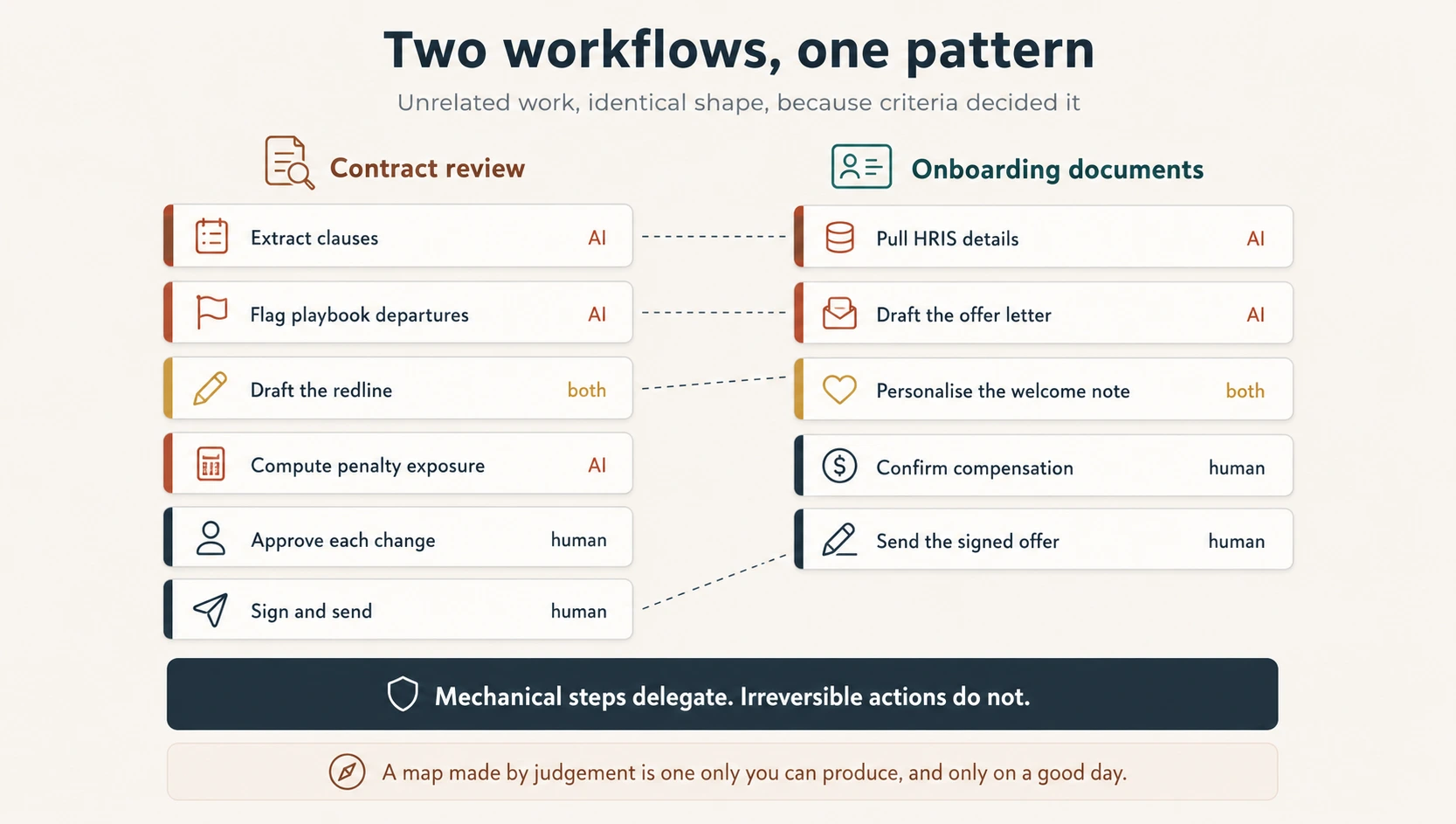
7. Three ways a map goes wrong
The second team was not careless. They watched AI draft redlines well for weeks, then let it approve the easy clauses. That is a reasonable response to evidence, and the most common way a workflow picks up a risk nobody chose.
Over-delegation means giving AI more than the risk of the step allows. It happens through reward. The drafting is good, week after week, so the next step feels safe. It is not a next step. It is a different kind of step.
Drafting quality is evidence about the draft. It is not evidence about the decision.
All three errors below look reasonable at the moment they happen.
Halo delegation means handing a step to AI because the previous step went well. The competence was real. It just belonged to a different step.
An unstaffed gate is a collaborative step whose review is no longer really done. When the reviewer is busy, or the queue is long, or the drafts have been good for two months, the review becomes a glance and then a click. Nothing was decided and nobody changed the map, but the step is now automated. The map does not tell you, because a map records what you designed rather than what is running.
Mapping the tool instead of the work. A team maps around the features they like. They built a good Skill, so the workflow gains a step shaped like that Skill. It is the hardest of the three to see from inside, because the workflow really does use the tool well. It just is not the work.
A map with all three in it. A customer-complaint workflow at a mid-size software company, and it looks reasonable. Read it before the diagnosis.
| Workflow step | Owner | Stated reason |
|---|---|---|
| Pull the complaint and the customer's ticket history | AI | Mechanical retrieval |
| Summarise the complaint into our issue template | AI | Our summarising Skill is very good at this |
| Classify severity (low, medium, high) | AI | The summaries have been accurate for three months |
| Draft the customer response | Collaborative | AI drafts, the duty agent reviews before it goes out |
| Send the response | AI | Low severity only, and the drafts have been strong |
| Log the outcome in the CRM | AI | Mechanical write |
Find the three problems before continuing.
The diagnosis
Row 3 is halo delegation. The stated reason is that the summaries have been accurate. Severity classification is a different step, and it decides whether a customer is escalated or ignored. A missed high-severity complaint is not recovered by reclassifying it a week later, and nothing after it re-reads the call. It is at best collaborative.
Row 5 is over-delegation, and row 4 is where it came from. "Low severity only" sounds like a control, but severity was set in row 3 by the same system that is now sending without review. A step cannot give itself permission to skip the gate. Sending also cannot be undone.
Row 2 is mapping the tool instead of the work. The reason given is that the Skill is good, not that the step needs doing this way. If the issue template exists because the summarizing Skill produces that shape, the workflow has grown around the feature.
Row 4 is the one to watch, not fix. As written it is correct. But the duty agent reviews every draft, including the ones row 5 will now send without them, and nobody has said how many drafts per shift that is. This is a gate with a sensible design and no capacity check behind it.
Every stated reason above is true. The Skill really is good, and the summaries really were accurate. Bad maps are built from true statements about the wrong step.
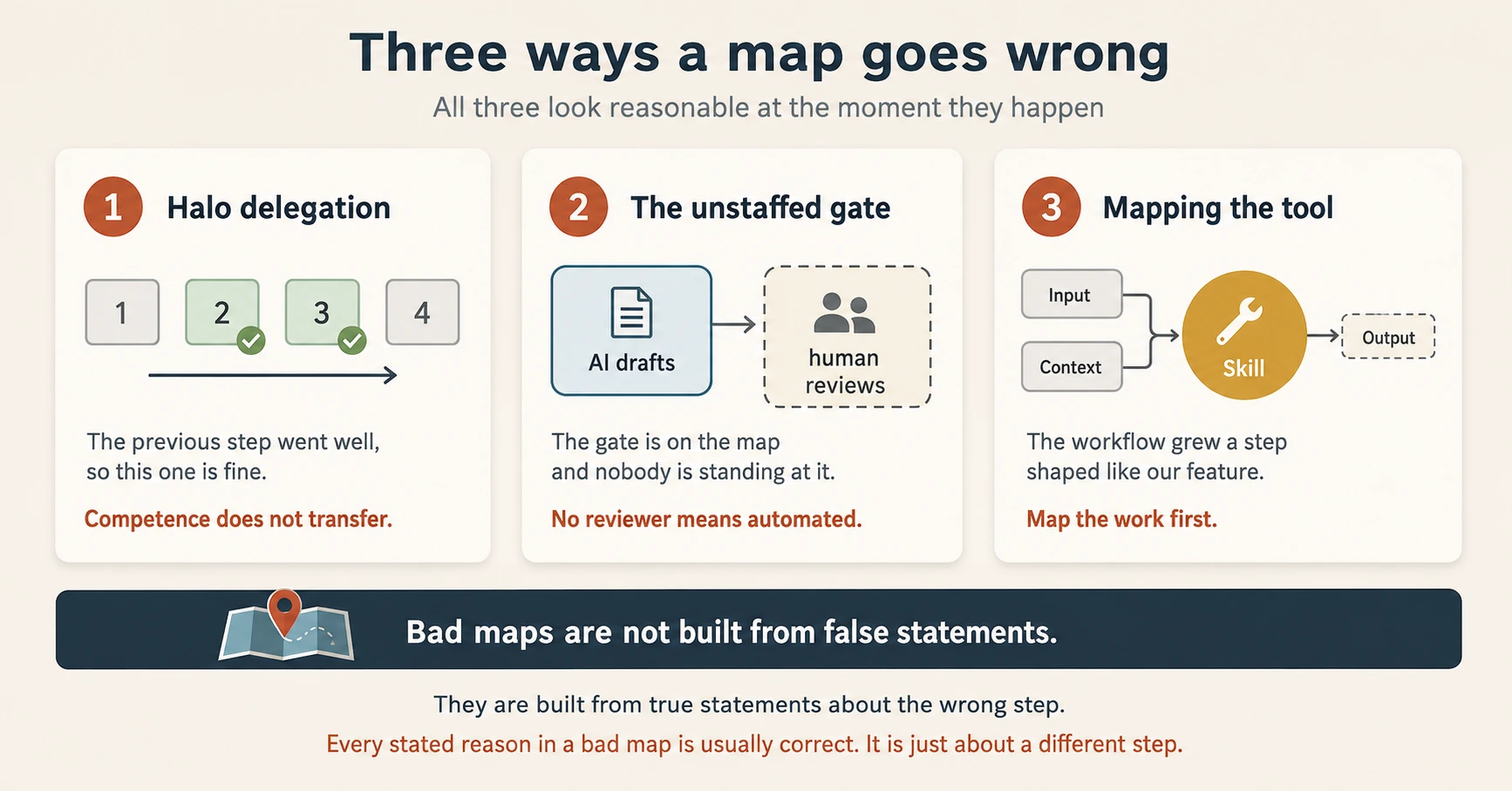
The order to check them in: map the work with no tools in mind, classify each step on its own, then ask of every collaborative step who is doing the reviewing and when.
Ask that last question regularly. Are the gates I designed still being staffed?
8. Who owns the map, and when it is read again
A delegation map is the workflow written out step by step, with an owner and a stated reason for each step. It is written once, and then it slowly becomes wrong.
Not because anybody changed it. Because the workflow moved underneath it. A step got added. A reviewer changed roles. Volume doubled, and the gate that worked at twenty cases a week stopped working at fifty. The document still describes the workflow you designed, not the one that runs.
Three controls in this course decay the same way:
| What decays | Looks like | Signal at the moment it fails |
|---|---|---|
| A review gate | Reviews become glances, then clicks | None |
| A standing instruction | Output slowly stops meeting a rule | None |
| The map itself | Describes a workflow nobody runs any more | None |
The one answer to a failure with no signal is a scheduled read, which means a review of the map on a fixed date.
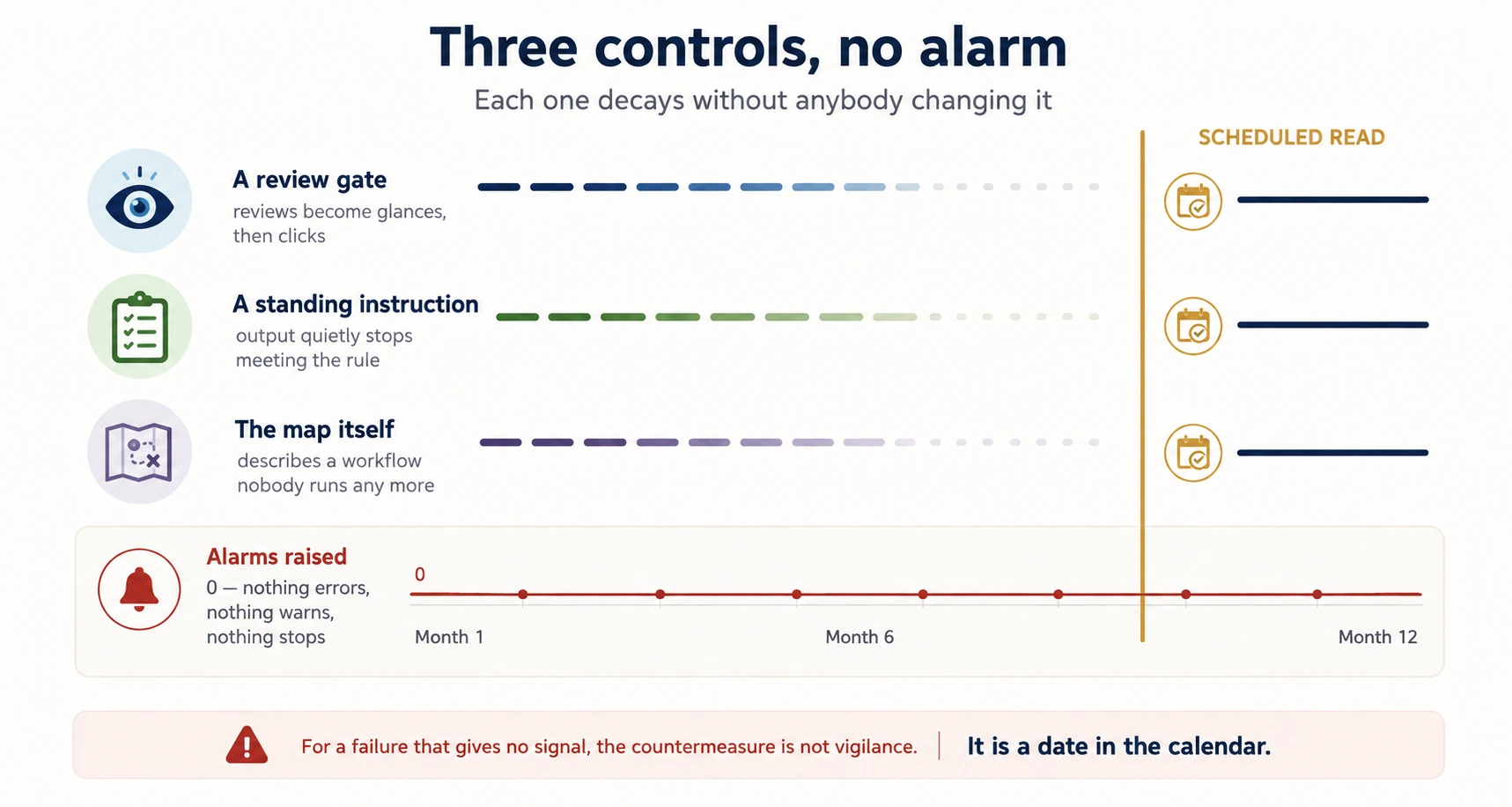
The map needs two things most maps do not have.
An owner. The map owner is one named person, not a team. The owner does not do the work, but is answerable for whether the map still describes reality.
A review date. Quarterly is a reasonable default. Sooner if the workflow's volume, staffing, or legal position changes, because all three break gates without touching the document.
The review itself is four questions, and it takes about twenty minutes:
- Has a step been added or removed that is not on the map?
- For every collaborative step: who reviewed it last week, and how long did they spend? If nobody can answer, the step is automated and the map is wrong.
- Has anything changed the volume or the stakes? A gate sized for the old numbers is a gate that fails at the new ones.
- Is every configuration the map depends on still current? The Skills, the knowledge sources, the standing instructions.
Question 2 finds the real problems. It asks about last week rather than about policy, because policy is what the map already says and last week is what happened.
A map with no owner and no review date describes your workflow accurately for about a quarter. With them it is an operating document, and it catches the unstaffed gate before the outcome does.
Part 3: Build it, and watch it
9. The loop: ideate, prototype, feedback, refine
AI is a design partner, not a vending machine. It reacts to what you put in front of it, and knows nothing about your situation that you did not supply. You will not get a solution by asking for one. You get one by running a loop with four steps: ideate, prototype, feedback, refine. Ideate means producing options. Prototype makes one concrete enough to react to. Feedback shows what is wrong with it, which you could not have known in advance. Refine fixes that. Then round again.
Run the loop inside a Project so the background, the limits, and earlier decisions stay stable. Across scattered chats each round restarts from a slightly different understanding, which is how you end up with a pile of drafts rather than a solution.
A worked example: three cycles, no code written.
A business analytics team needed a small internal tool to track a set of metrics. Rather than pay for a build, they had AI produce it as a web artifact. An artifact is a small working web page the assistant builds inside the chat. They improved it by asking.
Cycle 1: build.
Build a simple dashboard artifact that shows these five metrics from the attached data, with a chart for each.
An artifact comes back, working. Five charts, readable, roughly right. This is the cycle that makes people overconfident, because you have not yet asked for anything hard.
Cycle 2: filter and totals. The team asks for a date-range filter and a totals row.
The filter works. The totals are wrong.
Not obviously wrong. The figures are the right size and formatted correctly. One analyst notices that a column does not add up, and only because she knew roughly what one of the five numbers should be.
Nothing broke. The totals were written rather than computed, and a written number looks as right as a calculated one.
The fix is not a better prompt. It is Concept 3 in the middle of a design loop. The totals row is a calculation, so it belongs in code execution rather than in prose.
Cycle 3: color and print. The team asks for the brand colors and a print-friendly layout. It works first time.
Both were one-sentence requests. Cycle 3 was a description problem, and describing it better solved it. Cycle 2 was a feature problem, and no amount of describing would have solved it.
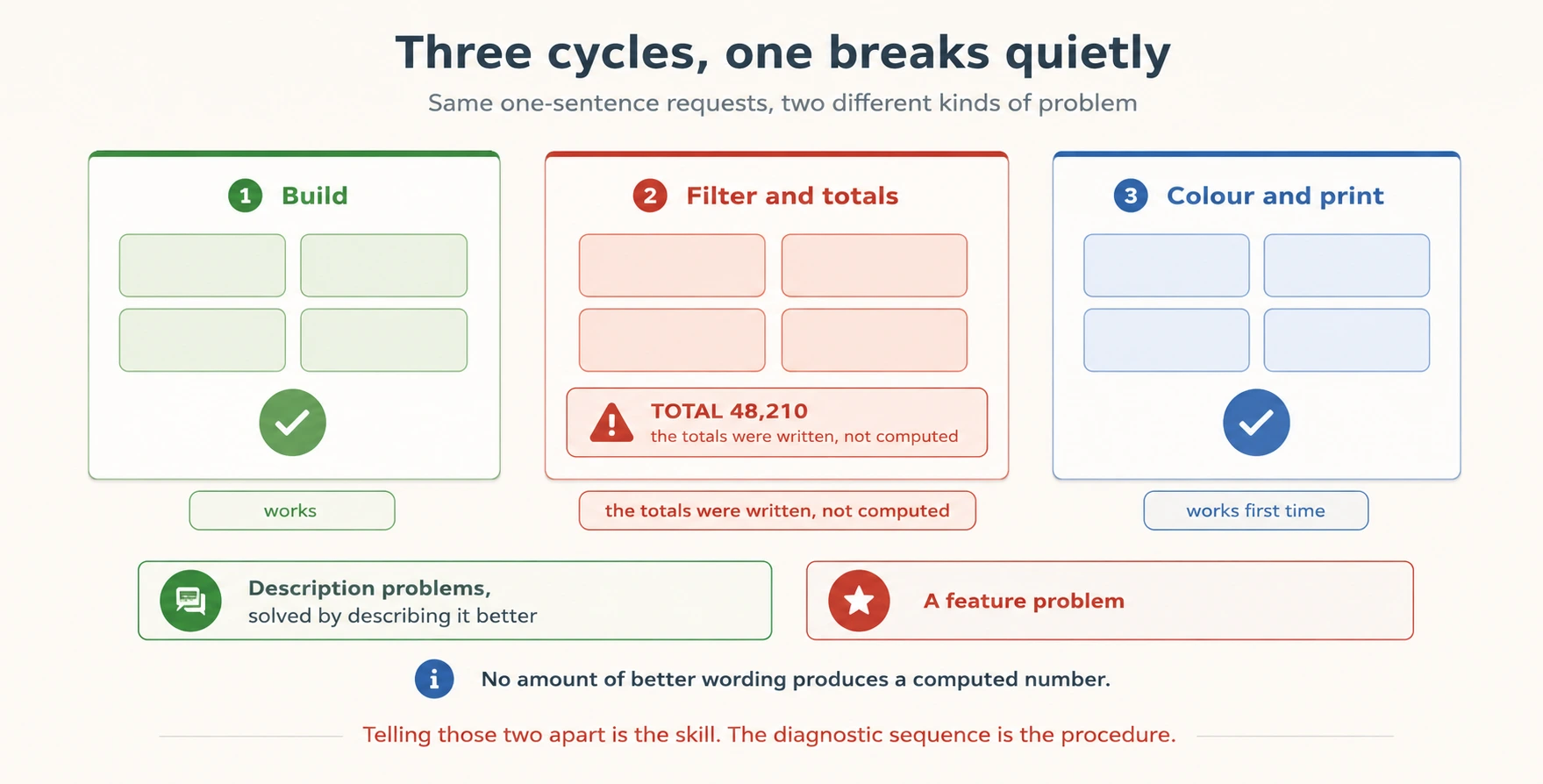
Telling those two apart is the skill. Part 4 is the procedure for doing it.
Why the failing cycle is in the middle
Cycle 2 fails with no noise, which is the point. A loud failure teaches you nothing, because an error message tells you where to look.
The realistic failure in a build loop is the one that passes review, because the output was smooth, formatted, and confident. It reaches real use because there was nothing to catch it.
10. When it has outgrown prompt-and-iterate
The dashboard artifact worked because it served one small team's internal need. Six months later, three departments open it every Monday and one of them puts its numbers into a report for the board.
That is a different object now, and nobody decided it should be.
Dependency is the escalation signal, which means the point where a tool has outgrown prompt-and-iterate. Once other people rely on something as infrastructure, it has requirements it never had before. Uptime, access control, somebody to call when it breaks, and a guarantee that it still does today what it did in March. That work belongs with developer or architect expertise.
Escalating is a correct answer, not an admission of failure. The failure is the opposite. You keep running something by prompt long after other people depend on it, because nobody marked the moment it stopped being small.
There is a second signal worth keeping separate.
| The signal you notice | What it means | Where to go |
|---|---|---|
| Other people now depend on this | It is infrastructure and needs engineering | Developer or architect expertise, past what this course covers |
| I have solved this the same way three times | The shape is stable and can be manufactured | From One-Off to Worker |
The first is about who is exposed. The second is about whether the method has stopped changing.
Part 4: When it misbehaves
11. Four causes, told apart by when the symptom appeared
When output disappoints, most people give up and decide the tool cannot do this, or change things at random until something works. Both skip the only question that narrows it down: when did the symptom first appear?
Four causes produce bad output that looks much the same on the page. Timing tells them apart, and it is free information you already have.
Timing tells you where to look first. It does not tell you what the cause is.
One timing can have more than one cause. A first answer can be poor because the prompt was thin, because the source material was bad, or because the same prompt gives two different answers on two runs. "It used to work" usually means the setup drifted. Sometimes it means the task changed shape and nobody noticed. So each signal gives a first guess and a cheap way to test it.
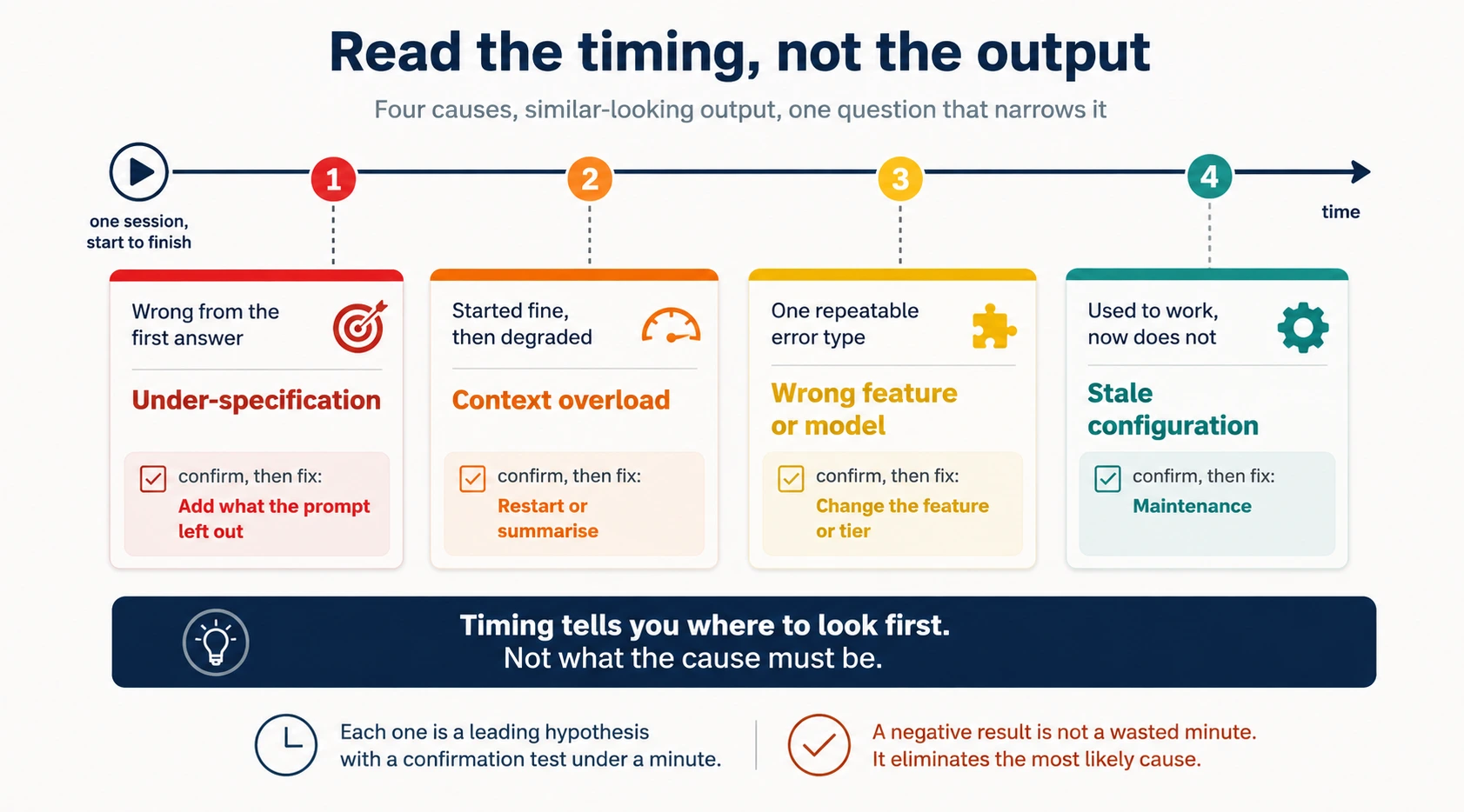
Under-specification means the prompt never carried what the step needed. It shows up from the very first response. It is the most common cause and the cheapest to fix.
Context overload means the conversation has grown longer than the context window. Earlier text is shortened or dropped to make room, so early instructions lose their force. A better prompt does not help, because the problem is not the prompt you just wrote.
Wrong feature or model means the step went to the wrong tool. It shows up as one repeatable kind of error. Numbers slightly off means a calculation was asked for in prose. Shallow work on a task that needs depth means a tier chosen for speed. A tier is a model version, from fast and cheap to slower and more capable. More prompting will not buy what the tool cannot produce.
Stale configuration means something the setup depends on is out of date. It shows up as "it used to work." Nothing reports an error, and the output slowly gets worse.
| When the symptom appeared | First hypothesis | Cheap confirmation | Fix if confirmed |
|---|---|---|---|
| Wrong from the first answer | Under-specification | Re-read the prompt. Is the missing thing actually in it? | Add what it left out |
| Started fine, then degraded | Context overload | Restate the instruction in a fresh session. Does it hold? | Restart or summarise |
| One repeatable error type | Wrong feature or model | Run the step once with the right feature or a stronger tier | Change the feature or the tier |
| Used to work, now does not | Stale configuration | Open the instruction or knowledge source and check its date | Maintenance on the configuration |
Every confirmation in that third column takes under a minute, and each one can come back negative. That is not a wasted minute. You have ruled out the most likely cause.
When you hand the problem to somebody else, name where the failure lives. The prompt, the context, the feature choice, or the task itself.
The other three announce themselves. This one does not.
There is no error, no warning, and no moment where something visibly stops. Last quarter's figures sit in the Project knowledge base and this quarter's report quotes them, formatted perfectly. The model has no way to know that what you gave it is out of date.
That makes it the twin of the unstaffed gate in Concept 7. Both are a control you set up correctly, decaying while everyone assumes it still holds, and a scheduled review is what finds them.
12. The sequence runs cheapest first
Run these in order, before concluding the task is not a fit:
- Re-read the prompt against its five parts. Role, context, task, constraints, and format. Is anything under-specified?
- Check the length of the conversation. Is it overloaded and in need of a restart or a summary?
- Check the feature and the model. Is this a calculation that needs code execution, or a hard task on a speed tier?
- Check whether the configuration is current. The instructions, the knowledge, and the Skills.
- Only then, question whether the task is a fit at all.
That order is the diagnostic sequence, which means the cheapest fix first.
Step 1 is more than reading it again. Hold the prompt against its five parts and check each one. The role. The context, meaning the background the model could not have known. The task, written as a clear instruction. The constraints on the answer. The output format. A prompt reads fine to the person who wrote it, because the missing piece is sitting in their head. Going slot by slot makes an absence visible.
Re-reading the prompt costs seconds and resolves the most common cause, so it goes first. Questioning the task is last, because it ends the attempt.
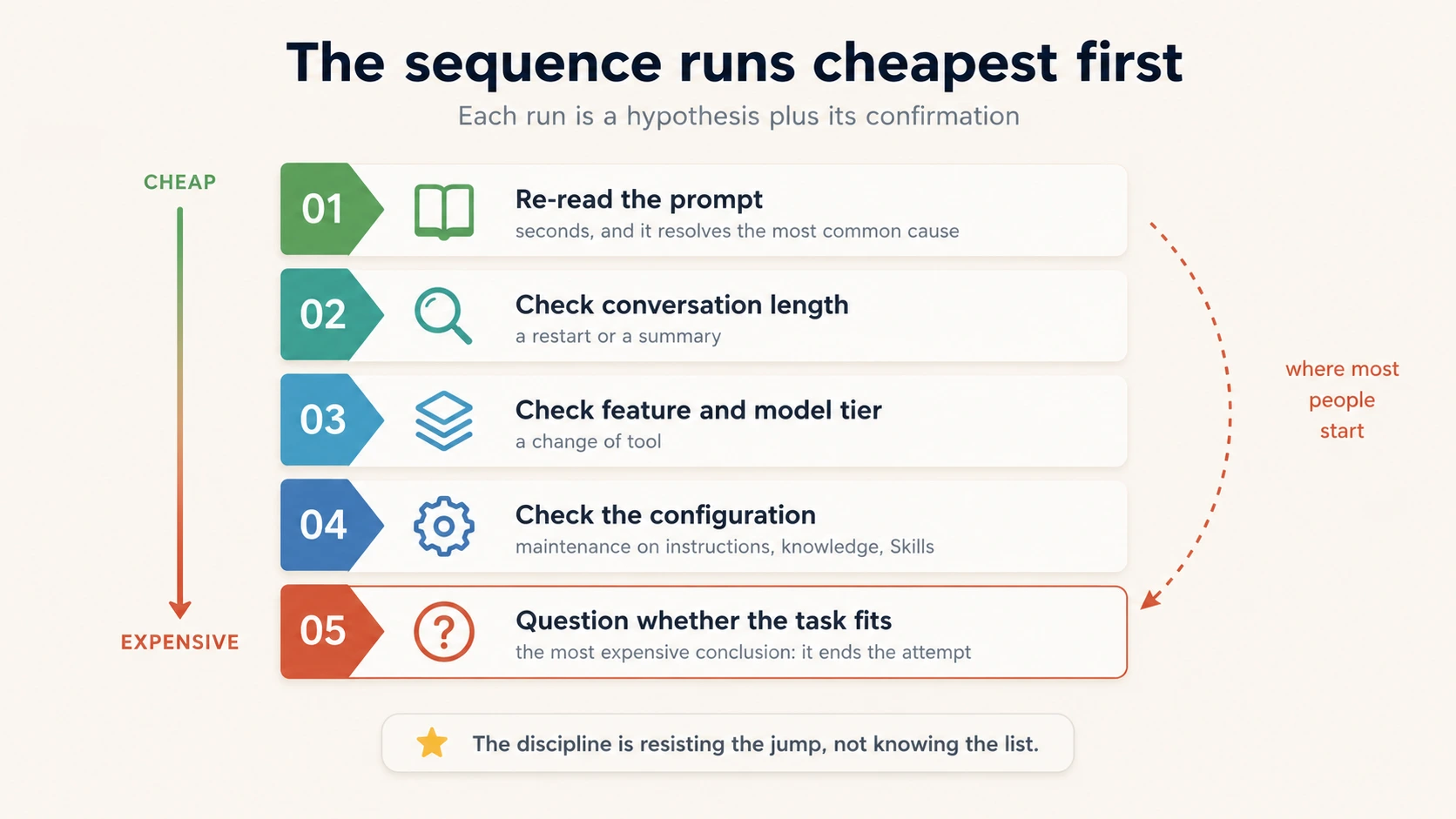
Picture the five steps as a ladder, with the cheapest check at the top. Most people run it backwards. The instinct on a disappointing output is to switch to the most capable model, or to declare the task impossible. Both are moves from the bottom of the ladder, made before anything at the top was checked.
Step 5 exists, and it is sometimes right. "I asked it to predict next quarter's exact sales figure and the number was wrong." No prompt, restart, feature change, or configuration check fixes that. An expectation mismatch is a task that asks for something the tool cannot do, which here is predicting one exact future number. The fix is to the task. Ask for a range with stated assumptions, or a model of the drivers you can adjust and re-run.
Naming a real mismatch stops you spending an afternoon tuning a prompt toward an output that was never available. But it is step 5 for a reason. The difference is whether the four cheaper causes were ruled out.
The diagnoses differ, not the complaints:
| What you would say | Diagnosis | Fix |
|---|---|---|
| "The summary keeps missing key points." | Under-specification | Name the criteria for what counts as key |
| "It stopped following my format halfway through." | Context overload | Restart from a summary, or persist the format |
| "The numbers are subtly wrong." | Wrong feature | Move the calculation to code execution |
| "It worked last month, now it's off." | Stale configuration | Audit the instructions and knowledge sources |
| "It can't predict next quarter's exact figure." | Expectation mismatch | Reshape the task into one that fits |
Nothing in the wording tells you which one you are in, which is why the sequence exists.
Run end to end it takes a minute or two, and most of the time it lands on a cheap fix. Reach for the sequence the moment output disappoints, before forming an opinion about whose fault it is.
Think of a real output that disappointed you recently. Answer from that one, not a hypothetical.
Discuss with an AI. Question your scores.
Come back when you have your BEST evaluation.
Part 5: Make the fix stick
13. Turn a reaction into an instruction
Every disappointing output tells you something about the setup that produced it. Most of that is lost, because the fix gets made by hand.
Turn the reaction into an instruction. A reaction names how the output feels. "Too generic." "Not quite right." "Missed the point." An instruction names what to change, so the next output is different.
One question makes the jump: what would have to be present for this to be right, and which part of the setup controls that?
| Reaction | Instruction | Which lever |
|---|---|---|
| "Too generic" | Name the audience and the one action I want them to take | The prompt |
| "Wrong tone" | Add a tone constraint that applies to every draft | The instruction |
| "Missed the point" | State the single question the output must answer, up front | The prompt |
| "It's using old data" | Replace the source document in the knowledge base | The knowledge |
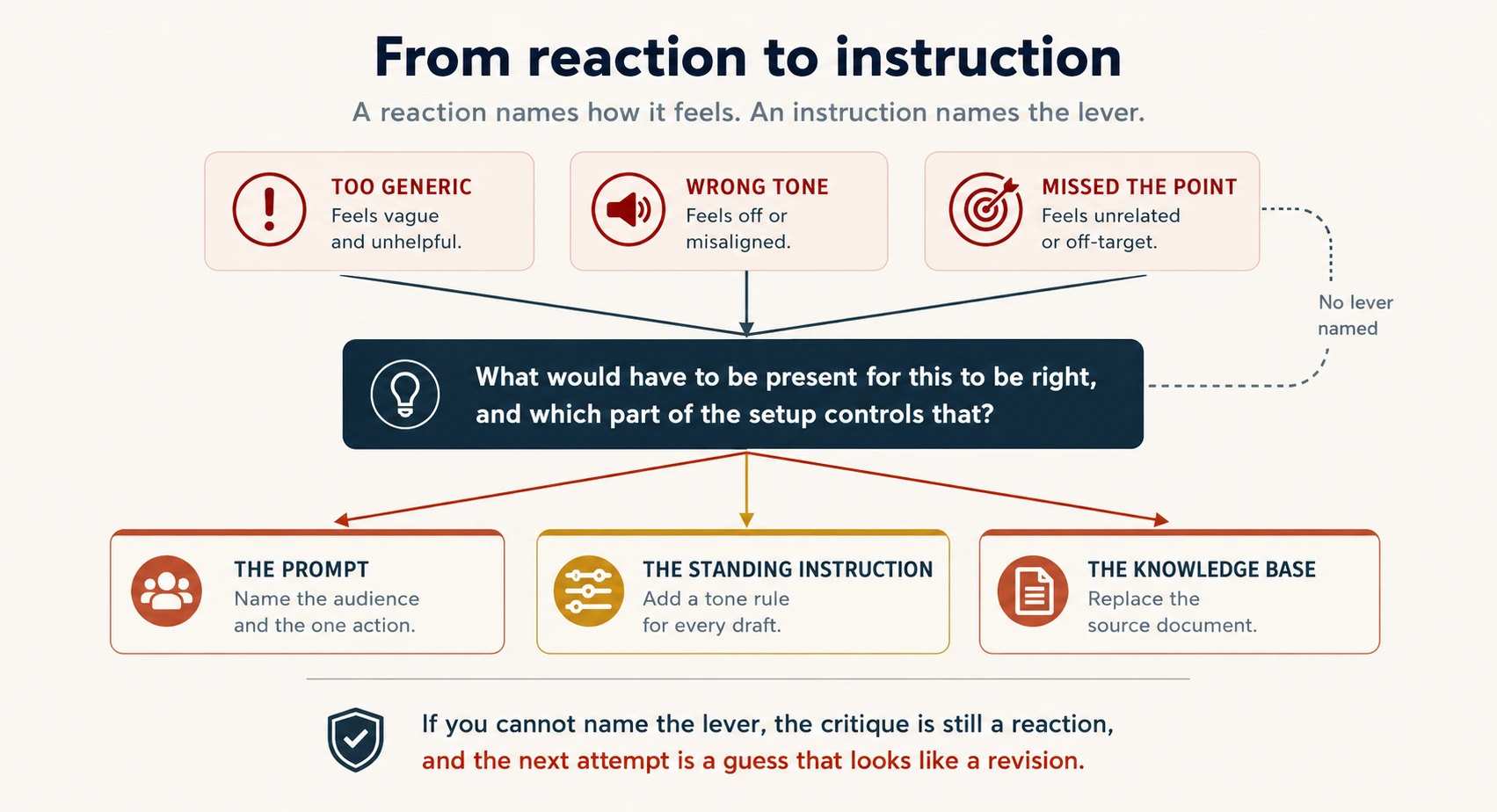
If you cannot name the lever, the critique is still a reaction, and the next attempt will be a guess that looks like a revision.
14. Rule, reference, or procedure
Finding the fix is the easy half. The expensive failure is finding it and then losing it.
A fix discovered in Monday's session and left in that conversation will be found again next Monday, and again by whoever covers for you. Each time costs what the first one cost.
The test is short. Will this correction be needed again, by me or by someone else? If yes, it belongs in configuration. Promotion means moving a fix out of a chat and into configuration, so it lasts.
One question decides where it goes. Is the fix a rule, reference, or procedure? A rule is a limit that always applies. A reference is material the work has to read. A procedure is a sequence of steps.
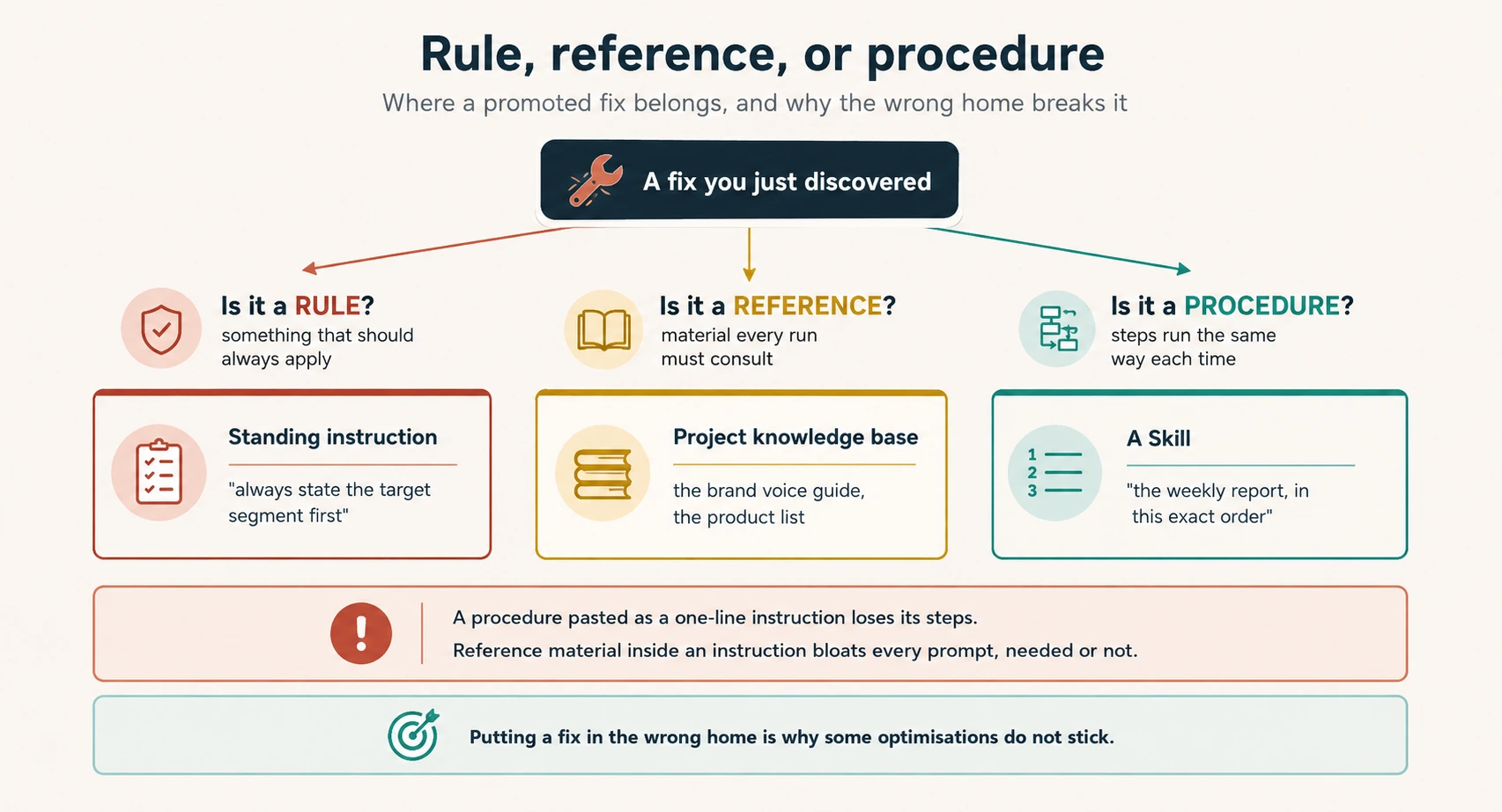
Each home changes a different thing.
Rules go to standing instructions. They change behavior inside a Project. "Always state the target segment in the first line."
References go to the knowledge base. They change what is known. The brand voice guide. The current product list.
Procedures go to Skills. They change how the work is done. "Generate the weekly report in this exact format, in this order."
Putting a fix in the wrong home is why some improvements do not stick. A procedure pasted as a one-line instruction loses its steps. Reference material stuffed into a standing instruction bloats every prompt, whether or not that run needs it.
Two people, one habit apart. A marketer notices that every campaign brief comes back missing the target segment and burying the call to action. She stops fixing it by hand and writes two standing instructions into the briefs Project. Every draft after that arrives correct, for everyone who opens the Project.
An analyst on the revenue report works out in his first month that the figures have to exclude canceled orders, and types that reminder into the chat every month. It works every month. Then he takes two weeks off, a colleague runs the report, and the numbers go out with canceled orders in them.
The fix existed the whole time. The failure was leaving it somewhere only one person could find.
Why memory is not the answer here
Assistants can pick up patterns you repeat. That is not a substitute for configuration.
It is per-user. Whatever it learned about your preferences is yours, and the colleague covering for you starts from nothing.
It is best-effort. It may pick a pattern up. It may not. You cannot point at it, read it, or hand it to somebody.
Configuration is the shared home you can open and read. Use both, and rely on configuration.
15. Find the friction before you optimize
Friction is a small repeated cost in a workflow that you have stopped noticing. Nobody minds a two-minute reformat. Everybody does it fifty times a year.
Three signals point at friction that configuration can remove:
| Signal | What it looks like | The fix |
|---|---|---|
| Repetition | You paste or type the same thing every run | Saved context or a standing instruction |
| Correction | You fix the same flaw in every output | A configuration change so it stops appearing |
| Variance | Different people running the same task get different results | A shared Skill or knowledge base |
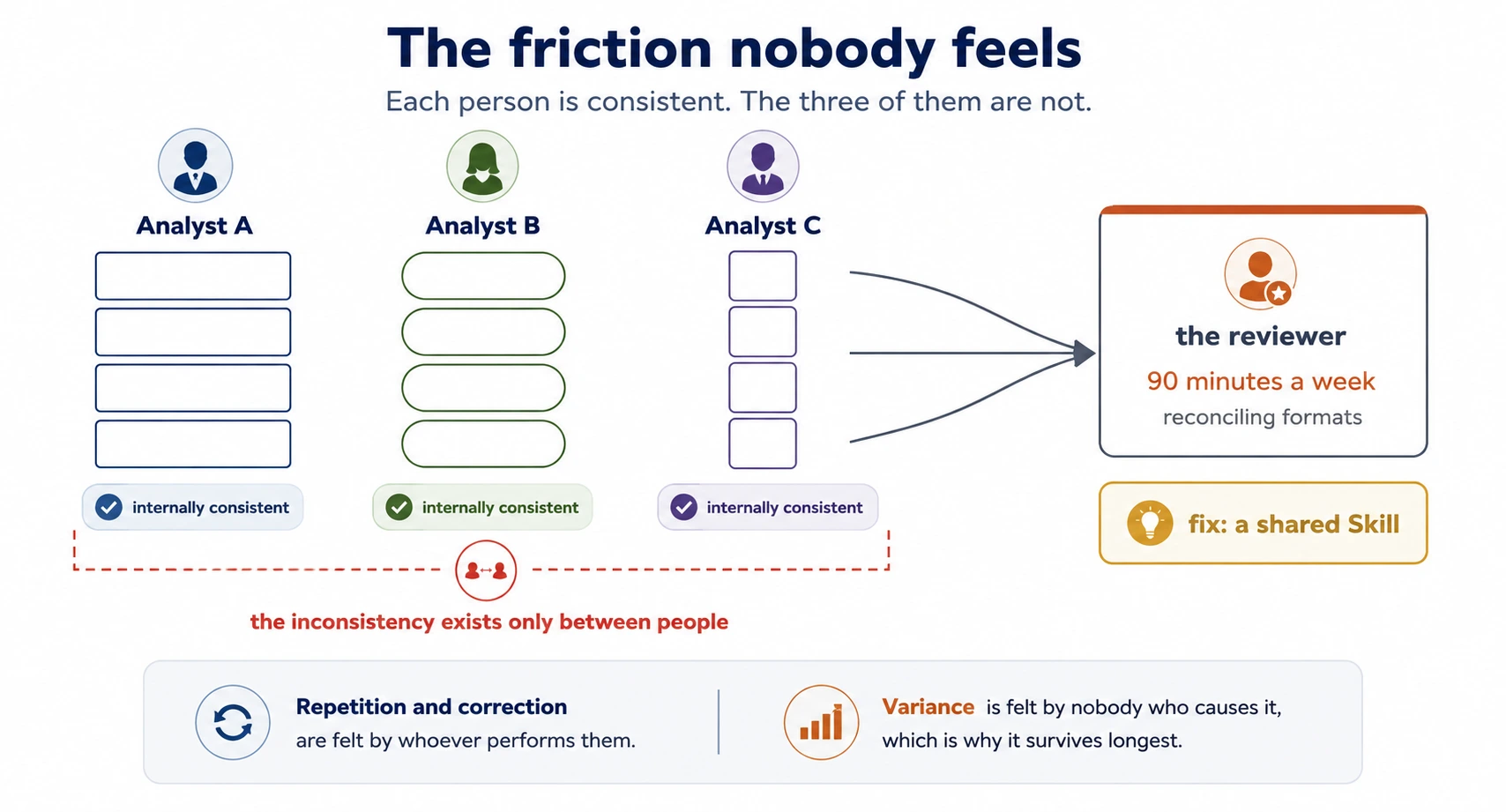
Variance is the one teams miss, because no individual feels it. The inconsistency exists only between people, so it shows up at the reviewer.
If you cannot see the friction, run the workflow once with the job of writing down every manual step. That list is your backlog.
Two moves remove friction.
Consolidate means running steps together instead of three prompts with you in between, re-explaining the background each time. Three prompts that each need the same background are one prompt.
Promote means moving the repeated pattern into configuration, as Concept 14 describes.
Consolidation reduces the number of steps. Promotion reduces the cost of the steps that remain. Do them in that order, because promoting a step you were about to merge away is work you did not need to do.
A worked audit. A team's weekly reporting workflow takes about 45 minutes per analyst, and the outputs vary by who runs it. The audit finds three frictions. Each analyst re-pastes the same background, reformats the output by hand, and catches different issues.
Sort them by the Concept 14 test. The background is a reference, so it goes to the shared Project knowledge base. The report format is a procedure, so it becomes a Skill. The checking step is a rule, so it becomes a standing instruction.
Result: about 25 minutes per analyst, a consistent format across the team, and one fewer revision round.
16. Measure the thing you actually care about
An improvement you cannot measure is hard to justify and harder to keep.
Measure the before. The audit above claims 45 minutes down to 25. That sentence is only sayable because somebody timed the workflow before changing it. A baseline is that measurement. Without one you have an improvement you believe in and cannot state, which is the same as no improvement the first time a manager asks.
It costs one cycle. Run the workflow once, unchanged, and record three numbers. How long it took, how many revision rounds it needed, and how many manual steps you performed. You cannot rebuild a baseline afterwards, because your estimate of the old way will flatter you.
Time saved is the easiest metric and often not the right one. Pick the metric that matches why the workflow mattered:
| If the workflow is... | Optimise for | Because |
|---|---|---|
| An internal draft | Time | Speed is the point, and small errors are cheap |
| A customer-facing report | Consistency | Varying formats erode trust faster than delay |
| A compliance or finance output | Accuracy | One wrong figure costs more than an hour saved |
| Work done by several people | Variance | The cost lives between people, not within a person |
Naming the metric up front also tells you when to stop. Once the metric you care about is good enough, more tuning becomes its own friction.
Run both for a few cycles. A parallel run is running the old and the new workflow together, and it costs real duplicated effort for two or three rounds. It buys evidence that the new way is better on your metric, a working fallback if it is not, and the agreement of the people whose work changed. That last one matters most, because a parallel run turns "we are changing your job" into "we ran both, here is what happened." Switch fully when the comparison is clear, and keep the old process written down for one more cycle.
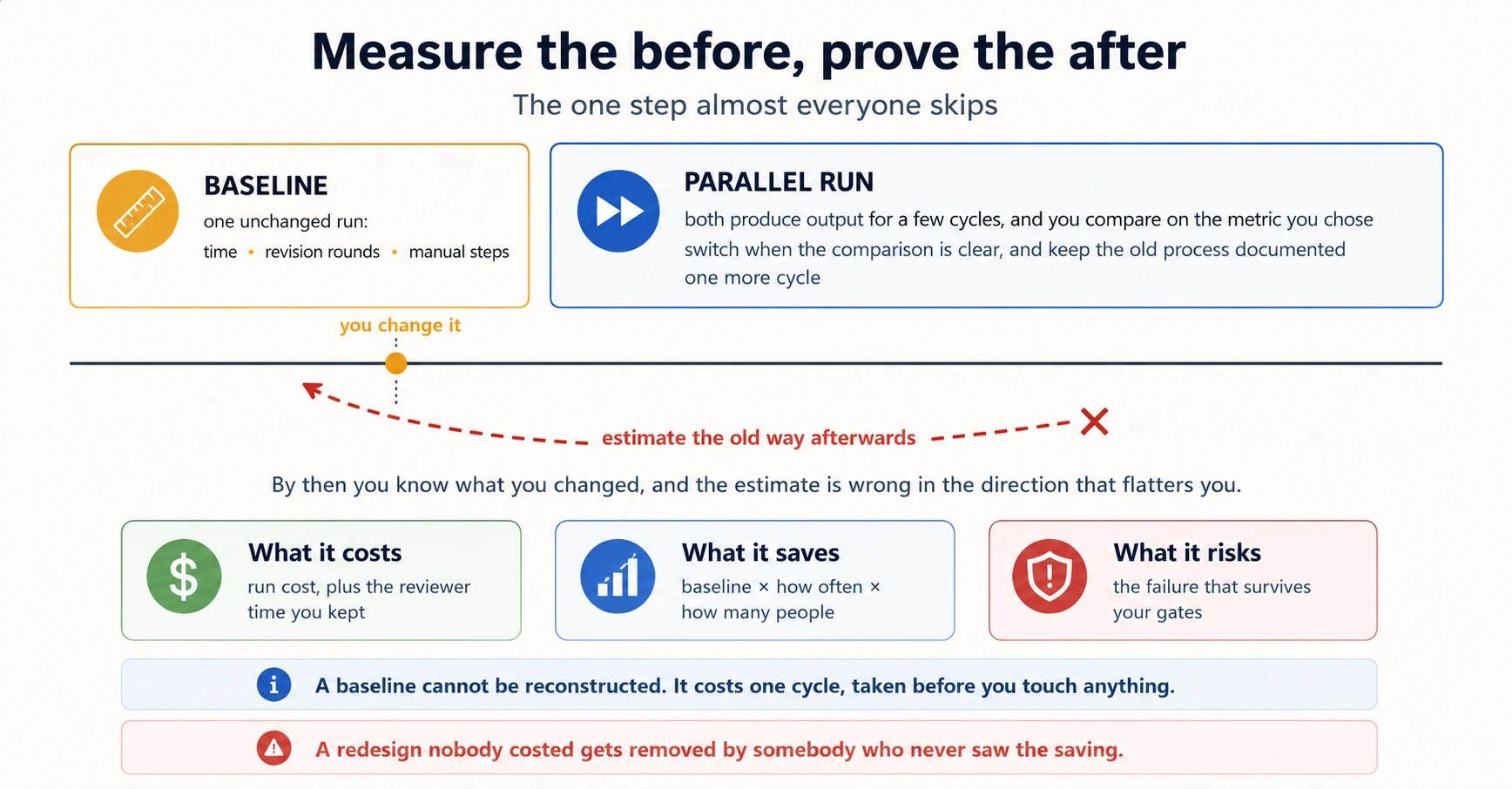
Be able to answer what it costs. A redesign survives a budget review on cost against saving. The cost is what you pay the AI tool, plus the human time still in it, which is the gates you kept. The saving is the baseline multiplied by how often it runs and by how many people run it. Twenty minutes a week across three analysts is roughly fifty hours a year, which is a sentence a manager can act on. Then name the risk that survives your gates, because a business case that hid one stops being believed. A redesign nobody costed gets removed by somebody who never saw the saving.
Not every change is an improvement. A good change adds up over time. So does the cost of a bad change built into a workflow everybody uses. That cost is the harder one to notice, because it is now the default.
Part 6: Operate it, and explain it
17. When a bad output gets out
Everything so far lowers the chance of a bad output reaching somebody. Nothing removes it.
A gate gets skipped on a busy Friday. A configuration goes stale between reviews. Eventually a workflow you designed sends something it should not have, and the design is judged by what happens in the next hour rather than by the map.
Most teams have no plan for that hour, so the response is improvised, slow, and defensive. What you do the moment you find a bad output, which is stop the spread, record the facts, and report through your organization's path, is the first-hour procedure in Governance, Risk & Responsible Use. These are the four things the designer of the workflow decides in advance, so that procedure has something to act on.
1. How it gets stopped. What is the fastest way to halt this workflow, who can do it, and does that person need permission? If the honest answer is "we would have to ask the person who set it up," fix that first, because it makes every other step wait.
2. What is already out. Not "did this one output go wrong" but how many outputs did this affect, and where did they go? A stale configuration does not produce one bad result. It produces every result since it went stale, and nobody notices which day that was.
3. Who is told, and by when. The customer, the internal owner, and the risk or compliance team if your organization has one. Decide this before it happens, because in the moment the pull to delay is very strong, and a late disclosure costs far more than an early one.
4. What changes in the map. Every incident tells you something about the design. Which of the four causes was it? Was a step classified wrongly, or classified correctly with the gate not staffed? Make the change to the map, with a date, so the fix outlasts the week everyone was paying attention.
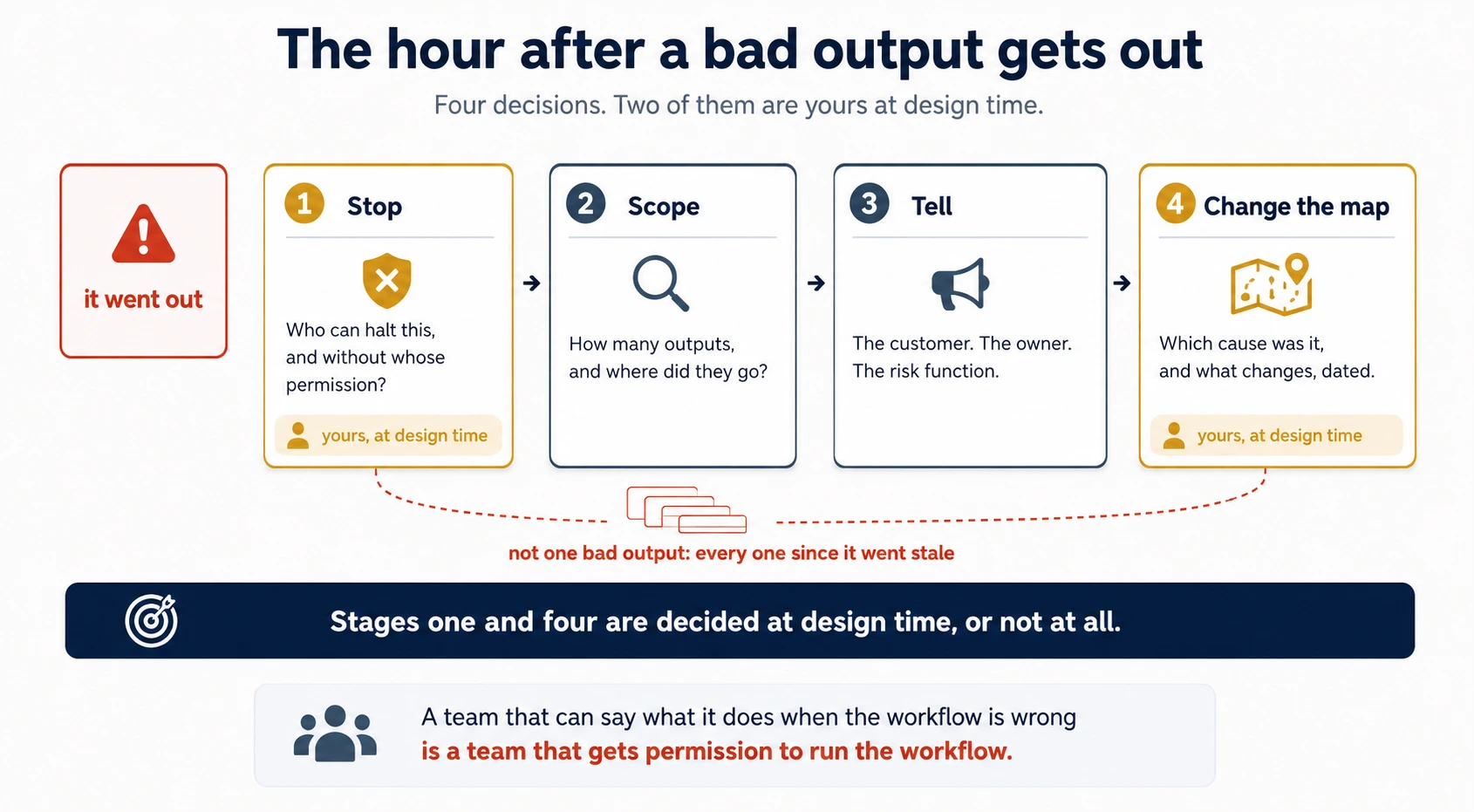
Decisions 1 and 4 are yours, and they are made at design time or not at all. A team that can say what it does when the workflow is wrong is a team that gets permission to run the workflow.
18. Say what it does, then name the gate
Putting AI into a team workflow means describing it to people who did not build it. A manager, a client, a risk team, an outside reviewer.
You are believed when you are accurate, which means stating the limits as clearly as the value. Overstating what the tool can do is how teams lose trust on the first visible miss.
Three phrases overstate, and all three are common.
"Fully automated." Almost never true, and the first visible error exposes it in public.
"AI handles X." It drops the human gate out of the sentence. Whoever hears it now believes there is no gate.
"It's basically as good as a person at Y." It sets a standard the tool will eventually miss, in front of somebody who remembers you said it.
The repair is the same every time. State what the tool does, then name the human checkpoint. It costs one extra sentence, and it is the difference between a claim you can defend and one you cannot.
Add a third clause when the audience is deciding whether to trust the workflow at all. Say what it refuses. Every well-designed workflow has cases it is built to decline and hand to a person. The unclear clause, the unusual contract, the request outside the playbook. Naming that list proves the boundary was designed in advance rather than found by an incident.
The same workflow, described three ways. What changes is the detail each audience needs in order to trust it.
To the legal lead, who wants the mechanism and the failure modes:
"It pulls the clauses out, marks anything that departs from our playbook, and writes the first redline. Approving a change is still yours. The one to watch is an obligation implied rather than stated, which it can miss, so treat the flags as a prompt for your read rather than a substitute for it."
To the practice executive, who wants the outcome and the oversight:
"Turnaround on a standard contract has gone from two days to about half a day, with the same approval standard. A lawyer still signs off every change before it leaves the building."
To the client's risk function, who wants the control:
"Drafting is AI-assisted. A qualified lawyer reviews and approves every term, and nothing is sent without that sign-off."
Same facts, three levels of detail. The executive gets the result in the units they care about, which is turnaround time, not product names. What none of the three does is drop the gate.
Stakeholders trust an AI workflow more, not less, when the human checkpoints are explicit.
The instinct is to play down the human involvement, because it sounds like the tool is doing less. The effect is the opposite. An unexplained gap between "the AI does it" and what happens when the AI is wrong is where a risk team stops listening.
The honest sentence in the legal lead's version names what the tool misses. You could not have written it in Part 1, because you did not yet know your own failure modes. An accurate description of a workflow comes after you have diagnosed it, not before.
Recap: the sentence to carry
The output is not the verdict. Judge the step by what it costs and who answers for it, and judge a failure by when it started.
The six stages in one line. Settle the requirements, map each step by the three criteria, build by loop, diagnose by timing, put the fix in configuration, then say what it does and name the gate.
Map your own workflow
Use the same workflow you used in the opening exercise, now that you have the criteria.
Discuss with an AI. Question your scores.
Come back when you have your BEST evaluation.
The one-page map: copy this
Copy the block below into a document and fill it in for a real workflow. This is what you hand to a colleague, an outside reviewer, or whoever takes the workflow over.
DELEGATION MAP: [workflow name]
Owner: [one named person]        Last reviewed: [date]      Next review: [date]

ELIGIBILITY  (both must pass before any step below is mapped)
Data gate: [may this data enter this tool? who confirmed, and when?]
Input gate: [can everything each step needs actually be supplied?]

STEPS
#  Step                    Owner          Criterion (reversibility /     Carried by
                                          stakes / accountability only)
1  ...                     AI             reversible, low stakes         Skill
2  ...                     AI             reversible, checked at step 4  code execution
3  ...                     Collaborative  high stakes, human judges      Skill + gate
4  ...                     Human          this step is the decision      named reviewer
5  ...                     Human          irreversible                   named signer

GATES  (one line per collaborative or human step)
Step 3: reviewed by [name], at [when], checking [what specifically]
Step 4: approved by [name], before [what happens next]

BASELINE  (measured before any change)
Time per run: ___    Revision rounds: ___    Manual steps: ___
Metric this workflow optimises for: [time | consistency | accuracy | variance]

IF IT GOES WRONG
Stopped by: [who, and can they act without permission?]
Scope check: [how do we find out how many outputs were affected?]
Told: [who, within what time]
Map change: [recorded here, with a date]
Three lines do most of the work, and they are the three most often missing. The owner, the next review date, and what each gate is checking. A map without them describes a decision. A map with them describes an operation.
Try this now: five prompts
You do not need all five in one sitting.
1. Extract and then attack
Take a real document you need to act on. A brief, a policy, a long email thread.
From the attached document, extract every distinct requirement or action it asks for. For each one: a short label, the exact section it comes from, and whether it is stated directly or only implied. Return it as a table.
Then, in the same conversation:
Now review your own list. Which of these are ambiguous as written? Which could two people on my team read differently? What did you extract as one requirement that is really two?
What to notice: the second pass usually changes the list. If it does not, ask whether the document was unusually clear or the pass was shallow.
2. Find the step you cannot undo
Here is a workflow: [your steps].
For each step, answer three questions and nothing else. Can it be undone? What does an error cost in the bad case, not the average case? Is this step the decision somebody answers for, or an input that somebody else judges afterwards? Do not recommend anything yet.
What to notice: holding back the recommendation is the point. Ask for the analysis and the recommendation together, and you get a recommendation with analysis written to support it.
3. Diagnose by timing
Next time an output disappoints you, before changing anything:
Before we fix this, help me diagnose it. I will describe what happened and when. Ask me one question at a time to work out whether this is under-specification, context overload, a wrong feature or model, stale configuration, or a task that does not fit. Do not suggest a fix until you have a diagnosis.
What to notice: how often it lands on under-specification, and how often your instinct had been to change the model.
4. Promote one fix
Find a correction you have made more than twice.
I keep making this correction: [the correction].
Is this a rule, a reference, or a procedure? Then write it in the form its home needs: a standing instruction, a knowledge-base entry, or the steps of a Skill.
What to notice: procedures are the ones people misfile. If your answer has an order to it, it is a procedure, and a one-line instruction loses the order.
5. Say it three ways
Here is an AI-assisted workflow my team runs: [describe it, including the human review step].
Write three descriptions of it: one for a technical colleague, one for an executive, one for a risk or compliance function. Each must name the human checkpoint. Do not use the phrases "fully automated", "handles", or "as good as a person".
What to notice: whether the executive version still contains the gate. That is the version where it most often disappears.
A project: map, break, fix, and explain
One workflow, all six parts, about an hour.
- Map it. Take a real workflow and produce the table: step, owner, reason. Every reason must name reversibility, stakes, or accountability.
- Place the features. For each AI step, name what carries it. A Skill, knowledge, code execution, or a standing instruction. For each human step, name the person and the moment.
- Run one step for real. Pick the most mechanical AI step and run it on real input.
- Break it deliberately. Ask for a figure in prose that should have been computed. Watch a right-looking number appear. Diagnose it out loud using Concept 11 before you fix it.
- Promote one fix. Take something you corrected in step 3 or 4 and put it in its correct home.
- Measure the before. One unchanged run: time, revision rounds, manual steps. Note that you are estimating rather than measuring, which is the cost of not having done it first.
- Fill in the one-page map, including the owner, the next review date, and the four lines under "if it goes wrong".
- Write the three descriptions. Technical, executive, risk. Each with the gate named.
You finish with one page somebody else could run, one working step, one diagnosed failure, one permanent fix, and three sentences you can say in a meeting.
What this course leaves out, and where it lives
Real topics, set aside on purpose, so you know they exist and where to find them.
The ten topics, and the course each one lives in
| Left out here | Where it lives |
|---|---|
| Whether AI may do this work, or touch this data, at all | Governance, Risk & Responsible Use, next in Foundations |
| Whether the task needed AI in the first place | Is This an Agent Problem? |
| Deciding what to delegate in your own personal work | AI Fluency, the competency underneath this course |
| Configuring and maintaining Projects, knowledge, Skills | ChatGPT & Claude Quick Reference and Skills & Connectors |
| Judging in depth whether an output is correct | Trusting the Checker |
| Choosing a model, which changes faster than any course | Which AI Employees in 2026 |
| Debugging a system that has a harness and a loop | The Four Layers, a different map for a related problem |
| Building the thing once it has outgrown prompt-and-iterate | Spec-Driven Development and From One-Off to Worker |
| Turning review gates into evaluation infrastructure | Eval-Driven Development |
| Incident response with a legal clock attached | Your compliance function, not a course |
Next in Foundations is Governance, Risk & Responsible Use.
If you are collecting credentials, this course covers the Workflow Integration and Solution Design and the Troubleshooting and Optimization domains of the Associate exam. See Certifications.
Terms this course adds
Open the full term list
Delegation map. The workflow written out step by step, with an owner and a stated reason for each step.
Reversibility. Whether a step can be undone if AI gets it wrong.
Stakes. What an error at a step costs in the bad case.
Accountability. Whether the step is the call somebody answers for. It never moves onto the machine.
AI-appropriate. A step AI may own, because it can be undone and somebody judges what it produces.
Human-retained. A step a person owns outright.
Collaborative. AI produces, a named person judges. It stops being collaborative the moment nobody judges.
Over-delegation. Giving AI more than the risk of the step allows.
Halo delegation. Handing a step to AI because the previous step went well.
The unstaffed gate. A collaborative step whose review is no longer really done.
Map owner. The one named person answerable for whether the map still describes the real workflow.
Scheduled read. A review of the map on a fixed date.
Escalation signal. Other people depending on your tool, which means it has outgrown prompt-and-iterate.
Under-specification. Output wrong from the first answer, because the prompt never carried what it needed.
Context overload. Output that gets worse as a session grows.
Stale configuration. Output that slowly gets worse because a standing instruction, knowledge source, or Skill is out of date.
Expectation mismatch. A task that asks for something the tool cannot do.
The diagnostic sequence. Prompt, session length, feature and model, configuration, then the task. Cheapest first.
Promotion. Moving a fix out of a conversation and into configuration, so it lasts.
Rule, reference, procedure. The test for where a promoted fix belongs.
Baseline. The measurement of a workflow taken before it is changed.
Parallel run. Running the old and new workflow together for a few cycles.
Sources and grounding
This course is built on Anthropic's Claude Certified Associate material for Workflow Integration and Solution Design and for Troubleshooting and Optimization. The framework is theirs. The delegation criteria, the three classifications, the contract-review and onboarding workflows, the mapping errors, the RFP and capacity-plan examples, the build loop, the escalation signal, the four causes, the cheapest-first sequence, the reaction-to-instruction move, the rule, reference, procedure test, the friction signals, the reporting audit, and the stakeholder framing all come from that material. The prose, the diagrams, the exercises, and the assessment here are this book's own work, and the worked scenarios have been rewritten rather than copied.
Four things are additions rather than restatements, marked so nobody mistakes them for the source:
- The window test in Concept 4, and the hiring-freeze failure it is built on. The source separates synthesis steps from judgment steps. Framing that as a question about what can be supplied is this book's.
- The failing cycle in Concept 9. The source shows the build loop through its first cycle. Cycle 2's written-not-computed totals, and the description-versus-feature contrast, are written for this book.
- The unstaffed gate as a pair with stale configuration. Both failures are in the source material, in separate modules. Naming them as one failure seen from two sides is this book's observation.
- Map ownership and the scheduled read in Concept 8, and the incident decisions in Concept 17. The source covers maintenance of a configuration that has drifted. Giving the map a named owner, a review date, and four review questions, and deciding the stop-and-scope questions at design time, are this book's additions.
Product behavior described here, including how long sessions are compressed and what code execution does, was current in the source material as of mid-2026. Check current documentation before relying on any specific behavior.
Flashcards Study Aid
Test Your Understanding
The delegation map is easy to read and hard to run. These scenarios drop you into somebody else's workflow with a decision already waiting. Answer from the reasoning rather than the wording, and notice which criterion or which cause each one is testing.