Token Economics: Which Model for Which Work
24 Concepts · From "where did my tokens go?" to a routing table you can defend
You do not pay for intelligence directly. You pay for the tokens it uses, and a stronger model charges more for each one.
Most builders do not know where their tokens go. They see a bill, or a usage bar that fills up by mid-afternoon, and they guess. They blame the model. They blame the tests. They blame the long explanations. Most of the time the guess is wrong, and the fix they reach for makes the work worse without making it cheaper.
This course starts with one real bill. A builder in this community spent a long working day with Claude Code, ran out of tokens sooner than expected, and did the one thing almost nobody does: asked the agent to audit the day. What came back overturned the obvious answer. Then the course gives you three things: the habits that cut the bill without cutting quality, a simple rule for matching models to work, and the current price ladders of three ecosystems.
The course serves both modes of this book. In Mode 1 you solve problems with a general agent, and the bill is your own. In Mode 2 you manufacture Digital FTEs, and the bill becomes your cost of goods sold. A Digital FTE that wastes tokens is an employee who wastes salary every hour of every day.
Key words in plain English
Quick glossary
Every term this course needs, in one place. Each one is explained again where it is first used.
| Term | Plain-English meaning |
|---|---|
| Token | a piece of text. Roughly four characters of English, or about three quarters of a word. Models read and write in tokens, and you are billed per token. |
| Step | one request to the model. One message from you can start many steps, because every tool call is its own request. |
| Session | one continuous conversation with your agent, from the moment it starts until you clear it. |
| Context | everything the model reads on one step. It grows as the session goes on, and you pay for all of it on every step. |
| Meter | one of the four things a vendor counts separately, each with its own price. The four are input, output, cache write and cache read. |
| Input | tokens the model reads for the first time. |
| Output | tokens the model writes. This includes its thinking and its tool calls, and it is the most expensive meter. |
| Cache write | storing a stretch of context so it can be reused. It costs a little more than reading it fresh. |
| Cache read | reading that stored stretch again. It costs a small fraction of the input price, and it is the meter that runs the most. |
| Cache miss | the stored stretch no longer matches, so the whole thing is processed again at full price. |
| Model | which trained system handles your request. The model dial is how capable the agent is, and it sets the price of every token. |
| Effort | how much work the model does on each request. The effort dial is how thorough it is, not how capable. |
| Subagent | a helper the main agent starts. It works in its own separate context and reports back. |
| Tier | this course's name for a class of work. There are three, and you sort the work before you pick a model. |
| Judge | the tier that decides, designs and reviews. It needs the strongest model you can justify. |
| Build | the tier that implements a clear spec. It needs a mid-tier model and a clear definition of done. |
| Fetch | the tier that searches, runs tests and summarizes. It needs the smallest model, because its output is easy to check. |
| Batch | sending work to be done whenever the vendor has room, instead of right now, in exchange for a large discount. |
| Your own eval | a small set of real tasks from your own work, with results you know are good, used to compare two models honestly. |
When you finish, you can do five things:
- Read an agent bill and find the real cause of the cost.
- Shape your sessions so that the same work costs far less.
- Sort any task into one of three tiers: Judge, Build, or Fetch.
- Pick a model for each tier from Claude, OpenAI, or a Chinese lab.
- Write standing instructions that make the savings automatic.
You need this first: Agentic Coding. That course introduced the context window, prompt caching, and the rules file, and it is where the words session, subagent, and CLAUDE.md come from. This course assumes them and goes to the bill. It also leans on Loop Engineering for subagents and the maker-checker split, on Harness Engineering for hooks, and on Trusting the Checker for the clean-context reviewer and the idea of running your own eval. If those words are new, do those courses first.
New here? A 2-minute recap of what you should already know
- A session: one continuous conversation with your agent, from the moment it starts until you clear it. Everything said inside it is carried forward.
- A step: one request to the model. One message from you can start many steps, because every tool call is its own request.
- The context window: everything the model can see on a given step. The system prompt, your rules file, every earlier message, every tool result, and your new message.
- A subagent: a helper the main agent starts, which works in its own separate context and reports back.
- Prompt caching: a discount the model provider gives for re-reading a stretch of text it has already processed.
- CLAUDE.md or AGENTS.md: the standing rules file your agent reads at the start of every session.
If any of these are new, read the Agentic Coding course first. This course puts a price on the machinery that one built.
Checked on September 18 and 19, 2026. This course uses three levels of evidence. Facts from vendor pages are stated as facts. Facts from third-party trackers are marked as reported. Facts that could not be confirmed are left out or marked. Prices and model names will change. The method will not. The Sources section at the end lists every page, and marks which numbers came from a vendor and which from a tracker.
The 24 ideas in one line each
- Ask the agent for the bill before you change anything.
- A bill has four meters, and the cheapest one usually costs the most.
- A model has no memory, so every step re-reads the whole conversation.
- Twice as long is about four times as much re-reading.
- New task, new session. The memory you need goes in files.
- The discount holds only while the front of the request stays the same.
- Whatever enters the window is paid for again on every later step.
- Ask for decisions before the work, not essays after it.
- Verify every change. Do not re-verify everything every time.
- Measure first. Your feeling about the cost is probably wrong.
- The commands change between tools. The reasons do not.
- The model dial is how capable. The effort dial is how thorough.
- Sort work into Judge, Build and Fetch before you pick a model.
- The price of a token is not the cost of a finished task.
- Route work sideways to helpers, not by switching models mid-conversation.
- Escalate only the stage that failed, then come back down.
- Sonnet for the day, Opus for decisions, Haiku for helpers.
- On OpenAI, a long request costs more per token as well as more tokens.
- The Chinese ladder is cheap enough to change what you automate, and it moves fast.
- A person at a keyboard wants a plan. A process without a person wants a key.
- Pass the governance gate first. Compare prices second.
- Route by tier, not by whichever model you happen to have open.
- A saving that depends on your memory will not last. Write it in the file.
- For a Digital FTE, tokens are cost of goods sold, so design the prompt for the cache.
📚 Teaching Aid
View Full Presentation, Token Economics: Which Model for Which Work
Part 1: Read the Bill
Concept 1: The $169 day
A builder in this community spent a long working day with Claude Code. The work covered a messaging feature, then an encryption change, plus setup tasks that included Stripe and git. The model was Claude Opus 5. The tokens ran out faster than expected. So the builder asked the agent a plain question: where did my tokens go?
The agent read the records of the last one and a half sessions and produced this table.
| Where it went | Steps | Estimated cost | Share |
|---|---|---|---|
| Explaining, deciding, thinking | 237 | $73 | 50% |
| Testing and verifying | 108 | $29 | 20% |
| Investigating and diagnosing | 88 | $26 | 18% |
| Actually writing code | 39 | $10 | 7% |
| Setup, Stripe, git | 24 | $7 | 5% |
That is 496 steps and about $145. A second session had run in parallel on the same repository. Its code was thrown away. That added $24. The total was about $169.
The builder's first reaction was natural. Writing code was only 7%. Explaining was 50%. The fix seemed clear: tell the agent to stop explaining. But the builder hesitated, for a good reason. Those explanations showed the decisions the agent had made, and some of those decisions needed to be challenged.
Then the agent reported the finding that mattered most:
Writing code cost $10. Re-reading the conversation cost $116.
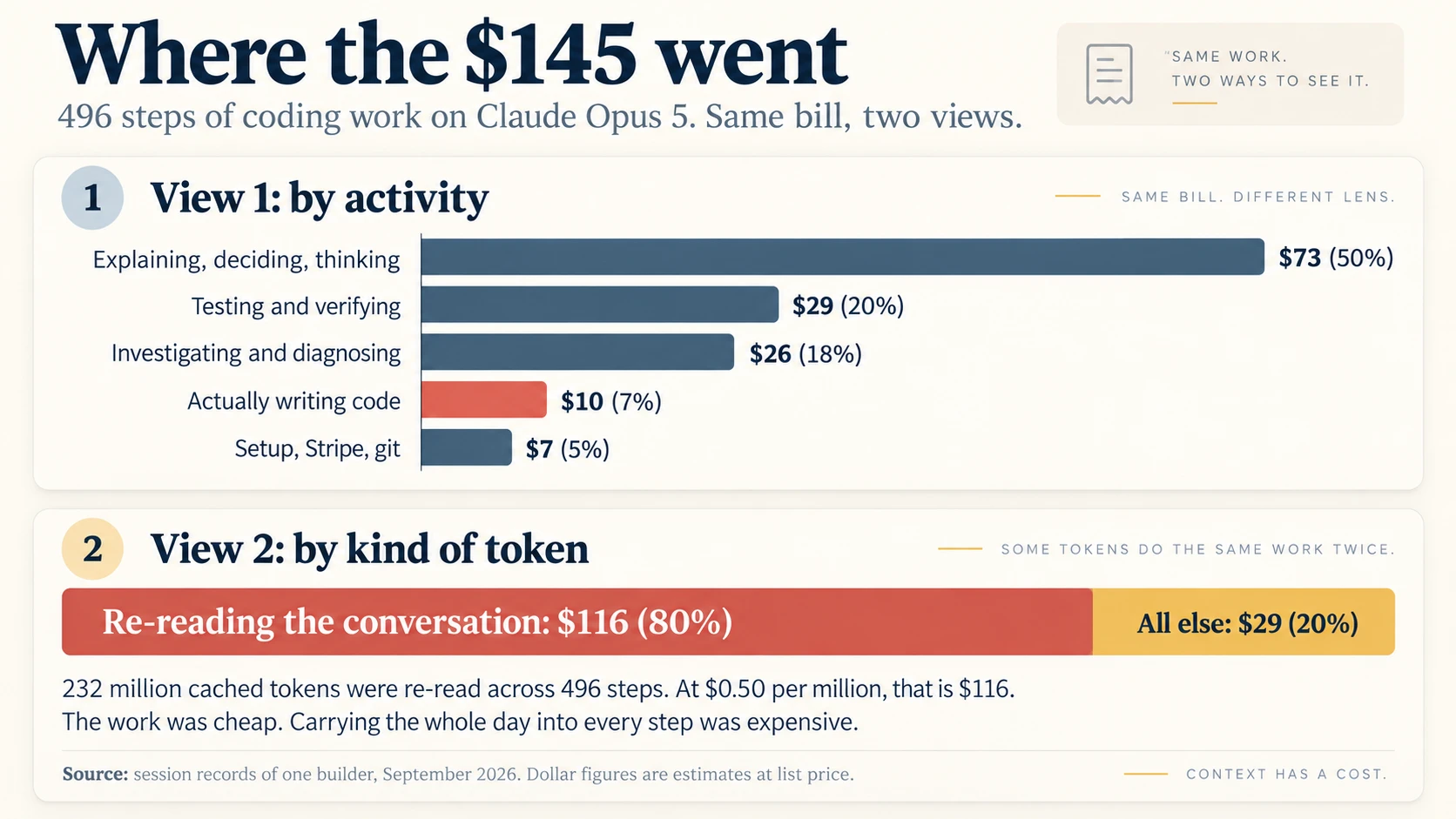
Figure 1. The same bill in two views. The second view shows the cause.
The activity table hides the cause. Explaining was not expensive because thinking is expensive. Explaining was expensive because the long explanations came late in the day, and each one carried the whole day's conversation with it.
Anthropic reports that Claude Code costs about $13 per developer per active day on average across enterprise deployments, and stays below $30 per active day for 90% of users. This day cost $169. The problem was not ten times harder than normal. The session was shaped badly.
So before you change anything, ask the agent for the bill.
Without it: You cut the wrong thing. The builder almost removed the explanations, which were a symptom, and would have kept the long session, which was the cause.
Concept 2: Four meters, not one
An API bill has four meters. Each meter has its own price. Here are the four meters for Claude Opus 5, per one million tokens.
| Meter | What it counts | Opus 5 price | Relative cost |
|---|---|---|---|
| Input | Tokens the model reads for the first time | $5.00 | 1x |
| Output | Tokens the model writes, including its thinking and its tool calls | $25.00 | 5x |
| Cache write | A long prefix stored for reuse (5-minute cache) | $6.25 | 1.25x |
| Cache read | The stored prefix read again | $0.50 | 0.1x |
The cache read meter is the cheapest. It also runs the most. In the $169 day, the agent read 232 million tokens from cache. At $0.50 per million, that is $116. The cheapest meter produced 80% of the bill.
A price you barely notice, charged a very large number of times, beats a price that looks alarming and is charged once.
Other vendors have the same meters with different names. OpenAI lists input, cached input, cache writes, and output. DeepSeek lists cache hit input, cache miss input, and output.
A token is a piece of text. Anthropic gives a rough size: one token is about four characters of English, or about three quarters of a word. The exact count depends on the tokenizer. Anthropic notes that Claude models from version 4.7 onward use a newer tokenizer that produces approximately 30% more tokens for the same text. So the price per token is not the price per page. You will meet this idea again in Concept 14.
Four meters, not one. Three of them tick slowly. The fourth, cache read, is the cheapest per token and runs on almost every step, which is exactly why it ends up largest. Watch the meter that is running, not the one with the biggest number printed on it.
Without it: You watch the input and output prices on the card, and you miss the meter that produced 80% of the bill.
Concept 3: Every step re-reads everything
A model has no memory between requests. So the agent sends everything again on every step. It sends the system prompt, the tool definitions, your CLAUDE.md file, every earlier message, every earlier tool result, and then your new message.
One message from you can start many steps. Each tool call is a new request, and each request carries the full history.
Think of a lawyer who bills by the page. Before answering any question, this lawyer must re-read the whole case file. The rule holds even for a one-line question. Prompt caching gives you a steep discount on the pages the lawyer has read before, usually a tenth of the normal price. You still pay for every page, every time.
Now look at the case again. The agent re-read 232 million tokens across 496 steps. That is about 468,000 tokens per step on average. Near the end of the day, a short question cost almost the same as a long one, because the question was tiny and the case file was huge.
Without it: You fix the wrong thing. You shorten your prompts. You blame the model. The real cause never appears in the chat window.
Concept 4: Why a session twice as long can cost about four times as much
The context grows on every step. Suppose each step adds about the same amount, and nothing is removed. Then step 400 carries ten times what step 40 carried. The total cost is the area of a triangle. If you double the length of a session, you re-read about four times as many tokens.
We can fit a simple model to the case. It is an illustration, not a measurement. The real records covered one and a half sessions. For simplicity, the model treats all 496 steps as one long session. Assume the session starts with 20,000 tokens of context. Assume each step adds about 1,800 tokens. After 496 steps the context is about 915,000 tokens, close to the limit of a one million token window. The total re-read is 232 million tokens, which matches the real session.
Now split the same 496 steps into five sessions of about 100 steps each. Each session starts again near 20,000 tokens and stays under 200,000. The total re-read falls to about 54 million tokens.
| Shape | Tokens re-read | Cost at $0.50 per million |
|---|---|---|
| One session of 496 steps | 232 million | about $116 |
| Five sessions of about 100 steps | about 54 million | about $27 |
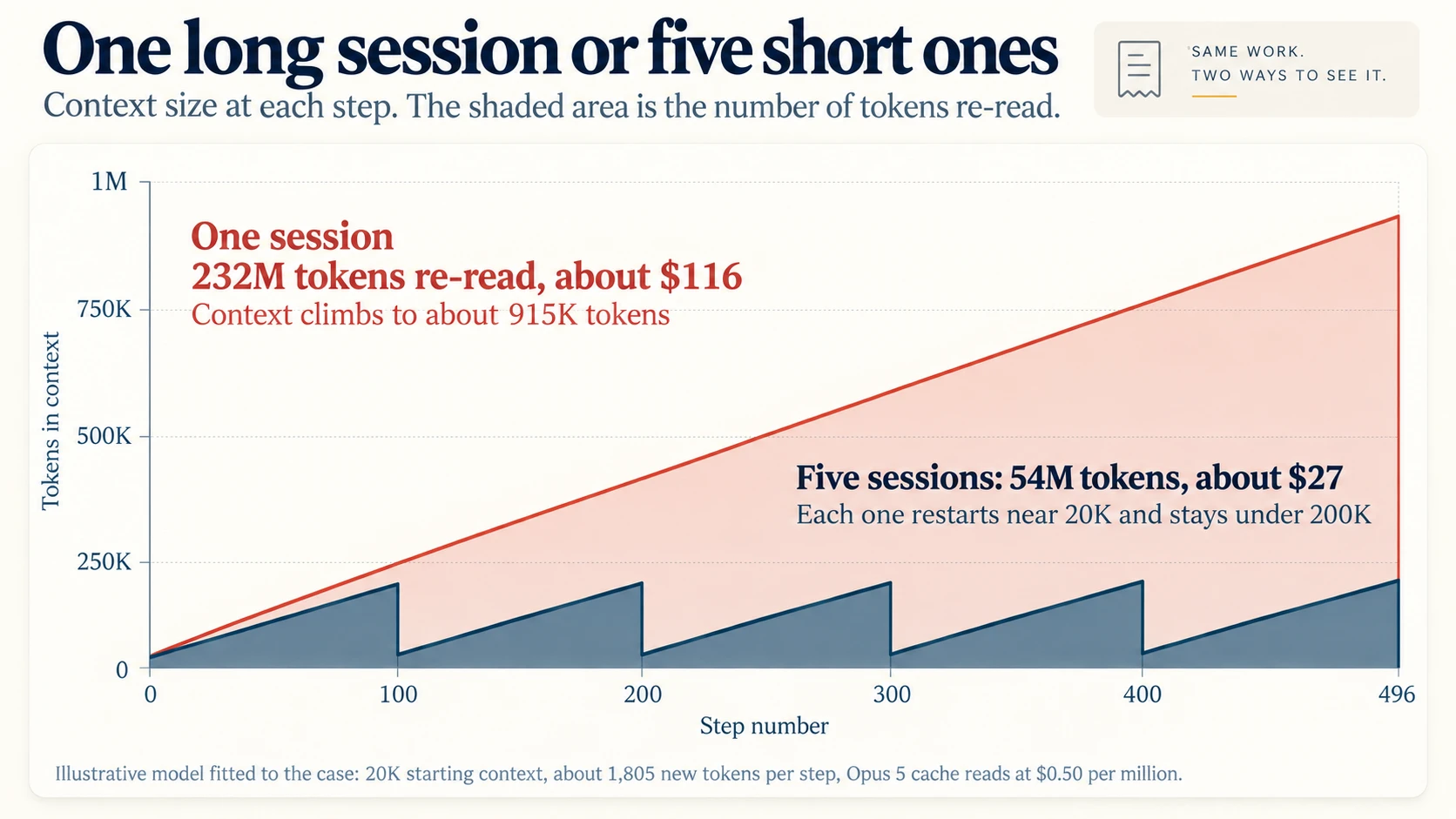
Figure 2. The shaded area is the number of tokens re-read. This is a model, not a measurement. Project 2 asks you to measure it on your own work.
The saving is about $89. That is about 60% of the whole $145 bill. The model is the same, and the intended work is the same. The calculation does not prove that the quality is the same. That depends on the handoff. With a good spec and a good handoff note, you should be able to keep the quality and still cut most of the re-reading. Each new session must load a short handoff note and a few files. That costs well under one dollar per session at Opus 5 prices.
This result gives you the order of the levers:
- Session shape. The largest saving. No cost in quality.
- Output. Shorter answers and the right level of effort.
- Model choice. A real saving, with trade-offs. Concept 13 sorts every task into three tiers, Judge, Build and Fetch, and matches a model to each.
- Schedule and discounts. Batch and off-peak prices for automated work.
The builder's agent reached the same order. It called cheaper models the third-best lever, not the first.
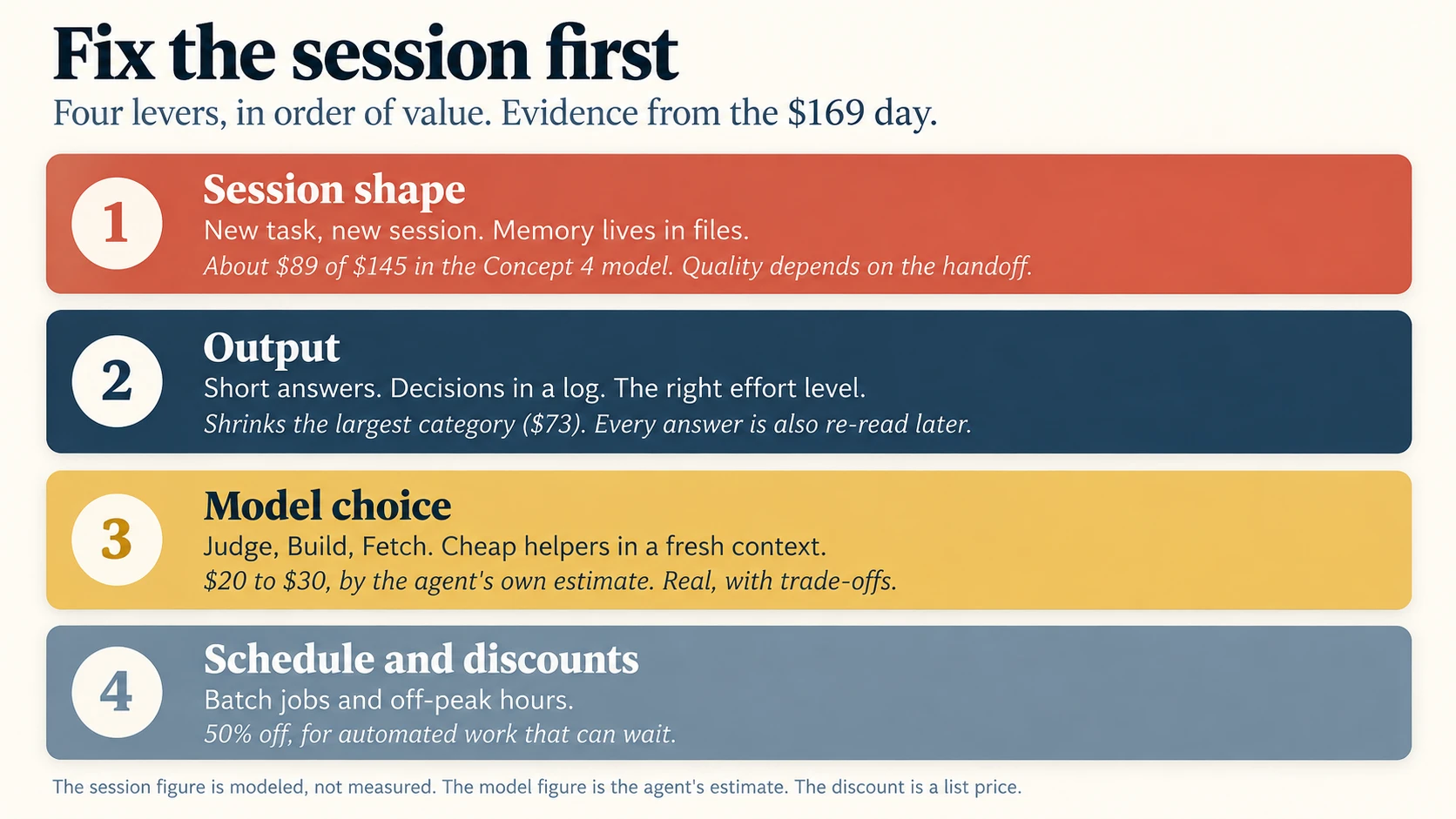
Figure 3. The order of the levers, with the evidence for each one from the $169 day.
So fix the session before you change the model. Splitting one long day into five sessions saves more than any model swap can.
Without it: You pay for a cheaper model and keep the long session. The bill falls by a fraction when it could fall by more than half.
- The activity table said explaining was 50% of the bill. Why was that the wrong thing to cut?
- Your question is eight words long and the session is at step 300. What decides what that step costs?
- You double the length of a session. About how much does the re-reading grow, and why is it not double?
Answers. (1) Explaining was a symptom. The explanations were expensive because they arrived late in a very long session, so each one carried the whole day with it. The cause was the session length, not the talking. (2) The size of the context, which is the whole conversation so far, not the eight words. (3) About four times. Each step carries everything before it, so the total is the area under a rising line, and the area of a triangle grows with the square of its base.
Part 2: Work Efficiently
Concept 5: One task, one session
When the task changes, end the session. In Claude Code, run /rename so that you can find the session later. Then run /clear. Use /resume if you need to go back. Clearing costs nothing.
Anthropic's cost guide names two habits with the highest impact. The first is to clear between unrelated tasks. The second is to match the model to the job. This course follows the same order, and Parts 1 and 2 are the first habit in detail.
A fresh session forgets the chat. So the memory must live in files:
- The spec. What you are building, and what done looks like.
- CLAUDE.md or AGENTS.md. The standing rules of the project.
- A handoff note. A short file written at the end of each session.
This is spec-driven development doing a second job. The spec is memory that costs almost nothing to carry. Chat history is memory that you pay for on every step.
Use a prompt like this at the end of a task:
Write HANDOFF.md for the next session. Maximum 20 lines. Include what was completed, decisions made and why, what is next, open questions, and the exact command to run the relevant tests. Do not include anything that is already in the spec or in CLAUDE.md.
Then start the next session with one line: read the spec and HANDOFF.md, then begin the next task.
Parallel work is fast, and it is not cheap. On September 17, 2026, Anthropic released a redesigned Projects experience in Claude Code, in beta. A coordinator chat directs the work. Each piece of work runs in its own thread, and each thread is a separate cloud session with a fresh context. All threads share one project memory. This is Concept 5 built into the product. Anthropic gives a warning in the same announcement: a project can run several threads at once, each thread is a full session, and so a project can reach usage limits faster. The same warning applies to agent teams, where Anthropic's own figure is blunt: teams use approximately seven times more tokens than standard sessions when teammates run in plan mode, because each teammate keeps its own context window and runs as a separate instance.
The $169 day shows the same lesson from the other side. A duplicate session on the same repository cost $24, which was 14% of the total, and its code was thrown away.
A new session is not a reset button you press when things go wrong. It is the cheapest tool you have.
Without it: Every new task carries every old task. The second half of the day costs several times the first half, for the same work.
Concept 6: Know what breaks the cache
The cache matches a request from its first token forward. If something changes near the start, everything after it is processed again at full price. In a long session, one cache miss is expensive. Take a context of 400,000 tokens on Opus 5. A cached step re-reads it for $0.20. A cache miss writes it again for $2.50.
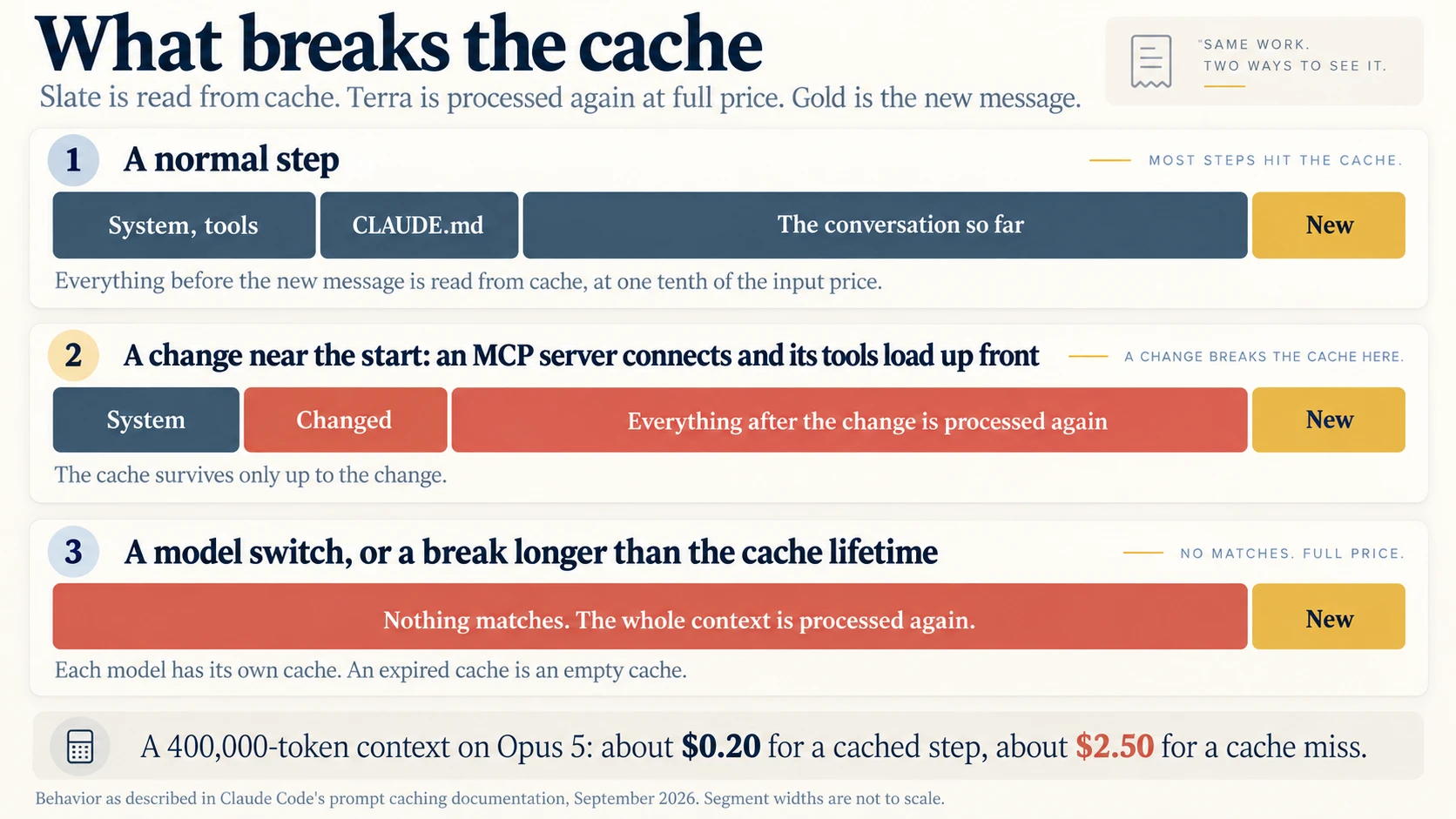
Figure 4. The cache survives only up to the first change. A model switch or an expired cache leaves nothing to match.
Claude Code's documentation lists what breaks the cache and what keeps it.
| Breaks the cache | Keeps the cache |
|---|---|
Switching models with /model. Each model has its own cache. | Editing files in your repository |
| Changing the effort level in the middle of a session, on most models | Changing the permission mode |
| Turning on fast mode, once per conversation | Changing the output style |
Entering or leaving plan mode while you use opusplan | Invoking a skill or a command |
| A skill or command that names a different model in its frontmatter | Running /recap |
| An MCP server that connects or disconnects, when its tools are loaded up front | Running /rewind |
| Enabling or disabling a plugin that brings its own MCP server, on the same condition | Spawning a subagent |
| Denying a whole tool by name, when tool search is unavailable | Turning the advisor on or off |
| Enough images accumulating that the oldest are dropped | Enabling or disabling most plugins |
| Compaction, by design | Editing CLAUDE.md in the middle |
| Upgrading Claude Code, on your next session | Editing your MCP config without restart |
| A break that is longer than the cache lifetime |
Editing CLAUDE.md mid-session keeps the cache for a simple reason: the edit does not apply until you run /clear or /compact, or restart. And the advisor keeps the cache because its tool definition sits after the cache breakpoint: you can turn a second opinion on and off mid-task for free.
The last row on the left is the one that catches people. A cache is like a parking meter. It expires. In Claude Code, the main conversation gets a one-hour cache on a subscription while you are inside your plan's included usage. On an API key, on a cloud provider, or once you are spending usage credits, the default is five minutes. Step away for a ten-minute coffee break on an API key, and your next message pays to process the whole context again.
The part almost everyone misses: subagents are in a different bucket. Everything outside your main conversation, which means subagents, workflows, teammates, forks, compaction, and session titles, gets five minutes by default even on a subscription. A helper you call once an hour rebuilds its cache every time. The subagentPromptCacheTtl setting changes that bucket, and promptCacheTtl changes the main one. Each takes 5m or 1h.
You have four defenses against an expired cache. Finish the task before the break. Clear the session and restart from the handoff note. Set promptCacheTtl to 1h, which makes cache writes cost 2x input instead of 1.25x. Or accept the miss, because one miss is cheap and one miss per hour all day is not.
So choose the model and the effort level at the top of the session, then leave them alone.
Without it: A model switch or a coffee break deep in a long session costs dollars in a single step, and you never see why.
Concept 7: Keep the window small
Everything that enters the context is read again on every later step. Suppose the agent reads a 10,000-line test log at step 50. You pay for that log again at step 51, and at step 52, and at every step until the session ends. So keep noise out of the window.
- Give noisy work to subagents. Test runs, log reading, documentation lookups, and code search produce a lot of text. A subagent does the work in its own context and returns only a summary.
- Filter before the model sees it. A hook can run before a command and change it. Anthropic's cost guide shows a
PreToolUsehook that rewrites a test command so it returns only the failures. Tens of thousands of tokens become a few hundred. - Prefer command-line tools to MCP servers when both exist. Tools such as
gh,aws, andgcloudadd no tool listings to the context. Disable MCP servers you are not using with/mcp. Run/contextto see what fills the window. - Keep CLAUDE.md short. Anthropic suggests under 200 lines. Move instructions for special workflows into skills. A skill loads only when it is used.
- Compact at natural breaks, with instructions. For example:
/compact keep the failing test names and the decisions made. Do not wait for automatic compaction in the middle of a task. If you want to abandon a path, use/rewindinstead. It returns to a point that is already cached, which compaction never is. - Treat the one million token window as a ceiling, not a target. Current Claude models charge the standard price across the whole window. There is no surcharge, so there is also no warning. Set a lower limit with
/autocompact 300k. - Write specific prompts. "Improve this codebase" starts a wide scan. "Add input validation to the login function in auth.ts" does not.
- Plan before large changes, and stop early. Use plan mode for complex work. Press Escape as soon as the direction is wrong. A wrong path is paid for twice: once to walk it and once to carry it.
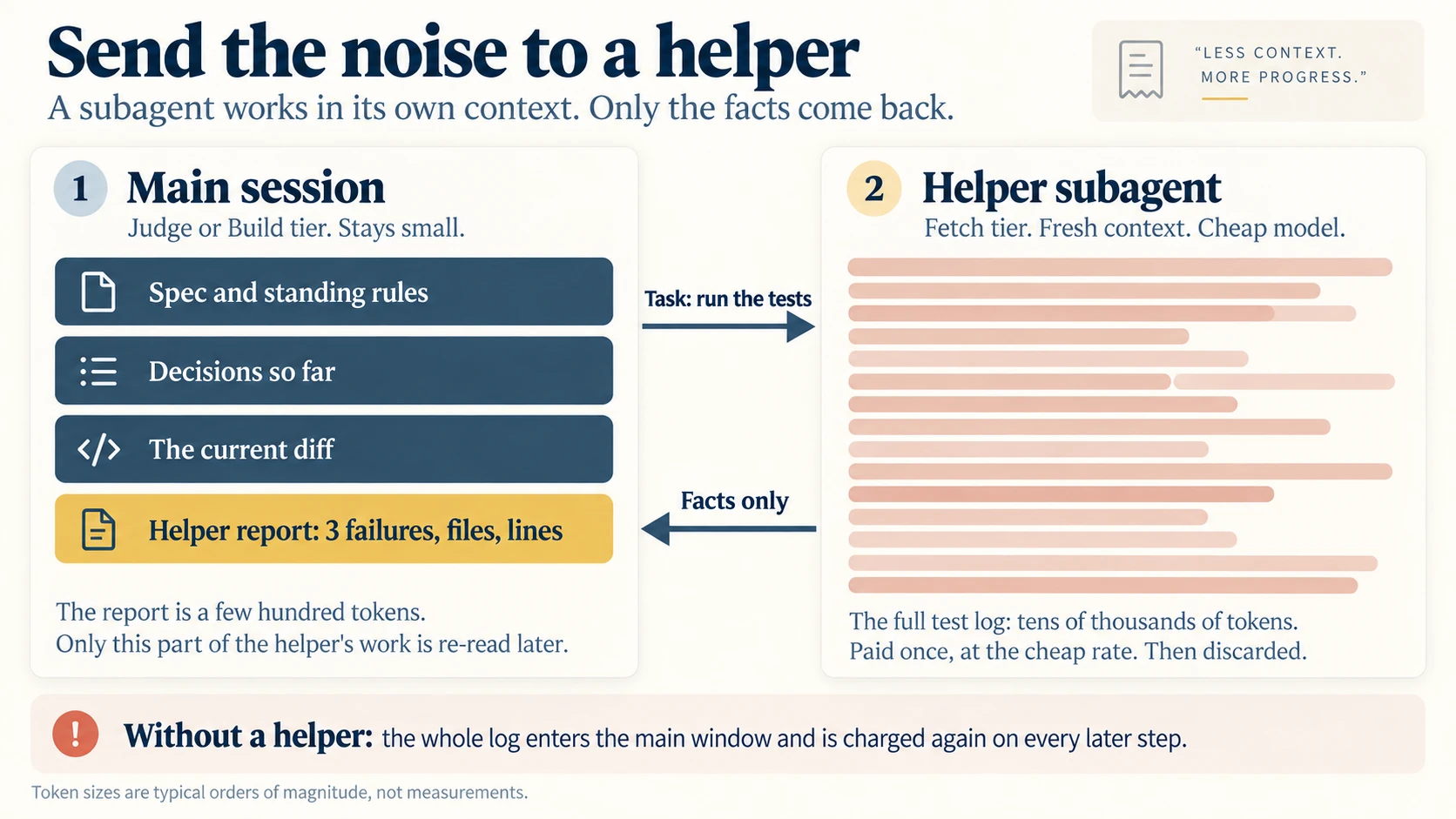
Figure 5. The helper pays for the noise once, at the cheap rate. The main session carries only the report.
So the real question about any large output is not "can the agent handle this?" but "do I want to pay for this on every step from now until I clear?"
Without it: One large log, read once, is charged hundreds of times.
Concept 8: Short answers, visible decisions
The builder had a hard choice. Long explanations cost money, and important points were missed inside them. But the explanations also showed the agent's decisions, and the builder wanted to catch the decisions that were wrong.
The way out is to see what the builder really needed. It was not explanation. It was a record of decisions.
- Decisions before, not explanations after. For any choice that is hard to reverse, the agent stops and asks first. Hard-to-reverse choices include a database schema, an authentication flow, a payment flow, a public API, and a new dependency. The agent gives the decision, the options, and its recommendation in a few lines. This is cheaper than an essay, and it comes at a better time.
- A decision log in a file. Keep a DECISIONS.md file. Each decision gets one line for what, one line for why, and one line for the option that was rejected. The file lives in the repository. It survives
/clear. Any future session, and any human teammate, can read it. - Brief chat by default. Claude Code includes a Concise output style that you can set in
/config. Changing the output style does not break the cache.
Output is the most expensive meter. It is also future input. Suppose the agent writes a 2,000-token explanation at step 100 of a 500-step session on Opus 5. Writing it costs $0.05. Then the session re-reads it 400 times. That is 800,000 tokens of cache reads, or $0.40. Carrying the explanation costs eight times as much as writing it.
Thinking tokens are billed as output too. Concept 12 covers how to set the effort level.
Without it: You are left with two bad options. You pay for essays, or you lose sight of the agent's decisions.
Concept 9: Test in proportion
In the $169 day, the agent ran end-to-end tests after every push. It also ran the full suite sixteen times while it chased a failure that never reproduced. By the agent's own count, ten of those runs taught it nothing new.
Testing was still fair value at $29. Verification is what makes agent work trustworthy, and Trusting the Checker is a whole course on why. The goal is not less checking. The goal is less repeated checking.
- Test the change, then the system. After each change, run the tests that cover the changed code. Run the full end-to-end suite at the merge gate, at milestones, and before a deploy.
- Limit the search for a flaky failure. Give the agent a standing rule: three attempts, then report the failure as unreproduced, with the evidence.
- Run tests in a subagent that reports failures only.
- Put the exact test commands in CLAUDE.md. Then the agent does not spend steps discovering them.
Without it: The agent proves the same thing again and again, and one flaky test can use up an afternoon.
Concept 10: Measure, then cut
Claude Code gives you the instruments.
| Instrument | What it shows |
|---|---|
/usage | Tokens and estimated cost for the session, and what is driving your plan limits |
Prompt cache (main) | A line inside /usage: request count, share of input served from cache, misses, and warm or cold |
/context | What is filling the context window right now |
/insights | A report on how you work across recent sessions, with friction points and suggestions |
| Status line | Live context size and cost, if you configure it |
--max-budget-usd | A spending cap for a scripted run |
The Prompt cache (main) line is the most useful of these for this course, because it turns Concept 6 from advice into a reading. It reports how many of your input tokens came from cache, how many misses you had, how long ago the last one was, and, when Claude Code can work it out, the likely cause, for example likely cause: tool definitions changed. A session with a 91% cache rate is shaped well. A session with a miss every few turns has something changing near the front, and now you can go find it.
On a paid plan, /usage also flags any behavior responsible for 10% or more of your recent usage, and attributes usage to skills, subagents, plugins, and individual MCP servers. That attribution is how you catch a helper that costs more than the work it saves.
You can also do what the builder did. Ask the agent to audit itself:
Read the session records for my last two sessions. Group every step into: explaining and deciding, testing, investigating, writing code, and setup. For each group, report the number of steps, the tokens on each meter (input, output, cache write, cache read), and the estimated cost at list price. Then name the single largest cause of cost and what you would change. Mark every figure that is an estimate.
Choose the right unit. Cost per token is the vendor's unit. Cost per message hides almost everything. Your unit is cost per accepted change. An accepted change passes its checks and gets merged. For each session, record the dollars, the steps, and the number of accepted changes.
Claude Code computes the dollar figure locally from token counts at list price, so on a subscription the session cost is an estimate of what the same work would cost on the API, not a bill. If your organization has contracted rates, an administrator can set a modelPricing table in managed settings so the figures match what you actually pay.
One number in /usage would have pointed at the re-reading in about four seconds.
Without it: You optimize by feeling. The builder's feeling pointed at the explanations. The measurement pointed at the re-reading.
Concept 11: The same habits in every tool
Part 2 used Claude Code commands, because the case came from Claude Code. The habits belong to no tool. Every agent loop re-reads its history, so the same physics apply everywhere.
| Habit | Claude Code | Codex CLI | OpenCode | Chat apps |
|---|---|---|---|---|
| Fresh start for a new task | /clear. Use /resume to go back. | /clear or /new. Use /resume to go back. | /new. Use /sessions to go back. | Start a new chat |
| Shrink a long conversation | /compact with instructions | /compact | /compact, or a compaction block in opencode.json | Ask for a short summary, then paste it into a new chat |
| Check the state of the session | /usage and /context | /status | The provider's usage page | The plan's usage page |
| Standing rules | CLAUDE.md | AGENTS.md | AGENTS.md, created with /init | Project instructions or custom instructions |
| Cheap helpers | A subagent file with a model: field | Subagents with their own model setting | An agent block with a model for each agent | Not available |
| Choose the model | /model and /effort at the top | /model at the top, or -m at launch | The /models picker, or model in opencode.json | The model picker |
Two settings do most of the work, and both belong at the top of the session rather than in the middle of it.
Route the noisy work by giving each subagent its own model. A subagent file carries a model: field, and CLAUDE_CODE_SUBAGENT_MODEL sets a default for every subagent that does not name one. CLAUDE_CODE_SUBAGENT_MODEL_FORCE overrides all of them at once, which is the honest way to test whether your helpers really are cheaper: force them all to Haiku for a day and watch what breaks.
Then set the cache lifetime for each bucket. promptCacheTtl covers your main conversation, and subagentPromptCacheTtl covers everything else. Both take 5m or 1h. If you sign in with an API key, setting the first one to 1h is usually the highest-value line in your settings file, because it is the difference between a coffee break costing nothing and a coffee break costing a full re-read.
One check before you trust any of it. Run /usage after an hour of real work and read the Prompt cache (main) line. If the share of input served from cache is in the high eighties or nineties, your session shape is working. If it is not, the same line usually names the cause.
OpenCode deserves a note. It is an open-source coding agent that works with many providers, so it is a natural home for the Chinese ladder in Concept 19. It names every model as provider/model-id. One config file can put a strong model on the planning agent and a cheap model on the helpers. The small_model setting handles background jobs such as session titles, which is a small, permanent saving you set once.
{
  "$schema": "https://opencode.ai/config.json",
  "model": "anthropic/claude-sonnet-5",
  "small_model": "deepseek/deepseek-flash",
  "agent": {
    "plan": { "model": "anthropic/claude-opus-5" },
    "explore": { "model": "deepseek/deepseek-flash" }
  }
}
The model IDs above are examples. Pick the exact IDs from the /models picker, because they change faster than any course can.
What you give up on this side is the built-in instrumentation. There is no /usage with a cache line, so your measurement comes from the provider's usage page instead. That is a real cost of the open path, and it is worth knowing before you choose it: you keep every lever from Part 2, and you do more of the reading yourself.
Chat apps follow the same physics. Claude and ChatGPT have no slash commands for this, but every message still re-sends the whole chat, and every attached file with it. So start a new chat for a new topic. Attach only the pages you need. Keep lasting reference material in a project, and do not paste it again in each chat. Say how long the answer should be. Use the fast mode for everyday questions and the thinking mode for hard ones. On a subscription, these habits decide how soon you reach your limit.
Without it: You learn these habits as Claude Code tricks, and you lose them on the day you change tools.
- You are ninety minutes into a session on an API key and you leave for lunch. What does your next message cost, and which single setting would have prevented it?
- You moved all your noisy work into subagents and your bill barely moved. Name one reason a helper might not be saving what you expected.
- The agent wrote a 2,000-token explanation early in a long session. Why is writing it the cheap part?
Answers. (1) A full re-read of the whole context at cache-write prices, because the default cache lifetime on an API key is five minutes. Setting promptCacheTtl to 1h would have kept it warm. (2) Several are possible: the helper is running on the same expensive model as the main session, its own cache expires between calls because subagents default to a five-minute bucket, or it is returning long conclusions instead of short facts, so the noise ends up in your window anyway. /usage attributes usage to individual subagents, which is how you find out which. (3) Because it is written once and then re-read on every later step. The carrying cost is larger than the writing cost, often by several times.
Part 3: Which Model for Which Work
Concept 12: Two dials, capability and effort
Coding agents give you two dials that both seem to make the answer better. They do different things.
The model dial chooses which trained model handles your request. It sets how capable the agent is. It also sets the price of every token.
The effort dial sets how much work the model does on each request. Anthropic's guide to these settings is clear that effort is more than thinking time. Effort also controls how many files the agent reads, how much it verifies, and how far it goes before it checks in with you. In short, the model dial is how capable. The effort dial is how thorough.
When a result is wrong, look at your context first. Was the prompt vague? Was the spec missing? Was a tool not connected? If the context was good, ask one question: did the model not know enough, or did it not try hard enough?
- It had the context, it clearly tried, and it was still wrong. Raise the model.
- It skipped a file, did not run the tests, or stopped halfway. Raise the effort.
| Tool | Effort levels | Vendor advice |
|---|---|---|
| Claude Code | low, medium, high, xhigh, max. The default is high on current models. | Keep the default for most work. Treat effort as a general preference, not a switch for each task. max can overthink. |
| Codex | Low, Medium (the default), High, Extra High, Max. Ultra adds subagents. | "Use the lowest reasoning effort that produces the result you need." Most tasks do not need Max or Ultra. |
Three notes. First, remember Concept 6. On most Claude models, a change of effort in the middle of a session breaks the cache, so Claude Code asks you to confirm it while the cache is still warm. Fable 5.1 on an API key or a subscription is the exception: there, changing effort keeps the cache. Second, some models always think. You cannot turn thinking off on Claude Fable models. Third-party trackers report the same for Kimi K3 and GLM-5.3. On those models, every request pays for reasoning tokens, even a tiny one. Third, thinking tokens are billed as output, which is the most expensive meter, so the effort dial is a price dial even when the model does not change.
Without it: You turn both dials up together. You pay the highest price per token, for the most tokens, on work that needed neither.
Concept 13: Judge, Build, Fetch
Go back to the law firm from Concept 3. Everyone in it still bills by the page, but they do not all bill at the same rate. A partner decides the strategy. An associate drafts the contract. A paralegal pulls the records. Nobody pays partner rates to pull records. And nobody lets the paralegal decide the strategy.
Agent work sorts into the same three tiers.
| Tier | The work | What it needs |
|---|---|---|
| Judge | Deciding, designing, reviewing. Diagnosing unclear failures. Anything that is expensive to reverse. | The strongest model you can justify |
| Build | Implementing a clear spec. Routine features. Refactors that have tests. | A mid-tier model and a clear definition of done |
| Fetch | Searching the code. Running tests and reporting. Summarizing logs. Renaming across files. Extracting and classifying. | The smallest model. The output is easy to check. |
The tiers are not only for code. They fit any knowledge work.
| Tier | In coding | In knowledge work |
|---|---|---|
| Judge | Choose the architecture. Review a risky change. | Decide the strategy in a memo. Review a contract. Give the final edit. |
| Build | Implement a feature from a clear spec. | Draft a report from an approved outline. Build a spreadsheet from a clear brief. |
| Fetch | Search the code. Run the tests and report. | Summarize meeting notes. Pull figures out of PDF files. Reformat a document. |
In the $169 day, the agent estimated that about $55 went to investigating and running tests. It estimated that a cheaper helper could take the mechanical half of that work and save $20 to $30. That is 15% to 20% of the day. It is real money, and it is still the third lever.
The agent then gave a warning, and this warning is the most important part of the concept. The most valuable findings of the day came from work that looked mechanical:
- The test setup was skipping half of the safety rules.
- Four kinds of record were showing no name.
- A planned encryption change was about to switch off, silently, the protection against dangerous content.
The agent was not looking for any of these. They appeared because something looked slightly wrong while it did something else. A cheaper model, asked only whether certain fields exist, would probably answer correctly and miss the problem next to it. The agent said it in one line:
Cheap for fetching, not for judging. The risk isn't a wrong answer, it's a confidently incomplete one.
This leads to a design rule. The Fetch tier returns facts and evidence: file paths, line numbers, failing test names, raw output. It does not return conclusions. The Judge tier reads the evidence and decides. In risky areas such as security, money, and data loss, let the Judge tier do its own looking.
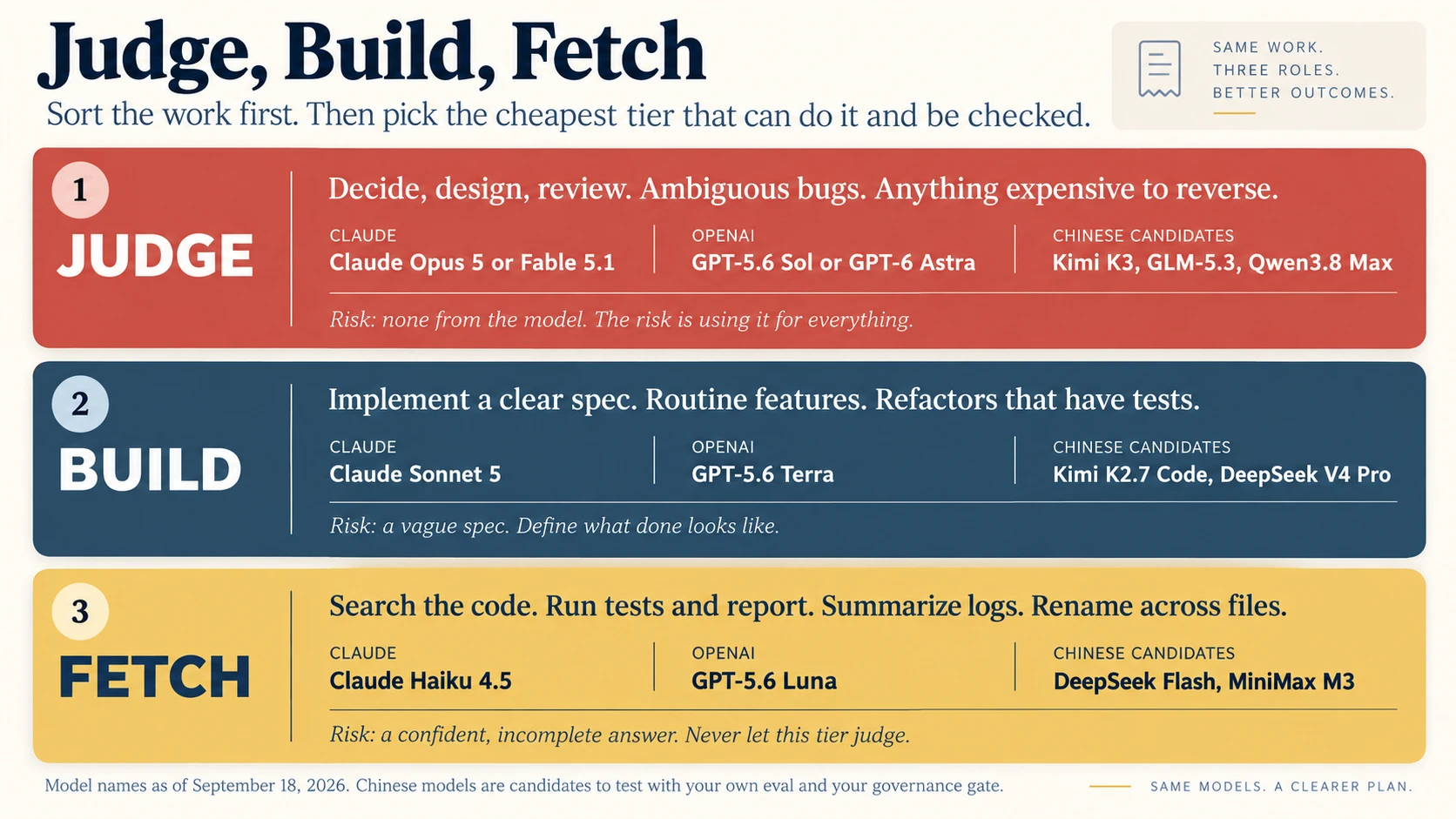
Figure 6. Three tiers of work, with current models for each tier.
Sort the work before you pick the model.
Without it: You make one of two mistakes. You pay the top rate to pull records, or you let the cheapest model make a judgment call.
Concept 14: Price per token is not cost per task
A price card tells you the cost of a token. You need the cost of a finished task. They differ for three reasons.
Reason 1: Token counts differ. Some models write more and think more to reach the same result. Some models always think. Tokenizers differ too, so the same page of text becomes a different number of tokens on different models. When Z.ai released GLM-5.3 at the same price as GLM-5.2, reports noted that the new model wrote longer answers. The price per token stayed flat. The cost per task did not.
Reason 2: Retries cost more than tokens. A small model that needs three attempts, plus your time to review each one, can cost more than one pass on a larger model. Anthropic makes the same point about hard work with many steps. A smaller model can use many iterations near the limit of its ability. A larger model can reach the same quality in fewer steps. The total cost per task can come out lower on the more expensive model.
Reason 3: The shape of the workload decides which meter matters. Long agent sessions are dominated by cache reads. Here is what the 232 million re-read tokens of the $169 day would cost on each Claude model.
| Model | Cache read price per million | Cost of 232 million cache reads |
|---|---|---|
| Claude Opus 5 | $0.50 | $116 |
| Claude Fable 5.1 | $0.25 | $58 |
| Claude Sonnet 5 | $0.20 | $46 |
| Claude Haiku 4.5 | $0.10 | $23 |
The Haiku row is a price comparison only. Haiku 4.5 has a 200,000 token context window, so it could not carry a session of this size at all.
The most expensive model on the price card is not the most expensive on this meter. Anthropic prices cache hits on Fable 5.1 at 0.025x the base input price, where every other model uses the standard 0.1x. Do not take too much from this. Fable's output costs twice as much as Opus output, and on subscription plans Fable draws on your limits in a different way. The lesson is narrow: look at the meter that your workload uses.
A writing job that produces long documents is dominated by the output price. A classification job with a high volume of short requests is dominated by input and output together, and it can usually wait for a batch discount.
So run a small eval of your own. Take 10 to 20 real tasks from your own work, with results that you know are good. Run them on two tiers. Record the pass rate, the steps, the tokens on each meter, the dollars, and your own review minutes. Then decide. Trusting the Checker is the course that teaches you to build that set properly. This is the smallest useful version of it.
Without it: You pick the cheapest price card and you get the most expensive result.
Concept 15: Four ways to combine models
Claude Code gives you four ways to use more than one model. They behave differently with the cache, so choose with care.
| Method | When the stronger model runs | Effect on the cache | Best for |
|---|---|---|---|
| Subagents with a model set | The main model leads. Cheaper helpers do Fetch work in a fresh context. | None on the main session | The default pattern. It fixes context size and price together. |
The advisor (/advisor opus) | A cheaper main model works. A stronger advisor is consulted at decision points. | None when you turn it on or off | Long routine tasks where the plan decides the outcome |
opusplan | Opus plans. Sonnet executes. | Each move into or out of plan mode starts a new cache | Plan once at the start, then execute |
/model at a task boundary | From the next request onward | A full re-read of the context | Switching right after /clear, when the context is small |
Subagents are the strongest of the four, because they solve two problems at once. The noisy work leaves the main window, and it runs at a lower price. Set model: haiku or model: sonnet in the subagent file. Concept 23 gives you a complete subagent file.
The documentation is explicit: the advisor's own read of the conversation is not cached, and each advisor call processes the full transcript anew, with no reuse between calls. In a short session this is cheap. In a very long session it is not. The advisor is experimental and requires the Anthropic API. It also has a pairing rule: the advisor must be at least as capable as the main model, so an Opus 5 main session can only take Fable or Opus 5 as its advisor. The pattern that saves money is a cheaper main model with a stronger advisor, not the other way round.
Codex offers similar tools. Subagents can have their own model and effort settings, and Ultra mode delegates parts of a task to subagents in parallel on its own. One caution applies to every tool. After you set up routing, check the usage report to confirm that the cheap model is really doing the cheap work. One Codex user reported in the OpenAI community forum that subagents used the parent model in place of the configured one, and the quota was used up quickly. That is a single user report, not a confirmed defect. The habit of checking is the point, and in Claude Code /usage attributes usage per subagent so the check takes seconds.
Routing work to a cheaper model is not one move, it is four, and only one of them is free. Route by session and by subagent. Do not change models in the middle of a long conversation.
Without it: You route work by switching models in the middle of a long conversation, and every switch re-reads the whole history at full price.
Concept 16: Start low, escalate the stage that failed
Start each task on the lowest tier and the lowest effort that can produce a result you can check. When something fails, escalate only the thing that failed.
| What you see | What to escalate |
|---|---|
| A confident wrong answer, or a task with real ambiguity | The model |
| Skipped steps, missing checks, work that stops halfway | The effort |
| A change with high consequences | The review. Use a fresh reviewer on the Judge tier, in a clean context, that sees only the spec and the diff. |
Then come back down. Anthropic's guidance says the same thing. If you are on the larger model and the work has been routine for a while, dropping to the smaller model raises speed and usually lowers cost, with no loss of quality.
The third row is the one people skip, and it is the one that pays. A reviewer in a clean context is cheap precisely because it is clean: it carries the spec and the diff, not the day. That is the same trick as Concept 7, aimed at verification instead of noise.
One hard moment does not mean the whole job is hard. Most jobs that live permanently on the top tier got there because of a single bad afternoon nobody ever reversed.
Without it: One hard moment moves the whole job to the top tier, and it stays there.
- The agent read every file it needed, ran the tests, and still produced a design that will not work. Which dial?
- Why does sending a task to a subagent cost your main session nothing, while switching your main session to the same cheap model costs a lot?
- You are running Opus 5 as your main model and you want a second opinion at decision points. What does the advisor pairing rule allow?
Answers. (1) The model. It had the context and it clearly tried, so the gap is capability, not thoroughness. (2) A subagent starts its own conversation with its own prefix, so the main session's cache is untouched and only a short report comes back. A /model switch changes the cache key for the main session, so the entire history is processed again. (3) Only Fable or another Opus 5, because the advisor must be at least as capable as the main model. If you want the cheap-main, strong-advisor pattern, the main model has to be the cheaper one.
Part 4: Model and Price Reference
Parts 1 to 3 teach the method. This part is market data, and it is built to be replaced. When prices change, update this part and leave the rest alone. All prices in this part are in US dollars per one million tokens. All were checked on September 18, 2026.
A price card is a starting point, not a quote. The same model can be sold through the lab's own API, through an inference provider, and through an aggregator, at three different prices with three different caching rules. Concept 21 turns that into a question you must answer before you route anything. Here it is just a reason to check the exact endpoint you plan to use, rather than the number you read somewhere.
Concept 17: The Claude ladder
Price snapshot: September 18, 2026. Source: Anthropic's pricing page. Refresh this block when prices change.
| Model | Input | Output | Cache read | Cache write (5 min) | Cache write (1 hr) | Batch input and output |
|---|---|---|---|---|---|---|
| Claude Fable 5.1 | $10 | $50 | $0.25 | $12.50 | $20 | $5 and $25 |
| Claude Opus 5 | $5 | $25 | $0.50 | $6.25 | $10 | $2.50 and $12.50 |
| Claude Sonnet 5 | $2 | $10 | $0.20 | $2.50 | $4 | $1 and $5 |
| Claude Haiku 4.5 | $1 | $5 | $0.10 | $1.25 | $2 | $0.50 and $2.50 |
What each one is for. Anthropic positions Fable 5.1 for the hardest and longest tasks, the kind that are larger than a single sitting. It is never the default model, and it always thinks. Opus 5 is for complex reasoning. It is the default on Max, Team Premium, Enterprise, and the API. Sonnet 5 is for daily coding. It is the default on Pro and Team Standard. Haiku 4.5 is for simple tasks and subagents, and it is the one model here with a 200,000 token window rather than a million. Anthropic's pricing page gives the short version: Haiku for simple tasks, Sonnet for most production workloads, Opus for the most complex reasoning.
The arithmetic. Sonnet 5 is 60% cheaper than Opus 5 on every meter. Haiku 4.5 is 80% cheaper. That "on every meter" means the saving survives whatever shape your workload turns out to have. The Sonnet 5 price of $2 and $10 began as introductory pricing. Anthropic has made it the standard price, and states that the increase to $3 and $15 planned for September 1, 2026 will not happen.
Discounts and extra charges. The Batch API takes 50% off, and the discount stacks with caching. Fast mode on Opus 5 costs $10 and $50, which is exactly twice the standard price, for up to 2.5 times the output speed, so pay for it only when a person is waiting. Inference pinned to the United States costs 1.1 times the standard price on every meter. The full one million token window is billed at the standard price: a 900,000 token request is billed at the same per-token rate as a 9,000 token one.
Caching pays for itself quickly. A 5-minute cache write costs 1.25x input and a read costs 0.1x, so it pays for itself after one read. A 1-hour write costs 2x, so it pays for itself after two. That is the whole calculation behind the promptCacheTtl advice in Concept 6.
Subscriptions. On a Pro or Max plan you do not pay per token. The same physics still applies, because it decides how fast you reach your limits. Your usage resets on a rolling five-hour window, with weekly limits on top, and your activity across Claude on web, desktop, mobile, and Claude Code all draws from one pool. A long session uses up your window in the same way that it uses up dollars on the API. Every habit in Part 2 works on a subscription too.
The settings. Use /model sonnet, /model opus, or /model fable to choose the model. /effort chooses the effort level, /advisor chooses an advisor, and the model: field in a subagent file routes helper work.
Without it: Opus stays your default for everything. Anthropic's cost guide names that as one of the two usual causes of unexpectedly high spend.
Concept 18: The OpenAI ladder
These are the standard tier prices for short context.
Price snapshot: September 18, 2026. Source: OpenAI's API pricing page. Refresh this block when prices change.
| Model | Input | Cached input | Cache write | Output | Batch or Flex input and output |
|---|---|---|---|---|---|
gpt-6-astra | $10 | $1.00 | $12.50 | $50 | $5 and $25 |
gpt-5.6-sol | $4 | $0.40 | $5.00 | $20 | $2 and $10 |
gpt-5.6-terra | $2 | $0.20 | $2.50 | $12 | $1 and $6 |
gpt-5.6-luna | $0.20 | $0.02 | $0.25 | $1.20 | $0.10 and $0.60 |
What each one is for. OpenAI describes the four models this way. Astra is its most capable model for complex work across code, apps, and research. Sol is for complex, open-ended work that needs extra analysis, judgment, or polish. Terra is "the pragmatic all-rounder" for everyday work. Luna is for specific, high-volume tasks where you already know what a good result looks like: extraction, classification, transformation, and structured summaries. In our terms: Astra and Sol judge, Terra builds, Luna fetches. That mapping is unusually clean because OpenAI wrote the roles the same way Concept 13 does.
Long context costs more here, and this is the difference that matters. OpenAI's price table has a second set of columns for long context. In those columns, input and cache prices double, and output costs 1.5 times as much. Third-party trackers report that the long context rate starts above 272,000 input tokens and applies to the whole request. OpenAI's page shows the columns but does not state the threshold, so treat the number as reported. On Claude, a long session means more tokens at the same rate. On OpenAI, a long session means more tokens at a higher rate, so the triangle from Concept 4 gets steeper.
Dates to know. The Sol price is promotional. OpenAI says it will last at least through November 21, 2026. GPT-5.5 retires from ChatGPT and Codex on October 14, 2026, and stays available on the API.
Discounts and extra charges. Batch and Flex processing both cost half of the standard price. Fast mode costs double.
The arithmetic. Luna is the cheapest Fetch-tier model from a Western lab in this course. Its input costs one fifth of the Haiku 4.5 price. Its output costs about one quarter.
The settings. Start Codex with a model, for example codex -m gpt-5.6-terra. Or set model = "gpt-5.6-terra" in config.toml. Choose the reasoning level in the picker, and follow OpenAI's own advice: use the lowest one that produces the result you need. Put your standing rules in AGENTS.md.
Keeping sessions short is worth more money here than anywhere else in this course.
Without it: A long session on OpenAI costs you twice. You pay for more tokens, and you pay a higher rate for each one.
Concept 19: The Chinese ladder
Price snapshot: September 18, 2026, re-checked September 19. DeepSeek, Qwen and MiniMax prices were read from the vendor's own documentation. The Kimi and GLM rows come from third-party trackers that agree with each other but were not confirmed on a vendor page. Treat those two as reported prices.
| Model | Input | Cached input | Output | Context | Notes |
|---|---|---|---|---|---|
DeepSeek V4.1 Flash (deepseek-flash) | $0.30 peak, $0.15 off-peak | $0.006 peak, $0.003 off-peak | $1.20 peak, $0.60 off-peak | 1M | Open weights under the MIT license |
DeepSeek V4 Pro (deepseek-v4-pro) | $1.32 peak, $0.66 off-peak | $0.044 peak, $0.022 off-peak | $3.96 peak, $1.98 off-peak | 1M | The stronger DeepSeek tier |
Kimi K3 (kimi-k3) | $3.00 | $0.30 | $15.00 | 1M | Moonshot AI. Thinking is always on. No batch rate. |
Kimi K2.7 Code (kimi-k2.7-code) | $0.95 | $0.19 | $4.00 | 256K | Moonshot AI. Tuned for coding. Batch at 60%. |
| GLM-5.3 | $1.40 | $0.26 | $4.40 | 1M | Z.ai. Thinking is always on. |
| Qwen3.8 Max | $2.00 | $0.25 | $6.00 | 1M | Alibaba Cloud. Cheaper in the Beijing region. |
| MiniMax M3 | $0.30 | $0.06 | $1.20 | 1M | Doubles above 512K input, to $0.60 and $2.40. |
Why they matter. The reason is price, above all at the Fetch tier. Look at the cache read meter. The 232 million re-read tokens that cost $116 on Opus 5 would cost about $0.70 at the DeepSeek Flash off-peak rate. This is not a prediction for your work. The tokenizer differs, and the model behaves differently. It shows the scale of the gap.
Peak and off-peak prices. DeepSeek charges double during peak hours. Peak hours run from 1am to 4am UTC, and from 6am to 10am UTC, Monday to Friday. Chinese public holidays are excluded. Those hours fall in the evening and at night in the United States, so an American workday is off-peak. In other time zones, check the hours against your own clock. Think of off-peak electricity prices. The power is the same, and the cheap hours are fixed. Schedule automated jobs inside them.
They plug into the tools you know. DeepSeek offers an endpoint in the OpenAI format and an endpoint in the Anthropic format. Its documentation covers Claude Code, Codex, and OpenCode. Third-party guides report Anthropic-format endpoints from Moonshot, Z.ai, and Alibaba as well. This setup follows DeepSeek's own guide for Claude Code. We changed one thing: the stronger model leads and the Flash model helps, which is Concept 13 applied to the ladder.
export ANTHROPIC_BASE_URL=https://api.deepseek.com/anthropic
export ANTHROPIC_AUTH_TOKEN=<your DeepSeek API key>
export ANTHROPIC_MODEL=deepseek-v4-pro
export ANTHROPIC_DEFAULT_HAIKU_MODEL=deepseek-flash
export CLAUDE_CODE_SUBAGENT_MODEL=deepseek-flash
DeepSeek's guide also sets the effort level to max. That setting aims at benchmark scores, not at your bill. Start lower and raise it only when Concept 12 tells you to.
The same model, two prices, two countries. Alibaba publishes Qwen3.8 Max at $2.00 and $6.00 in its international regions, and at $1.65 and $4.951 in the Beijing region. Same model, same context window, a price gap of about 18%, and a different answer to the question of where your data is processed. Hold that example until Concept 21, because it is the cheapest possible illustration of why price is the last question rather than the first.
Aggregator prices are a different number. The same model listed on an aggregator or an inference marketplace can carry a price well below or above the lab's own API, because it may be a different host, a different quantization, or a promotional rate. DeepSeek V4 Pro is the live example. DeepSeek's own page charges $0.66 per million input tokens off-peak and $1.32 at peak. On OpenRouter the same model is listed at $0.554, under a discount the page itself labels as 68% off. Three numbers, one model, and the cheapest one is the one most likely to move. Price the exact endpoint you will call, and re-check it when you switch routes.
What you lose on a third-party endpoint. The advisor works only on the Anthropic API. With a custom base URL, Claude Code's tool search can be unavailable, and then MCP tool definitions load into the start of every request, which is exactly the Concept 6 failure made permanent. Caching depends on how the endpoint handles the cache markers Claude Code sends: a gateway that forwards them works normally, one that strips them bills your whole conversation as uncached input on every turn. Test before you trust, and read the Prompt cache (main) line to confirm.
Coding plans. Several Chinese labs sell flat monthly plans for use inside coding tools. The GLM Coding Plan from Z.ai starts at $18 per month. These plans are metered in credits, and they have their own peak rules. Read the rules before you compare.
Open weights, with different licenses. Many of these models can be downloaded. The licenses are not the same. DeepSeek V4.1 Flash uses the MIT license. Qwen3.8 has a 27B model under Apache 2.0, and a very large model under a custom license. Kimi K3 has its own license, with conditions for large commercial use. Open weight means downloadable. It does not mean unrestricted. Open weights do give you a third path: run the model on your own GPUs, or on a host inside your own jurisdiction. Open Source LLMs is the course that runs these models at all three scales.
This ladder moves fast. Look at the ten weeks before this course was written. Moonshot released Kimi K3. Z.ai released GLM-5.3. Alibaba opened Qwen3.8 Max. DeepSeek introduced peak pricing, and then replaced its Flash model. Moonshot retired Kimi K2.5 on August 31, 2026, and third-party guides report that calls to it now fail. Pin exact model names. Watch the change logs. Keep a fallback.
It is also the part of this course most likely to be out of date when you read it, which is why the rule is "test it", not "use it". Test them at the Fetch tier first, in off-peak hours, through the exact endpoint you plan to use.
Without it: You ignore a price gap of ten to one hundred times at the Fetch tier, or you chase that gap without checking what you lose.
- Your workload is one very long agent session per day. Which single column of the Claude table should you compare first, and which model wins it?
- You move a 300,000 token job from Claude to OpenAI to save money. What might go wrong?
- A tracker lists your chosen model at a third of the lab's own price. What should you do before you budget with that number?
Answers. (1) Cache read, because a long session is dominated by re-reading. Haiku 4.5 is cheapest at $0.10 but cannot hold a session that size, so among models that can, Sonnet 5 at $0.20 wins. (2) You cross OpenAI's long-context threshold, reported at about 272,000 input tokens, and the higher rate applies to the whole request: input and cache double, output rises by half. (3) Price the exact endpoint you will actually call. The low number may be a different host, a different quantization, or a promotion, and its caching behavior may differ too.
Part 5: Put It to Work
Concept 20: Subscription or API key
There are two ways to pay for the same models. A subscription has a flat monthly price and usage limits that reset. An API key charges for each token and has no usage window.
| Question | Subscription | API key |
|---|---|---|
| Who is it for? | A person who works with an agent most days | Automation, batch jobs, and every Digital FTE |
| What shape is the cost? | Fixed. The limits are the cap. | Variable. There is no cap unless you set one. |
| What does waste cost you? | Time. You reach the limit and you wait. | Money |
| Which discounts apply? | None | Batch, off-peak hours, and control of caching |
| Can you measure cost per task? | Only roughly | Exactly |
Price snapshot: September 18, 2026, re-checked September 19. Claude Pro costs $20 per month, and Claude Max starts at $100 with 5x and 20x tiers. ChatGPT Plus costs $20 per month. The GLM Coding Plan from Z.ai runs $18 for Lite, $72 for Pro and $160 for Max, and is metered in prompts per five hours rather than in tokens, which makes it hard to compare directly with anything else on this page. Check the vendor pages for the current plans and limits.
Anthropic reports that Claude Code on API billing costs an average of $150 to $250 per developer per month across enterprise deployments. So if you work with an agent most days, a flat plan usually costs less than the API average. If you use an agent for a few hours a week, an API key can cost less.
Look at the $169 day once more. On an API key, that one day costs more than a month of Claude Max at $100. On a subscription, the same day costs no extra dollars. It costs hours of waiting for the limits to reset. The habits of Part 2 pay you back in both cases, in different currencies.
Two details matter on Claude. When you pass your plan limit, you can continue on usage credits at standard API rates. And in Claude Code, the main conversation's cache lifetime drops from one hour to five minutes the moment you are on usage credits, so Concept 6 starts costing you exactly when your day is already going badly.
Most builders end up with both. Use a subscription for your own interactive Judge and Build work. Use an API key for automation, for Fetch-tier batch jobs, and for every Digital FTE. A client's Digital FTE runs on API billing that the client has approved, so the cost of each task can be measured.
The question is not which is cheaper. It is what your waste turns into.
Without it: You run automation on a plan that was built for a person, and you reach the limit at the worst moment. Or you pay per token for daily interactive work that a flat plan would cover.
Concept 21: The governance gate
Price is the last question, not the first. Before you route any work to any provider, in any country, pass the gate.
- Whose data is in the context? Your own code is one thing. A client's code, customer records, or regulated data such as health and financial records are another.
- Where is the data processed and stored? Ask which legal entity and which region. The same model can be sold from several regions, with different prices and different data locations.
- What are the terms for retention and training? Terms differ by plan, even inside one vendor. Read the terms for the exact plan you use.
- What does the client contract allow? A Forward Deployed Engineer does not make this choice alone. The client decides. Get the decision in writing.
- Can you switch? Keep your specs, prompts, and evals portable. Then a change in price or policy does not trap you.
- Does the whole tool chain still work? Test tool calling, caching, and your eval through the exact endpoint you plan to use.
Ask before you test, not after. Some companies and some public agencies restrict services that are hosted in certain countries. Some ban them. A quick test with real client code can already break a contract.
One model, three routes. An open-weight model gives three different answers to question 2. You can call the lab's own API, and the data goes to the lab's servers. You can call the same model at an inference provider in the United States or in Europe. Or you can run the model on your own hardware. The weights are the same. The answer to the data question is not.
Behavior differs too. Models from different labs refuse different things and follow safety rules in different ways. Run your eval on your own content, not only on coding tasks. Governance, Risk and Responsible Use is the course that turns this gate into a policy you can hand to someone else.
A safe default follows from the gate. Sensitive Judge and Build work stays with the provider that your client has approved. Public or synthetic Fetch work, and batch work, can go to the cheapest tier that passes your eval. When the data must stay inside a jurisdiction, consider an open-weight model on an approved host.
Every saving in this course is reversible. A contract breach is not.
Without it: The cheapest route can break a client contract, and then the saving is lost many times over.
Concept 22: The routing table
This table joins Part 3 and Part 4. Treat it as a starting point for your own eval, not as a ranking. The Chinese models are candidates. They must pass your eval and your governance gate first.
| The work | Tier | Claude | OpenAI | Chinese candidates | Effort |
|---|---|---|---|---|---|
| Architecture, security review, unclear bugs, final review of risky changes | Judge | Opus 5. Fable 5.1 for the longest and hardest jobs. | Sol. Astra for the hardest end-to-end work. | Kimi K3, GLM-5.3, Qwen3.8 Max | The default. Raise it if checks are skipped. |
| Implementing a clear spec, routine features, refactors that have tests | Build | Sonnet 5 | Terra | Kimi K2.7 Code, DeepSeek V4 Pro | The default, or medium |
| Code search, test runs, log summaries, renames, extraction, classification | Fetch | Haiku 4.5 | Luna | DeepSeek Flash, MiniMax M3 | Low |
| Nightly jobs and bulk jobs that can wait | Fetch or Build, in batch | Any model through the Batch API, at 50% off | Any model through Batch or Flex, at 50% off | DeepSeek in off-peak hours, at 50% off | Low |
Its job is to make the choice a decision you made once, in advance, instead of a decision you make badly at the moment you are busiest. Route by tier, not by habit.
Without it: Every task goes to the model you happen to have open.
Concept 23: Standing instructions
A saving that depends on your memory will not last. Put the rules in a file, so they apply to every session. Use CLAUDE.md for Claude Code and AGENTS.md for Codex and OpenCode. The complete set of files is in The Cost Kit below, ready to paste. This block is the heart of it: the lessons of the $169 day turned into standing rules.
## Working rules for cost and clarity

- Keep chat replies short. Lead with the result. Do not repeat what I can see in the diff.
- Before any decision that is hard to reverse (schema, auth, payments, public API,
  new dependency), stop and ask. Give the decision, the options, and your
  recommendation in five lines or fewer.
- Record every design decision in DECISIONS.md: what, why, and the option rejected.
- After each change, run only the tests that cover the changed code.
  Run the full end-to-end suite before a merge, or when I ask.
- If a failure does not reproduce in three attempts, stop. Report it as unreproduced,
  with the evidence.
- Delegate code search, test runs, and log reading to subagents. Bring back facts
  with file paths and line numbers, not conclusions.
- When a task is complete, write HANDOFF.md and tell me to start a fresh session.
- Work in one session per repository unless I say the tasks are independent.
Every line in that block traces back to a concept, which is the test a standing-rules file should pass. If you cannot say why a rule is there, it will not survive its first inconvenient morning.
Without it: The savings last only as long as your attention does.
Concept 24: Token economics for Digital FTEs
When you manufacture a Digital FTE, tokens become your cost of goods sold. A person at a keyboard has session habits. A production agent has architecture. The levers change.
- Put the stable part first. The cache matches from the first token. Put the system prompt, the tool definitions, and the reference documents at the start, and never change them between requests. Put the content that changes at the end. A timestamp or a user name at the top of a prompt breaks the cache for every request, forever, and nothing in your logs will say so.
- Turn caching on, and match the lifetime to the traffic. On the Claude API, one
cache_controlfield at the top level of the request turns on automatic caching. A 5-minute cache pays for itself after one read. A 1-hour cache pays for itself after two reads. If your Digital FTE gets a request every 20 minutes, the 1-hour cache is the right choice. - Verify the cache is actually working. Read
cache_read_input_tokenson the response. If it stays at zero across repeated requests with the same prefix, something in your prefix is changing and you are paying full price for every token, every time. - Batch what can wait. Anthropic and OpenAI both take 50% off for batch work. DeepSeek takes 50% off in off-peak hours. Nightly classification, document processing, and report generation rarely need an answer in seconds. Check how discounts combine. On the Claude API, the batch discount stacks with caching. Third-party guides report that on Alibaba's platform the two discounts cannot be combined.
- Small by default, escalate by rule. Let a Fetch-tier model handle the common case. When validation fails, or confidence is low, send that one case up to the Build tier or the Judge tier. Log the escalation rate. A rising rate is an early warning that something upstream has changed.
- Set caps. The only hard limit on a response is
max_tokens. Task budgets and brevity instructions are advice that the model tries to follow. Add spend limits for each workspace, and use--max-budget-usdfor scripted Claude Code runs. - Log cost per task and per customer. This is your unit economics. Anthropic's pricing page works through an example: a support conversation of about 3,700 tokens on Haiku 4.5 costs about $37 for 10,000 tickets. That is less than half a cent for each ticket. When you know this number for your own Digital FTE, pricing and margin become simple arithmetic.
From Agent to Digital FTE builds the Worker these levers apply to, and Deploy Your Agent Harness to the Cloud puts it somewhere it can run all night.
A person can be taught to clear the session. A production agent cannot, because it has no sessions and no habits. Design the prompt for the cache. Design the pipeline for the batch.
Without it: A small waste on each request, multiplied by every customer and every hour, becomes your margin.
- Your Digital FTE puts the current time at the top of every system prompt, for context. What does that cost you?
- You are a solo builder using an agent most days, and you also run one nightly classification job. What should you pay with?
- Why is a rising escalation rate worth an alert?
Answers. (1) Every request is a cache miss, because the cache matches from the first token and the first token changes every time. You pay full input price for the entire stable prefix on every single call, and no error is ever raised. Move the timestamp to the end. (2) Both. A subscription for your own interactive work, and an API key for the nightly job, which can also take the 50% batch discount because nobody is waiting for it. (3) Escalations cost more per case, so the rate is a live cost signal. More importantly, it means the cheap tier is failing more often than it used to, which usually points at a change in the inputs rather than in the model.
The Cost Kit
Four files. Drop them into any repository and the habits in Part 2 start applying on their own, in every session, whether or not you remember them. This is Concept 23 made concrete, and it takes about five minutes.
1. Add the working rules to CLAUDE.md (or AGENTS.md for Codex and OpenCode). Paste the block from Concept 23 above. Keep the whole file under 200 lines. If it is longer, the extra instructions are being re-read on every step of every session.
2. Create the Fetch-tier helper at .claude/agents/test-runner.md:
---
name: test-runner
description: Runs a given test command and reports failures only. Use after code changes.
tools: Bash, Read, Grep
model: haiku
---

Run the exact test command you are given.
Report the failing test names, the first error line for each, and the file and line number.
Do not fix code. Do not give opinions. Do not summarize what passed.
If a failure does not reproduce in three runs, report it as unreproduced and stop.
The helper runs on the cheapest model, in its own small context, and returns only facts. Your main session stays on the Judge or Build tier, and its window stays clean. Make a second helper for code search the same way, with model: sonnet if the search needs judgment.
3. Create the audit command at .claude/commands/cost-audit.md:
---
description: Audit where this session's tokens went and name the largest cause.
---

Read the session records for my last two sessions.
Group every step into: explaining and deciding, testing, investigating,
writing code, and setup. For each group, report the number of steps,
the tokens on each meter (input, output, cache write, cache read),
and the estimated cost at list price.
Then name the single largest cause of cost and what you would change.
Mark every figure that is an estimate.
Run /cost-audit at the end of a heavy day. It is the prompt that produced Figure 1.
4. Keep a handoff template at HANDOFF.md, overwritten at the end of every task:
# Handoff

**Completed:** (what is done and verified)
**Decisions:** (what was decided and why; see DECISIONS.md for the full log)
**Next:** (the single next task)
**Open questions:** (anything blocking)
**Tests:** (the exact command to run)
Then set two things once, at the top of the session, and leave them alone: your model and your effort level. If you sign in with an API key, also set promptCacheTtl to 1h in your settings, and consider subagentPromptCacheTtl if your helpers run more than a few minutes apart.
Nothing in this kit is clever. All of it is the difference between knowing the habits and having them.
The Card
Keep this list where you work.
- Ask for the bill before you change anything.
- The cost of a step is the size of the context, not the size of the question.
- New task, new session. Memory lives in the spec, in CLAUDE.md, and in the handoff note.
- Choose the model and the effort at the top of the session. Then leave them alone.
- What enters the window, you pay for again and again. Send noisy work to subagents.
- Ask for decisions, not essays. Keep a decision log.
- Test the change. Test the whole system at the gate. Three attempts, then report.
- Sort the work: Judge, Build, Fetch. Cheap for fetching, not for judging.
- Wrong answer with full context, raise the model. Lazy answer, raise the effort.
- A person at a keyboard: subscription. A process without a person: API key.
- Pass the governance gate first. Compare prices second.
- Measure cost per accepted change. Nothing else tells the truth.
🚀 Projects
Six moves, easy to hard. One rule throughout: measure before and after. A saving you did not measure is a story you told yourself, and this whole course exists because one builder's story was wrong. Easy · Uses Concepts 1, 2, 10. Build. Run Done when you can name your largest meter and your cache hit rate as two numbers, and say whether your day looked more like the $169 day or more like the $13 average. Easy · Uses Concepts 4, 5. Build. For one full working day, end the session every time the task changes. Write a handoff note each time using the kit template. Start each new session with one line pointing at the spec and the note. Done when you have Easy · Uses Concepts 3, 6. Build. In a throwaway session, build up a large context. Note the cost of a normal step. Then switch models with Done when you can state the price of one cache miss on your own setup, in dollars, and have seen Claude Code name the likely cause. Medium · Uses Concepts 7, 13, 15. Build. Add the Done when Medium to hard · Uses Concepts 14, 16. Build. Pick ten finished tasks from your own history whose correct outcome you know. Run each on a Build-tier model and on a Fetch-tier model. Record pass rate, steps, tokens per meter, dollars, and your own review minutes. Done when you have a table and a decision, and the decision is made on cost per accepted result rather than on the price card. Expect at least one task where the cheaper model loses on total cost despite winning on price. Medium · Uses Concepts 19, 21, 22. Build. Choose one model from the Chinese ladder. Answer all six questions of Concept 21 for a real client, or a realistic imaginary one. Then fill one row of the routing table for that client. Done when you have written down what you would route to that model, what you would never route to it, and which of the six questions you could not answer without asking someone else. That last list is the real output.Project 130 minGet your own billRun the audit on your own work and find out which meter is actually running.
/cost-audit from the kit on your last two sessions. Then run /usage and read the Prompt cache (main) line: the share of input served from cache, and the miss count.Project 21 working daySplit one dayWork one full day as five sessions instead of one, and compare the totals.
/usage totals for the split day next to a normal day, and an honest note on whether the quality held. Figure 2 predicts a large fall. Your number is the one that counts.Project 320 minBreak the cache on purposeMake the invisible expensive thing visible, once, so you never do it by accident.
/model and send one short message. Note that step's cost. Then read the Prompt cache (main) line and find the miss.Project 445 minBuild the Fetch helperMove the noisiest job out of your main window and confirm the cheap model really did it.
test-runner subagent from the kit. Use it for a week instead of running tests in the main session./usage attribution shows the subagent's share, you have confirmed it ran on the cheap model rather than the parent's, and the helper returns file paths and line numbers rather than conclusions. If it returns conclusions, tighten the prompt until it stops.Project 52 hrsRun a ten-task tier evalDecide between two tiers on your own work, with cost per accepted result.
Project 645 minPass the gate on paperAnswer the six governance questions for a real client before any price enters the conversation.
Where this connects
This course touches ideas that other parts of the book teach in depth.
- Memory in files: System of Context and Spec-Driven Development.
- Hooks, subagents, and stop rules: Loop Engineering and Harness Engineering. Loop Engineering also covers the cost lever this course does not: for a scheduled loop, how often it runs sets the bill more than which model runs it.
- Verification and the clean-context reviewer: Trusting the Checker and Graph Engineering.
- Shared settings and spend limits for a team: Claude Code for Teams.
- Open-weight models and the Chinese ladder: Open Source LLMs and Which AI Employees in 2026.
- An eval of your own: Eval-Driven Development.
- Production agents: Build AI Agents (Claude), Claude Managed Agents, and Building a Digital FTE.
- Unit economics and pricing: Getting Paid as a Vertical FDE.
Sources & further reading
All sources were read on September 18, 2026, unless a later date is shown.
Case data. The $169 day comes from one builder's Claude Code session records, shared with the author and published with permission. The dollar figures are estimates at list price, produced by the agent from exact token counts. The five-session comparison in Concept 4 is an illustrative model, not a measurement.
Vendor pages that were read directly.
- Anthropic pricing: claude.com/pricing and platform.claude.com/docs/en/about-claude/pricing. Source for every Claude price, the cache multipliers, the batch table, fast mode, the 1.1x data-residency multiplier, the standard-price 1M window, the tokenizer note, the Sonnet 5 pricing note, and the support-ticket example.
- Claude Code, Manage costs effectively: code.claude.com/docs/en/costs. Source for the $13 per active day average, the $150 to $250 monthly average, the 90% below $30 figure,
/usageand its prompt-cache line,/insights, thePreToolUsehook example, the agent-team token multiple,modelPricing, and the reasons usage climbs in a long session. - Claude Code, How Claude Code uses prompt caching: code.claude.com/docs/en/prompt-caching. Source for Concept 6, including both TTL buckets and the
promptCacheTtlandsubagentPromptCacheTtlsettings. - Claude Code, Model configuration: code.claude.com/docs/en/model-config. Source for the aliases, the defaults by plan, the effort levels,
opusplan,/autocompact, and the subagent model environment variables. - Claude Code, the advisor tool: code.claude.com/docs/en/advisor. Source for the uncached advisor read and the advisor pairing rule.
- Anthropic blog, Choosing a Claude model and effort level in Claude Code (July 7, 2026): claude.com/blog/claude-model-and-effort-level-in-claude-code. Source for Concept 12 and for the cost-per-task argument in Concept 14.
- Anthropic blog, Projects redesigned (September 17, 2026): claude.com/blog/projects-redesigned.
- OpenAI API pricing: developers.openai.com/api/docs/pricing. Source for every OpenAI price, the long-context columns, the Sol promotion date, Batch, Flex, and fast mode.
- OpenAI Codex models: learn.chatgpt.com/docs/models, read on September 19, 2026. Source for the roles of Astra, Sol, Terra, and Luna, the five reasoning levels, Ultra mode's use of subagents, the lowest-effort advice, and the GPT-5.5 retirement date. The older
developers.openai.com/codex/modelsaddress now redirects here. - DeepSeek API documentation: api-docs.deepseek.com, its pricing page at api-docs.deepseek.com/quick_start/pricing, and its guide for Claude Code at api-docs.deepseek.com/quick_start/agent_integrations/claude_code. Source for the model names, every DeepSeek price, the peak hours and holiday exclusion, the two endpoint formats, and the environment variables.
- OpenAI Codex CLI slash commands: developers.openai.com/codex/cli/slash-commands, read on September 19, 2026. Source for
/clear,/compact,/model, and/statusin Concept 11. - OpenCode commands: opencode.ai/docs/tui, read on September 19, 2026. Source for
/new,/compact,/models,/sessions, and/initin Concept 11. - MiniMax pay-as-you-go pricing: platform.minimax.io/docs/guides/pricing-paygo, read on September 19, 2026. Source for the MiniMax M3 row, including the rates above 512K input tokens.
- Alibaba Cloud Model Studio, qwen3.8-max: alibabacloud.com/help/en/model-studio/qwen3-8-max, read on September 19, 2026. Source for the Qwen3.8 Max row, the cached input price, and the difference between the international and Beijing regions.
Numbers that come from third-party trackers. Re-check these on the vendor pages before you rely on them.
- Kimi prices, context sizes, always-on thinking, the 60% batch rate, and the retirement of K2.5: morphllm.com/kimi-api and benchlm.ai/moonshot/api-pricing. Two independent trackers agree on every figure, but neither was confirmed against a Moonshot vendor page.
- GLM-5.3 prices and always-on thinking: aipricing.guru/z-ai-pricing and glm5.app/blog/glm-5-3-pricing. The headline $1.40 and $4.40 figures were also reported by VentureBeat, which is also the source for the note that GLM-5.3 writes longer answers. The Coding Plan tiers come from aipricing.guru/z-ai-subscription-pricing.
- The rule that Alibaba's batch and caching discounts cannot be combined: developer.puter.com/tutorials/qwen-api-pricing. The Qwen3.8 Max prices themselves now come from Alibaba's own documentation, listed above.
- The OpenRouter listing for DeepSeek V4 Pro used in Concept 19: openrouter.ai/deepseek/deepseek-v4-pro, read on September 19, 2026, where the price carries a discount the page labels as 68% off.
- The OpenAI long-context threshold of 272,000 tokens: aipricing.guru/openai-pricing. OpenAI's price page shows the long-context columns but does not state the threshold.
- Open-weight licenses: wavect.io/blog/open-weight-llm-comparison-2026. The MIT license for DeepSeek V4.1 Flash is reported by benchlm.ai/deepseek/api-pricing.
- The Codex subagent report in Concept 15 is a single user post in the OpenAI community forum. OpenAI has not confirmed it.
- OpenCode config settings in Concept 11 (
model,small_model, theagentblock,compaction): public OpenCode configurations on GitHub, for example himorishige/switchyard-opencode-bundle. The model IDs in the example are placeholders. - ChatGPT Plus pricing in Concept 20: eesel.ai/blog/gpt-6-astra-pricing.
The one-line summary
You do not pay for intelligence, you pay for tokens, and the meter that runs the most is the one nobody watches. Every step re-reads the whole context, so a session twice as long costs about four times as much, and fixing the session shape saves more than any model swap. Ask for the bill before you change anything. Keep the noise out of the window and the memory in files. Sort work into Judge, Build, and Fetch, and let the cheap tier hand back evidence rather than conclusions. Pass the governance gate first, compare prices second, and measure cost per accepted change, because nothing else tells the truth.