Plugins for AI Agents: One Bundle, Your Whole Team
13 Concepts, 80% of Real Use · ~90-min concept read · a focused day for a first real plugin · From an empty folder to a plugin a teammate installs in one command
First: what a plugin actually is. Out of the box, a coding agent like Claude Code or OpenCode is a capable generalist. It can work in any project, but it doesn't know your way of working. A plugin is the package that fixes that in one install: it bundles the playbooks the agent follows (skills), the specialists it delegates to (subagents), the systems it can reach (MCP servers), your standing instructions, and the rules it can't skip (hooks). Hand that bundle to a generic agent and it becomes yours, and a teammate who installs it gets the exact same one.
Here is that, made real. Anthropic ships a whole marketplace of these. Two commands, claude plugin marketplace add anthropics/knowledge-work-plugins then claude plugin install finance@knowledge-work-plugins, and a blank Claude becomes a finance specialist: skills that fire on their own, commands like /finance:reconciliation, and connectors to the systems a finance team lives in. Swap finance for sales or legal and you get that specialist instead. That is a plugin: one install turns a generalist into the exact expert you need. By the end of this course you will have built one of your own, and seen where it leads, the sellable domain marketplaces this book is built around, like agentfactory-business (banking, legal-ops, Islamic finance), which layer regulated-domain depth on top of Anthropic's.
A bundle is host-specific; most of what's inside isn't. A Claude Code plugin and an OpenCode plugin wrap those same pieces in different formats that don't load in each other (Concept 2 shows why). But the pieces mostly travel: a skill is the same SKILL.md everywhere, your instructions are the same markdown, an MCP server is a URL any host can point at. Only the hook is truly per-host, because it plugs into machinery that is built differently inside each host (you'll see exactly how in Concept 7). So you build for the host you use, and most of what's inside still reaches claude.ai, Codex, Cursor, even a personal agent like OpenClaw.
And here is what you are really here to learn. Your agent already knows the syntax; it can write a hook or a manifest on command. If that were all a course taught, the agent would have made it pointless. What's scarce is the judgment it doesn't have: which lever a job needs, when a rule must be a guarantee instead of a hope, and how to prove a plugin does what you claim. So you direct in plain English and build each lever yourself from an empty folder, with a complete, proven build beside you to compare against, and you ship one real plugin a teammate installs in one command. You make the decisions; the agent does the typing.
It all follows from one fact: you are extending an agent you don't own. The host owns the loop, the model, and the machine. Your plugin doesn't run the show; it hands the host pieces to load. Four non-negotiables fall out of that, and the whole course is these four, built:
- Bundle to share. A plugin is the shareable, versioned form of customization. If it's just for you on one repo, you need a
.claude/folder, not a plugin. Reach for a plugin when others should get it too. - Right lever for the job. A skill is knowledge it uses by choice; a subagent is work it delegates; an MCP server is tools and data it reaches; a hook is code that runs on its own at fixed moments. Match the job to the lever.
- Must-always is a hook, not an instruction. Anything in a skill or
CLAUDE.mdis advice the model may skip. A hook is code that runs every time. If it has to happen, a formatter or a safety gate, it's a hook. - A plugin runs in the user's trust. It executes code on the installer's machine. Build with least privilege, say what it touches, and treat installing one (and shipping one) as a trust decision.
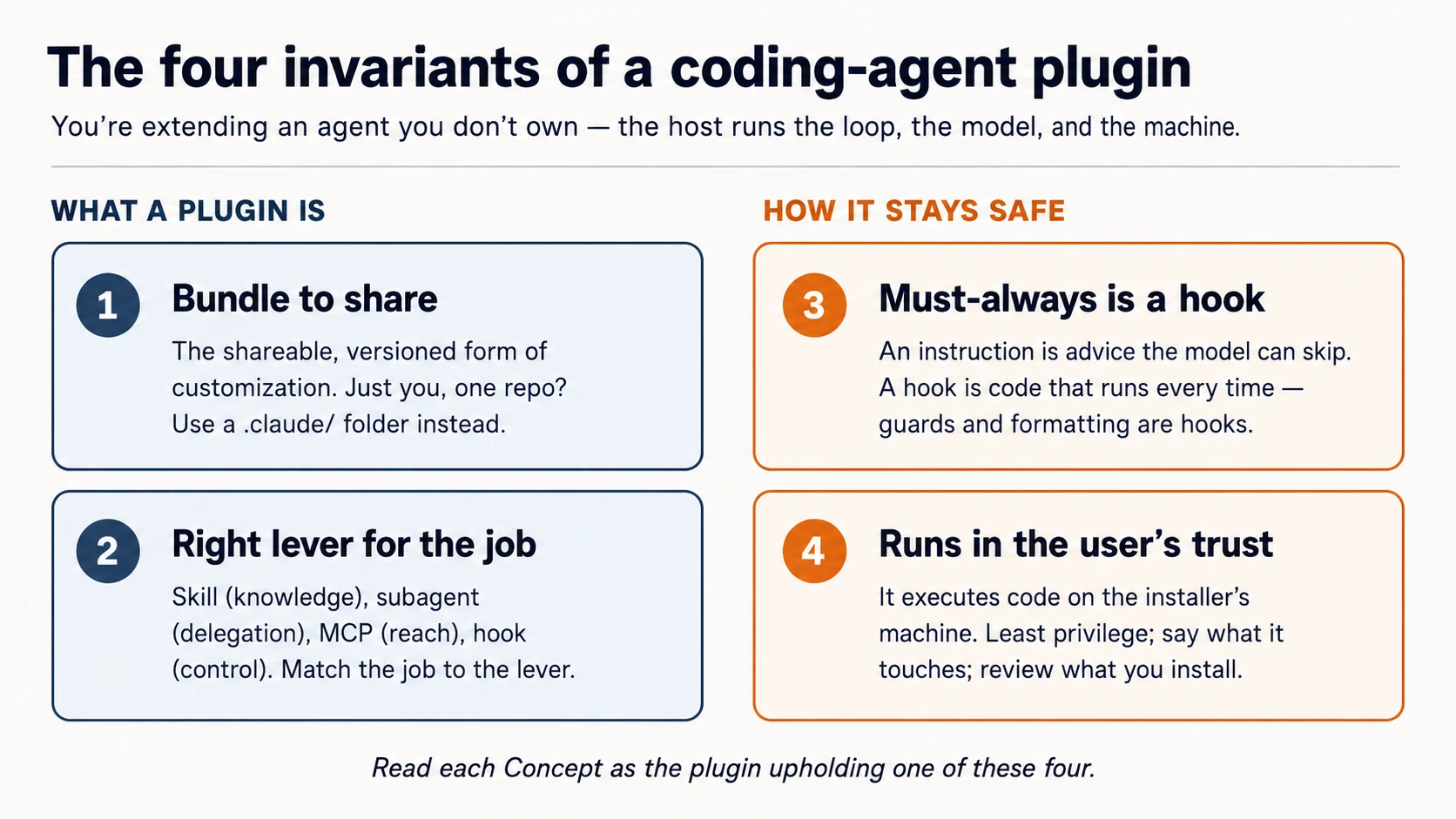
Read each Concept asking: which invariant is this?
Prerequisites. This page assumes three things.
- You drive a coding agent. You've done the Agentic Coding Crash Course — Claude Code or OpenCode, plan mode, a rules file. We build through that workbench.
- You can read typed code — shell and a little JSON and TypeScript — directly or by pasting blocks to your agent for a plain-English explanation.
- Recommended: Connector-Native Apps. That course taught the same habit — know which layer you're on — and built an MCP server. A plugin can bundle one (Concept 6), so the two connect.
You don't need Build AI Agents or AI Identity first. Both come later on the path, and this course points to them.
Where this sits. In Mode 2, right after Connector-Native Apps. The path runs: Connector-Native Apps → this course → AI Identity (sign-in & agent access) → Build AI Agents. Connector-native apps extend the chat app for end users; plugins extend the coding agent for builders. Same move, the other host.
Setup (a few minutes)
You won't hand-run shell commands here. You direct your coding agent in plain English and check what it reports — the same loop you'll use to build the plugin. Setup is your first rep of it.
-
Download the base (
plugins-crash-course-base.zip), unzip it, and open theplugins-crash-coursefolder in Claude Code (or OpenCode). On open, the agent readsAGENTS.md— your brief for what you're building and where the proven reference lives. -
Tell it to set itself up. Paste:
Set up my base environment, then tell me what you did and what passed.
Behind that one line, your agent follows the brief in AGENTS.md: on Claude Code it installs the official plugin-structure skill so it works from the current spec; on OpenCode it reads the plugin docs; then it runs the reference build's checks.
- Now have it teach you the layout. Paste:
Walk me through, in plain English, how a plugin is laid out on my host.
Done when your agent reports the reference build is green (its guard blocks .env and rm -rf, the sample skill and the MCP server check out) and it can explain your host's plugin layout back to you.
What's in the box. Almost nothing of yours yet — and that's the point. You build the plugin; the starter hands you a brief and a proven build to check your work against.
plugins-crash-course/           ← you build YOUR marketplace + plugin here, from blank
  AGENTS.md                     your brief + how each host lays out a plugin
  CLAUDE.md                     points Claude Code at the same brief (@AGENTS.md)
  reference/                    a COMPLETE, PROVEN build — read it, diff against it, don't copy it
    plugins/agent-factory/      the finished plugin: proven guard, a model skill, a model reviewer
    server/                     a runnable MCP server you point your plugin at
    verify.sh                   one command that proves the reference is sound
You'll build each lever yourself — the guard hook, a skill for a job you actually have, a reviewer subagent, the MCP wiring, the marketplace — by directing your agent in plain English. When a piece comes back wrong, you diff it against reference/, the known-good version. You direct; the agent types; you check; you compare.
See one work before you build one (5 minutes)
You just read what a plugin does. Now feel it. Before any concepts, install the finished plugin that ships in your starter and watch it enforce something. Seeing it first is what makes the rest land.
Load the reference plugin into a session:
claude --plugin-dir reference/plugins/agent-factory
Open reference/plugins/agent-factory in OpenCode. It loads the guard from that folder's .opencode/plugins/ and the skill from its skills/.
Then put it to work. Paste:
Try to read a file called
.env, then use your loop-engineering skill to explain an agent loop in four moves.
What you should see:
- The agent is blocked from reading
.env, and it tells you why. (a hook, firing on a tool call the model cannot skip) - The skill answers in its own voice, pulled in without you naming it. (a skill the model chose)
- (Claude Code) Ask it to fix up a scruffy file and it comes back auto-formatted, unasked. (a second hook)
That hard block on .env is the thing a plain "please don't read secrets" instruction can never guarantee, and learning to build it is the heart of this course. You configured nothing per file; the plugin carried the behavior in. Now the concepts have something real to attach to.
Part 1: The shape
Concept 1: You extend the agent — you don't own it
A plugin is not a program you run. It's a set of pieces a host loads and runs for you. The host, Claude Code or OpenCode, owns the agent loop (the decide-act-repeat cycle), brings the model, and runs on the user's machine. Your plugin contributes capabilities and rules the host picks up. Get that picture right and the rest is detail; get it wrong and you'll keep trying to make the plugin "do" things it was never in charge of.
There's a pleasing twist worth naming: you direct a coding agent to build a plugin for coding agents. You tell Claude Code to write the very kind of extension that Claude Code loads. The thing building it and the thing it extends are the same kind of tool. That's not a gimmick; it's the fastest way to build one.
Concept 2: Two hosts, one idea
This course covers two hosts. They package extensions differently, but the idea is identical: a unit the host loads.
- Claude Code takes a declarative bundle — a folder of components (skills, subagents, hooks, MCP servers) described by a small manifest. You mostly write configuration and scripts; Claude Code wires them in.
- OpenCode takes a code module — a JavaScript/TypeScript file that hooks into the agent's events and can add tools. You write functions; OpenCode calls them.
| Claude Code plugin | OpenCode plugin | |
|---|---|---|
| Form | a folder + plugin.json manifest | a .ts/.js module that exports functions |
| You write | skills, subagents, hooks config, .mcp.json | event handlers, custom tools |
| Loaded from | a marketplace, or --plugin-dir | .opencode/plugins/ or an npm package |
They don't extend better or worse; they extend differently, and the difference is worth knowing before you pick a target. Claude Code is Anthropic's tool, tied to Claude models, with a declarative bundle format and a marketplace to distribute through. OpenCode is open-source and model-agnostic: bring your own API key, or run free or local models (Gemini, GPT, local), and its plugins are code, which buys finer control at the cost of writing more yourself. For cost-sensitive learners that model freedom is the headline: the same skill you write can run on a free model in OpenCode. (The two also interoperate, but that's using the tools together, not authoring plugins, so it's out of scope here.)
Most of this course is the shared mental model and the Claude Code form (it's the richer bundle); Part 5 shows the OpenCode form for the same job. Pick the host you actually use; the four invariants don't change.
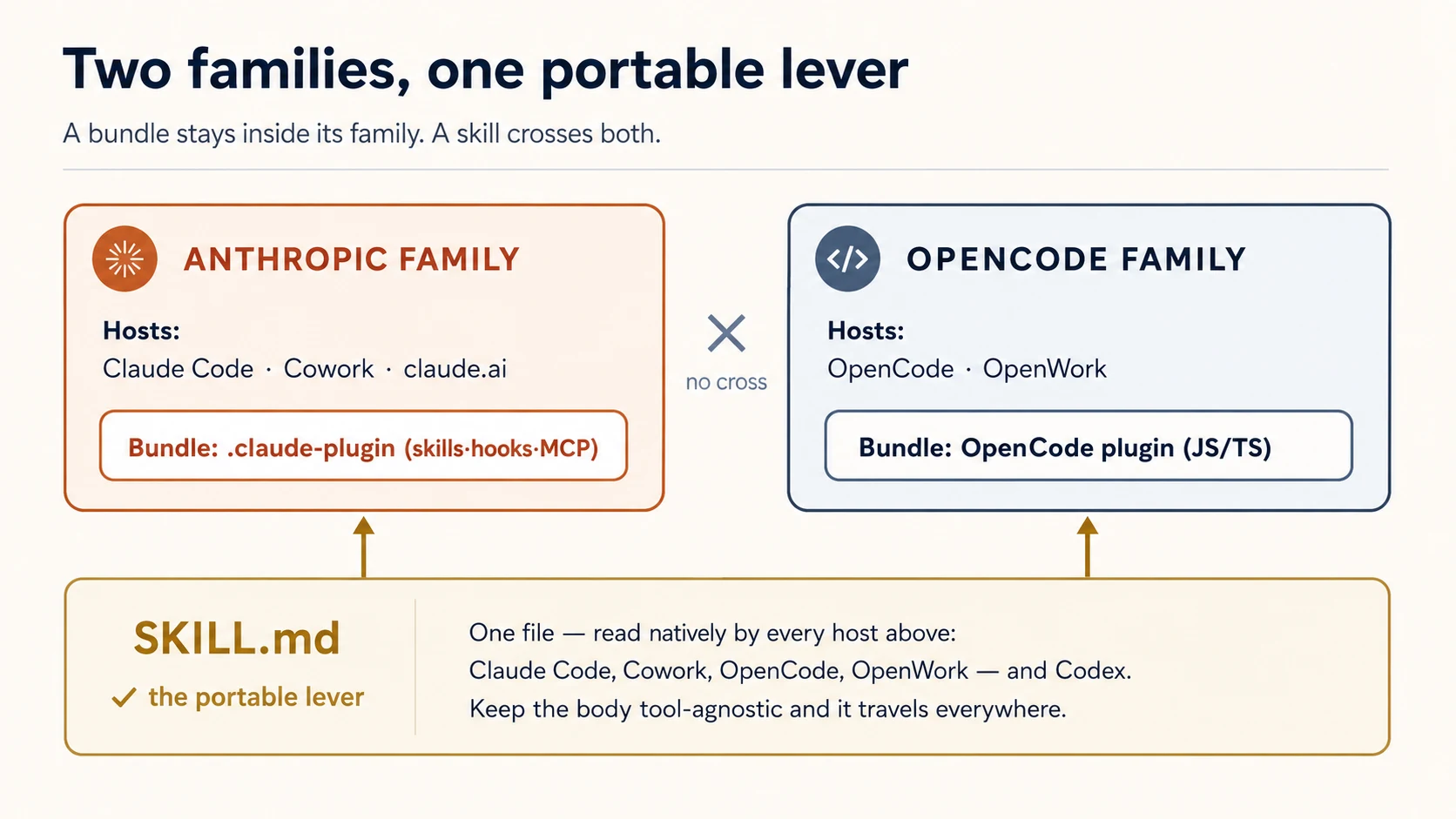
Most pieces port; one does not. A skill is just a SKILL.md file, and all three coding agents in this course read that format natively — Claude Code, OpenCode, and Codex. OpenCode discovers skills on its own from .opencode/skills/, .claude/skills/, and .agents/skills/ (no plugin needed for skills at all). Your instructions carry the same way (the same markdown, named AGENTS.md or CLAUDE.md), and an MCP server is just a URL any host can point at — only the one-line wiring that names it differs. Hooks are the exception: Claude Code hooks are JSON config plus a shell script, OpenCode hooks are a JavaScript module that throws — there's no shared format, so the hook is the one piece you write once per host. Keep that split in mind; it shapes how you lay out a cross-tool plugin (Concept 4).
That split scales up to two families. The Claude Code plugin you build also loads in Claude Cowork and claude.ai — they share Anthropic's plugin format. The OpenCode plugin you build also loads in OpenWork, an OpenCode-powered desktop agent — same OpenCode format. Skills cross both families and reach well past them (OpenClaw, Codex, Cursor, and more all read SKILL.md too); the bundles don't cross (a Claude bundle isn't an OpenCode module). So the host you target decides how far the bundle travels — but a plain skill travels everywhere. We stay on the two coding agents here; the knowledge-work hosts are their own course (see the ceiling).
Concept 3: Bundle to share, not configure to keep
Both hosts let you customize without a plugin — Claude Code reads a .claude/ folder in your project; OpenCode reads .opencode/. That's the right tool when the customization is personal and lives in one repo. A plugin is what you reach for when the customization should travel: to your teammates, across your projects, to the community, with versions and updates.
So the test for "should this be a plugin?" is not what does it do — it's who else needs it. One developer, one project: a .claude/ folder. A team, many projects, or strangers: a plugin (invariant 1).
One consequence to know early: plugin skills and commands are namespaced by the plugin's name — a hello skill in a plugin called repo-tools is invoked as /repo-tools:hello. That prevents two installed plugins from clashing over the same name.
✓ Checkpoint: the shape is in place. You know a plugin is a host-loaded unit, that two hosts package it differently, and that "plugin" means "customization made to share." Now the four levers.
Part 2: The capability levers
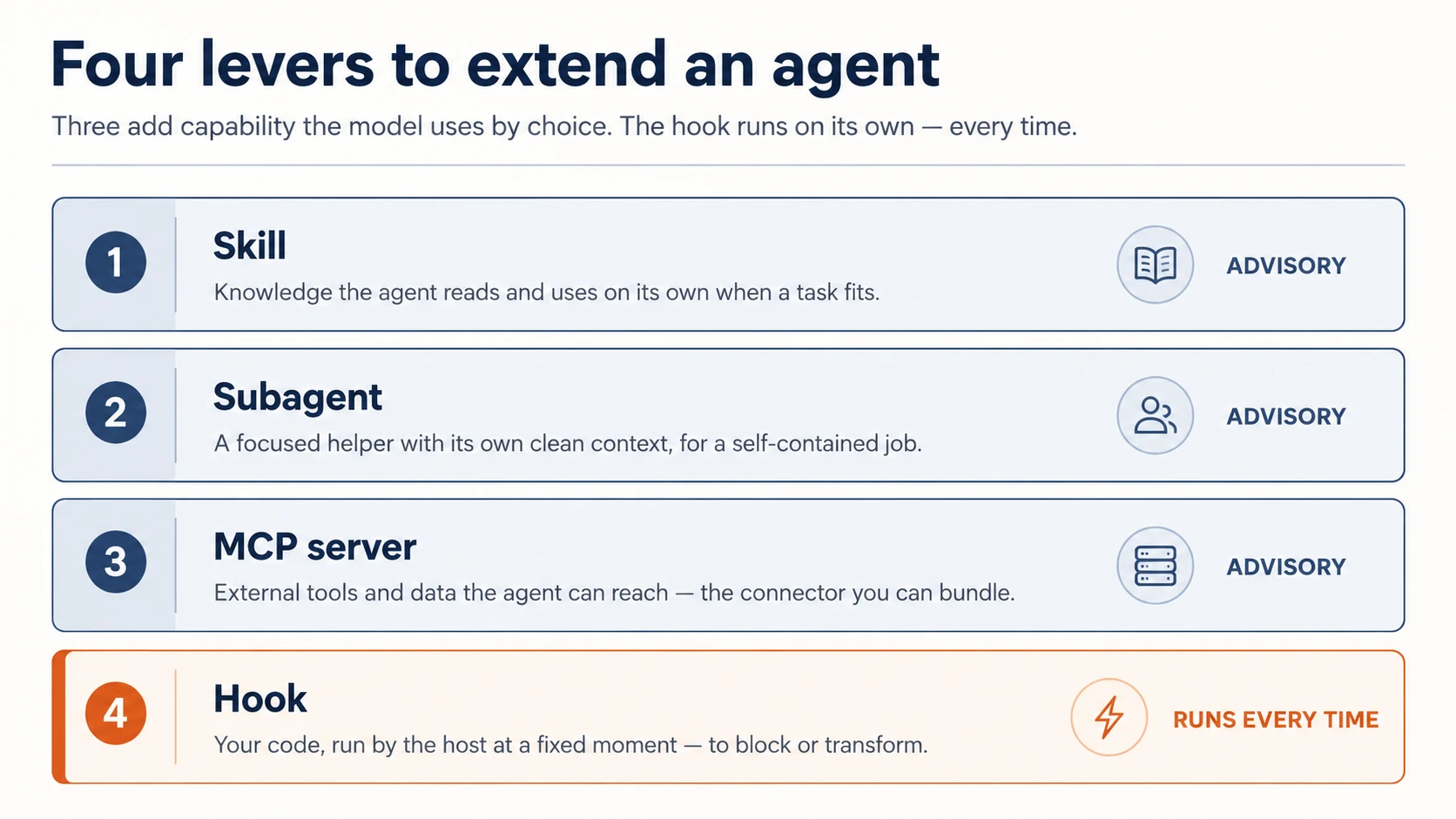
Three of the four levers add to what the agent can do. (The fourth, hooks, is different enough to get its own Part.)
Concept 4: Skills — knowledge the agent uses by choice
A skill is a folder with a SKILL.md file: a description plus instructions. Claude reads the description and, when a task matches, pulls the skill in on its own — it's model-invoked. That is exactly the loop-engineering skill that answered you in the Quick Win: you never named it, but your question matched its description, so the agent reached for it. A skill is how you teach the agent how your team does a thing: your review checklist, your commit-message format, the steps of your release process.
---
description: Review a diff for our team's standards. Use when reviewing code or a PR.
---

When reviewing, check in this order:

1. Does it match the existing patterns in the file?
2. Error handling and edge cases.
3. Tests for the new behavior.
4. Security: secrets, input validation, injection.
The description is the most important line — it's what the model reads to decide whether the skill is relevant, so write it about when to use this, not just what it is. The body only loads when the skill fires, so it can be as long as it needs to be.
Because a skill is advice the model chooses to follow, it's the right lever for guidance — and the wrong lever for anything that must happen without fail (that's a hook, Concept 8).
Write a skill once, and every tool reads it. This is the skill's superpower as a lever: the SKILL.md format is shared across Claude Code, OpenCode, and Codex. To keep a skill portable, keep its body tool-agnostic — lean only on the frontmatter name and description, and don't reach for tool-specific constructs like $ARGUMENTS, allowed-tools, or disable-model-invocation. Then the same file works everywhere: Claude Code loads it from your plugin's skills/; OpenCode finds it natively in .opencode/skills/ or .claude/skills/; Codex in .agents/skills/. The reference build's loop-engineering skill is a complete, portable example — read it before you write your own.
Why frontmatter only?
Each host derives the skill's name and decides when to invoke it from the description. Beyond those two fields, the hosts diverge — what one supports, another ignores or chokes on. So anything you put in the body that's specific to one tool quietly breaks the skill on the others. Plain instructions in the body, two fields in the frontmatter, and the skill is universal.
Concept 5: Subagents — delegate with a fresh context
A subagent is a helper the main agent can hand a job to, with its own clean context window and its own instructions. You define it as a markdown file in the agents/ folder — frontmatter for its name and description, the body for its brief:
---
name: reviewer
description: Reviews a diff against our standards. Use after a change is written.
---

You review code in your own context. Check, in order: matches existing patterns,
error handling, tests, security. Report findings as a short ordered list.
Do not edit files — only review and report.
Delegation matters for two reasons: the subagent isn't distracted by the main conversation, and its work doesn't clog the main context.
Reach for a subagent when a task is self-contained and verifiable — "review this diff," "find everywhere this function is called," "write tests for this file." The main agent stays on the through-line; the subagent goes deep and reports back.
The mistake to avoid: making everything a subagent. Delegation has a cost (a fresh context has to be told what it needs). Use it when the focus and the clean slate are worth it, not for every small step.
Concept 6: MCP servers — the external reach a plugin can ship
The fourth lever gives the agent reach it didn't have: your internal API, a database, a service. It does that by pointing at an MCP server, and you already built one of those, in Connector-Native Apps. You don't build another here. The plugin's whole job is to wire it.
A plugin connects through a .mcp.json file at its root: name the server, give its URL, carry the user's key in the header. When the plugin is enabled, the host connects and the server's tools appear to the agent.
{
  "mcpServers": {
    "my-api": {
      "type": "http",
      "url": "https://api.yourdomain.com/mcp",
      "headers": { "Authorization": "Bearer ${MY_API_KEY}" }
    }
  }
}
The server is remote by design: the logic, the data, and the secrets stay on infrastructure you control, and the plugin ships only that pointer. That is what makes the reach durable, and (Concept 10) gateable and sellable. The plugin is a thin client; the value lives behind the URL. The key in that header is your simplest gate: your server checks it, and a cancelled key stops working. (Anything sturdier is a sign-in, which you already met in the connector course, and the next course, AI Identity, is all about giving agents their own bounded access. You don't need it here.)
So where does the server come from? The one you already built. Open your connector from last course, ask your agent to run it, and copy the URL it prints into the .mcp.json above. Same server, a second front door: the connector served the chat app; this plugin serves the coding agent. (No connector handy? The starter ships a tiny runnable server in reference/server/ to wire against instead.) Either way you point at a server; you never write one inside the plugin.
Why not a local server?
Claude Code also supports local MCP servers (a command the host runs as a process on the user's machine). We skip them on purpose. A local server ships its code with the plugin and runs on someone else's computer, copyable like a skill and a runtime you don't own. For a plugin, a remote server is almost always the right call: build and host it once, then point any number of plugins at it by URL.
One thing carries over either way: that server runs your code and holds your secrets. Shipping a plugin that wires it makes it part of the trust you ship (invariant 4), now extended to your users too.
✓ Checkpoint: capability levers covered. Skills add knowledge, subagents add focused help, MCP servers add reach — and all three are advisory: the model decides when to use them. Next, the lever that isn't optional.
Part 3: The deterministic lever
Concept 7: Hooks — code that runs every time
A hook is a command the host runs automatically at a fixed point in the agent's lifecycle. It is not a suggestion to the model; it's your code, executed by the host, on a schedule the model can't change. That single property is why hooks matter more than they first appear.
The lifecycle points (events) fall into three cadences:
- Once per session:
SessionStart,SessionEnd. - Once per turn:
UserPromptSubmit(before the agent sees a new prompt),Stop(when the agent finishes). - On every tool call:
PreToolUse(before a tool runs — the only point that can block it) andPostToolUse(after).
A command hook works the same way every time: the host sends it a JSON description of the event on standard input; your script reads it, does its job, and signals back with an exit code.
- Exit 0 — allow / done.
- Exit 2 on
PreToolUse— block the tool call. Whatever you print to standard error is handed to the model as the reason, so it can adjust. - Any other non-zero — a non-blocking error: it's logged, but the action still proceeds.
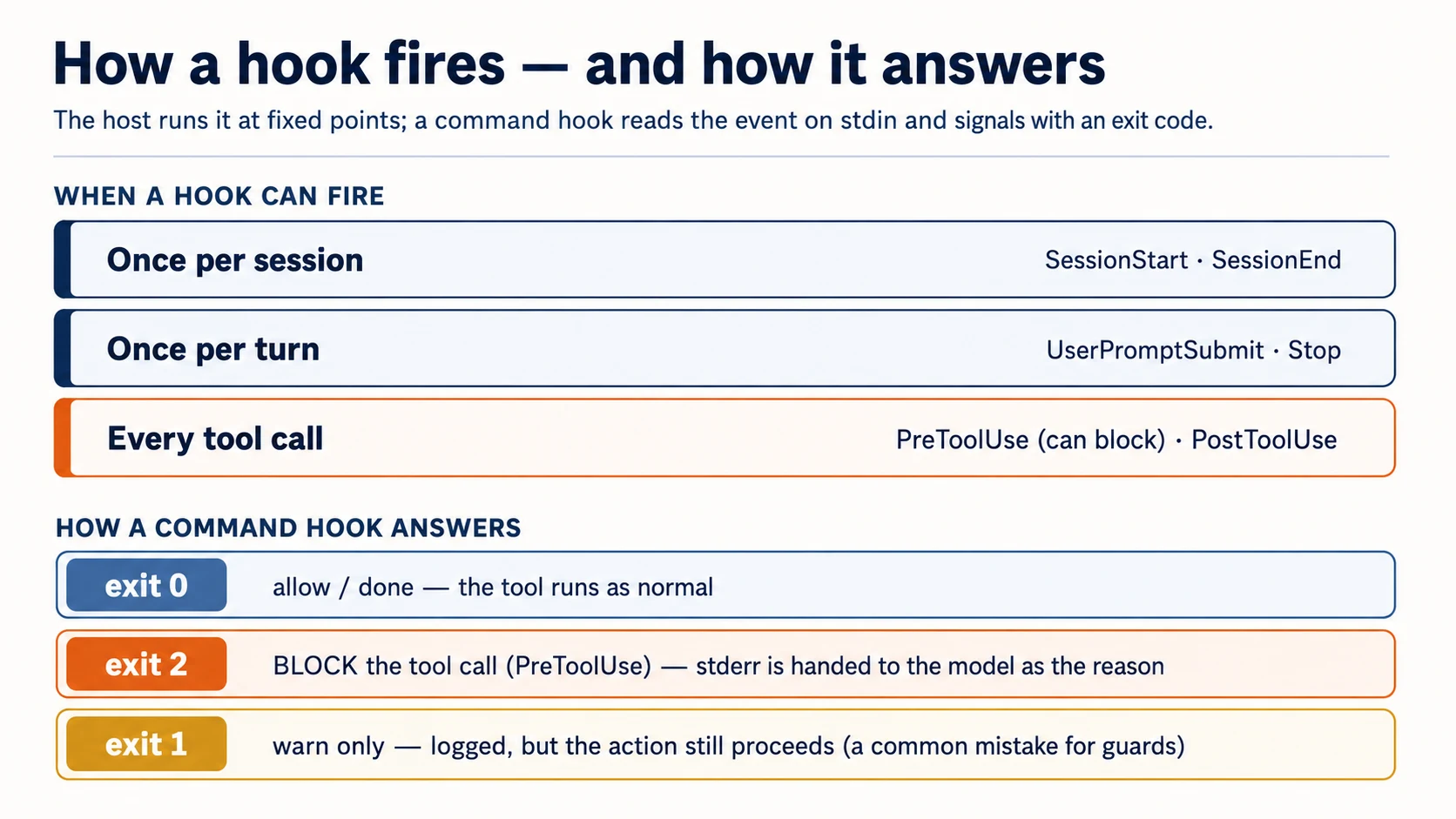
That exit-2 rule is the whole game for guardrails, and it's the most common thing people get wrong (exit 1 doesn't block). In a plugin, hooks live in hooks/hooks.json:
{
  "hooks": {
    "PostToolUse": [
      {
        "matcher": "Write|Edit",
        "hooks": [
          {
            "type": "command",
            "command": "${CLAUDE_PLUGIN_ROOT}/hooks/format.sh"
          }
        ]
      }
    ],
    "PreToolUse": [
      {
        "matcher": "Read|Edit|Write|Bash",
        "hooks": [
          {
            "type": "command",
            "command": "${CLAUDE_PLUGIN_ROOT}/hooks/block-secrets.sh"
          }
        ]
      }
    ]
  }
}
The matcher is a pattern for which tools the hook fires on (Write|Edit = file writes; Bash = shell commands). The plugin-root path variable points at your plugin's folder so the host can find your scripts — confirm its exact name against your Claude Code version (the SDK and plugin paths move).
Concept 8: Must-always is a hook, not an instruction
Here is the most important idea in the course. Anything you write as instructions — a skill, a CLAUDE.md line — is advisory. The model usually follows it, but it can forget, run out of context, or decide the conversation has moved on. For most guidance, that's fine. For anything that must hold every single time, advice isn't enough. A hook is. You already felt this in the Quick Win: the agent didn't choose not to read .env, it was stopped. That stop is a hook; an instruction could only have asked.
Two patterns carry most of the real value:
Format on write — PostToolUse. After every file edit, run your formatter. The model's output no longer has to be perfectly styled, because the formatter normalizes it every time:
#!/usr/bin/env bash
# hooks/format.sh — runs after every Write/Edit
path=$(jq -r '.tool_input.file_path // empty')   # read the edited file's path from the event
[[ -n "$path" ]] && npx --yes prettier --write "$path" 2>/dev/null
exit 0
Block what must never happen — PreToolUse, exit 2. Inspect the tool call; if it crosses a line, block it and tell the model why. This guard covers both secret files and destructive commands, so it reads two fields from the event:
#!/usr/bin/env bash
# hooks/block-secrets.sh — runs before Read/Edit/Write/Bash
input=$(cat)                                                   # read the event ONCE (see note)
path=$(printf '%s' "$input" | jq -r '.tool_input.file_path // empty')
cmd=$(printf '%s' "$input" | jq -r '.tool_input.command // empty')

if [[ "$path" == *.env* || "$path" == */secrets/* ]]; then
  echo "Blocked: $path is a secret file. Do not read or edit it." >&2   # stderr → the model
  exit 2                                                                  # exit 2 → blocked
fi
if [[ "$cmd" == *"rm -rf"* || "$cmd" == *"git push --force"* ]]; then
  echo "Blocked: refusing to run a destructive command ($cmd)." >&2
  exit 2
fi
exit 0
The one-line gotcha: read the event ONCE
The host sends the event on standard input, and standard input is a stream — the first thing that reads it drains it. If you call jq twice directly (path=$(jq …) then cmd=$(jq …)), the first call consumes the whole event and the second gets nothing, so cmd is silently empty and your command guard never fires. Capture it once with input=$(cat) and parse that variable, as above. This is the exact bug the reference build's test catches — and it would have shipped a guard that looks right and quietly fails on rm -rf.
A skill that says "never read .env" is a hope. This hook is a guarantee.
Build it. Tell your agent what must be true, not how to type it — it knows hooks. Paste:
Set up two house rules my agent can't skip: auto-format any file right after it's changed, and hard-block anything that touches my secrets or tries to wipe my project. Then prove both — have it try to read a secret file and run a destructive command and show me they were stopped, then edit a file and show me it came back formatted.
The judgment is yours (a must-always rule is a hook, and it has to actually block); the mechanics — PreToolUse, exit 2, reading the event once — are the agent's job. You build it here to see those mechanics; in the worked example you'll build the real one from blank and diff it against the proven guard in reference/.
Then have it prove the guard the way the host does — by feeding it a fake event and reading the exit code. Paste:
Prove the guard really blocks: show me it stops a secret-file read and a destructive command, but lets a normal file through — and show me the signal it sends back each time.
echo '{"tool_input":{"file_path":"/app/.env"}}' | ./hooks/block-secrets.sh; echo "exit: $?"   # expect: exit 2
echo '{"tool_input":{"command":"rm -rf /"}}'    | ./hooks/block-secrets.sh; echo "exit: $?"   # expect: exit 2
echo '{"tool_input":{"file_path":"/app/main.ts"}}' | ./hooks/block-secrets.sh; echo "exit: $?" # expect: exit 0
Verify. All three exit codes match: .env blocked (2), rm -rf blocked (2), normal file allowed (0). If the secret read goes through, the hook is exiting 1 instead of 2 — the single most common mistake. If rm -rf goes through but .env is caught, it's reading stdin twice (see the gotcha above). Exit 2, read once, or it doesn't block.
✓ Checkpoint: the deterministic lever works. You can make something happen on every edit, and stop something on every tool call. That's the difference between a plugin that suggests and one that enforces.
When a hook misbehaves (the part guides skip)
Hooks run on every matching tool call, so a bad one is felt immediately. Four rules keep them out of your way:
- Keep them fast. A
PreToolUsehook gates every matching call, so slow logic (a network round-trip, a full test suite on each edit) stalls the agent. Aim for well under a second; do heavy work atStop, not per call. - Fail safe, on purpose. Decide what happens when your hook itself errors. A formatter that can't run should exit 0 (let the edit stand) — that's why
format.shends inexit 0and swallows prettier's errors. A guard is the opposite: if it can't decide, prefer to block. Never let a crashing guard silently fall through to exit 0. - Say why, every time you block. A bare exit 2 with no message sends the model nothing to act on, and it will retry the same thing. The
stderrline is the fix instruction — make it specific ("edit the source, not the generated file"). - Debug it the way the host calls it. Pipe a fake event in and read the exit code (the raw-command test above). If a hook seems to fire too often, check your
matcher—Write|Editis narrow; an empty or broad matcher fires on everything.
Part 4: Ship it
Concept 9: The manifest and the structure
A Claude Code plugin is a folder described by a manifest, .claude-plugin/plugin.json. (Claude Code can auto-discover the standard component folders even without it, but ship the manifest — it carries your name, version, and description.)
{
  "name": "agent-factory",
  "description": "A portable skill, guard hooks, and a reviewer subagent.",
  "version": "1.0.0",
  "author": { "name": "Your Name" }
}
Everything else sits at the plugin root (not inside .claude-plugin/ — that's the one structural mistake people make):
agent-factory/
├── .claude-plugin/
│   └── plugin.json          # the manifest (this, and only this, goes here)
├── skills/                  # skills as <name>/SKILL.md
├── agents/                  # subagent definitions
├── hooks/
│   └── hooks.json           # event → command wiring
└── .mcp.json                # optional: MCP servers to load
version matters for updates: when you bump it, installers get the new version; if you omit it and distribute via git, every commit counts as a new version. Run claude plugin validate before you share — the same check the marketplace review runs.
The tree above is the plugin itself, wherever it sits. You build yours at your marketplace's plugins/agent-factory/; the proven version sits at reference/plugins/agent-factory/. The marketplace that wraps it is the next Concept.
Concept 10: Marketplaces — how a teammate gets it
A marketplace is just a git repository with a catalog file (marketplace.json) listing one or more plugins. That's the whole distribution story: you don't publish a package to a registry, you point people at a repo.
{
  "name": "agent-factory",
  "owner": { "name": "Your Name" },
  "plugins": [
    {
      "name": "agent-factory",
      "source": "./plugins/agent-factory",
      "description": "A portable skill, guard hooks, and a reviewer."
    }
  ]
}
A teammate then runs two commands inside Claude Code:
/plugin marketplace add your-org/agent-factory   # the git repo with marketplace.json
/plugin install agent-factory@agent-factory       # plugin@marketplace
While you're developing, skip the marketplace. Two faster loops on your own machine: load the plugin straight from disk with claude --plugin-dir ./plugins/agent-factory (it also accepts a .zip), or scaffold one with claude plugin init <name>, which drops it in ~/.claude/skills/<name>/ and auto-loads next session as <name>@skills-dir, with no marketplace and no install. The marketplace is for sharing; you don't need it to build and test.
Don't confuse the two manifests. A plugin has .claude-plugin/plugin.json; a marketplace has .claude-plugin/marketplace.json. The documented layout keeps them apart: the marketplace.json sits at the repo root, and each plugin lives in its own subfolder (./plugins/<name>/) with its own plugin.json. The starter uses exactly this — plugins/agent-factory/. (One repo can be both a marketplace and host one plugin, but keeping the plugin in a ./plugins/<name> subfolder is the pattern every official example uses — prefer it.)
Pinning and sources — how updates actually work. A plugin's source can be a relative path (above) or an object pointing at another repository entirely; a marketplace can list plugins from many repos, each pinned independently:
{
  "name": "code-formatter",
  "source": { "source": "github", "repo": "acme/formatter", "ref": "v2.1.0" }
}
ref pins a branch or tag, sha pins an exact commit, and when both are set the sha wins. That — not the catalog file itself — is how a teammate gets a specific version and how you ship updates. (A url source covers GitLab and other git hosts; a local path is handy for testing.)
Two footguns worth knowing before you publish:
- Relative paths only resolve when the marketplace is added via Git (GitHub/GitLab/git URL). If someone adds it by a direct URL to the
marketplace.jsonfile,./plugins/...won't resolve — use agithuborurlsource then. - Installed plugins are copied to a cache, so a plugin can't reach files outside its own folder with
../. Keep everything the plugin needs inside it; symlinks are followed during the copy as long as they point within the plugin — which is why the reference build's two symlinks target the plugin's own files.
Anthropic runs its own official catalogs — claude-plugins-official (curated) and the community claude-community (you add its repo anthropics/claude-plugins-community and install from it as @claude-community) — so pick a distinct name for your own marketplace rather than shadowing those. (Naming and submission rules are young; confirm the current reserved-name policy against the plugins reference before you publish.)
Distributing to a team — or to non-coders. On Team and Enterprise plans, owners publish a marketplace from Organization settings → Plugins; a Knowledge Work marketplace is added by default, and the plugins you distribute appear in chat and in Claude Cowork — the same bundle reaching knowledge workers, not just builders (see the ceiling, and the Cowork and OpenWork course).
Run claude plugin validate before you share. The schema above is current as of mid-2026; re-verify field names against the Claude Code plugins reference before publishing, since this surface is young and moving.
Can you charge for it? Yes, but not for the files. A marketplace is a catalog, not a store: no payment layer, no licence check, no subscription primitive in the format. Billing and access enforcement are yours to build, entirely outside the plugin system. And there's a sharp edge: a skill is a plaintext SKILL.md with no DRM. The instant a customer installs it they hold your source, so gating static files behind a subscription invites one churn event per customer (pay once, clone, cancel), and for a curriculum where the value is the readable text, you give the IP away on first download.
So the only model that supports a real subscription is hosted access: keep the valuable logic on a server you control and sell entry to the server, not the files. The installed plugin is a thin, free client whose .mcp.json points at your hosted MCP server with the user's key in the header (the wiring from Concept 6); the key is the subscription gate, and revoking it cuts access at once. The free SKILL.md is the funnel; the paid moat is what a clone can't copy: the hosted server, the retrieval quality, the live data behind the URL.
This is the plugins-only version of a pattern you already built. A connector-native app doesn't have the copyable-files problem, because it is a pure hosted server with nothing on the user's disk. So the clean shape is both together: the free plugin is the client and the funnel, and the subscription rides on the connector-native server behind it. Same server, a second front door. It cuts both ways, though: your users are now trusting your server with their requests, so the trust contract runs in both directions (Concept 11).
Two cautions before you bill for it
- Don't break Anthropic's usage policies. If students consume Claude through your hosted service, how that usage is licensed and billed has to be legitimate — the same reasoning that makes routing a personal Pro/Max subscription into third-party tools a problem. If this turns into real revenue, read Anthropic's commercial terms directly (not a blog) and confirm the billing path for the Claude usage your server triggers.
- Hosting means you own the security surface. A paid, gated MCP server is an attack target, and paying customers expect stability — so tool permissions and confirmations for any write/delete/network action stop being optional. That's invariant 4, now with money riding on it.
Human-only step. Creating the git repo and submitting to a marketplace are yours; your coding agent writes the files but can't open accounts or push in your name. So is the /plugin install your teammate runs — that's their trust decision (next Concept).
Concept 11: A plugin runs in the user's trust
Step back and see what a plugin can do on the machine that installs it: its hooks run shell commands, its bin/ is added to the path, its MCP servers run and reach out. Installing a plugin is running someone else's code. That cuts both ways, and both are your job:
-
As an author: least privilege. Only the hooks you need, matched as narrowly as possible. Don't reach for the network or the filesystem beyond the job. And make the trust legible — ship a README that states, in plain words, what the plugin does on the installer's machine:
README.md — the trust contract
  What this plugin installs   (skills, subagents, hooks, MCP servers)
  What hooks run, and when    (e.g. PostToolUse formatter on Write/Edit)
  What files they inspect     (e.g. reads tool_input.file_path; never opens .env)
  What commands they execute  (e.g. prettier; no network calls)
  What network access they use (ideally: none)
An installer who can read that in ten seconds can trust you in ten seconds.
-
As an installer: review before you install, the way you'd review a dependency. Prefer marketplaces you trust; read what the hooks do; remember a
PreToolUsehook sees every tool call. Before trusting one, runclaude plugin details <plugin>— it prints the component inventory (which skills, subagents, hooks, and MCP servers it ships) and the projected token cost, without enabling anything. The hooks are the line to read first.
This is invariant 4, and it's not paperwork — a formatter hook that quietly uploaded your files would be invisible until you read it. Ship plugins you'd be comfortable installing.
✓ Checkpoint: you can ship. Manifest, structure, a marketplace a teammate installs from, and a clear-eyed view of the trust you're shipping. One more host, then the full build.
Part 5: OpenCode plugins
Concept 12: OpenCode plugins — hooks as code
OpenCode takes the same ideas in a different form: a plugin is a JavaScript/TypeScript module that exports a function. The host calls your function with a context object and you return hooks — handlers for the agent's events. There's no separate manifest; you drop the file in .opencode/plugins/ (or install an npm package).
Verify this section against your version. OpenCode's plugin API is younger and more code-level than Claude Code's declarative one, so the exact event names and signatures below (tool.execute.before, session.idle, the tool helper) move faster than the rest of this course. They're current as of mid-2026, but check them against your installed @opencode-ai/plugin before you teach or ship from this section.
A key difference from Claude Code: in OpenCode, a plugin is for hooks and tools — not for skills. OpenCode discovers skills natively from directories (.opencode/skills/, .claude/skills/, .agents/skills/), so your portable SKILL.md files need no plugin and no shim here at all. The plugin exists for the part that can't port — the hooks.
// .opencode/plugins/block-secrets.ts
import type { Plugin } from "@opencode-ai/plugin";

export const BlockSecrets: Plugin = async ({
  project,
  client,
  $,
  directory,
}) => {
  return {
    // runs before any tool — throw to block it (the OpenCode equivalent of exit 2)
    "tool.execute.before": async (input, output) => {
      if (input.tool === "read" && output.args.filePath?.includes(".env")) {
        throw new Error("Blocked: .env files are off-limits.");
      }
    },
  };
};
The mental model maps straight across from Claude Code: tool.execute.before is your PreToolUse, tool.execute.after is your PostToolUse, and throwing an error blocks the call the way exit 2 does. OpenCode also fires session and file events (session.idle, file.edited, and more), and a plugin can add a custom tool with the tool helper — the same "add reach" idea as an MCP server, written inline.
The context object hands you what you need: project and directory (where you are), $ (run shell commands), and client (talk to the agent, log). The form differs; the four invariants don't. A must-always rule is still a hook here — it's just a function that throws instead of a script that exits 2.
Part 6: A complete worked example — build the agent-factory plugin
You already ran the finished agent-factory in the Quick Win. Now you build it yourself, from blank, lever by lever, directing your agent in plain English. When a piece comes back wrong, you diff it against reference/, the proven build you just installed. You're not filling in stubs; you're making the calls (which lever, hope or guarantee, does it travel) and proving each one. The rhythm is the one you know: plan → review → execute → verify.
When you're done, your agent-factory shows all four levers: a portable skill for a job you actually have, a reviewer subagent, a guard hook plus a format-on-write hook, an MCP server wired by URL, and a marketplace entry a teammate installs from. The must-always guard comes first, because it's the part that has to be right.
1. Scaffold the empty plugin. The prompt points your agent at the authoritative layout for your host. Paste the one for yours:
Using the Plugin Structure skill you installed in setup, scaffold an empty plugin called agent-factory, set up the right way for Claude Code. Show me the layout.
Read the OpenCode plugin docs at https://opencode.ai/docs/plugins, then scaffold an empty OpenCode plugin called agent-factory the way they describe. Show me the layout.
Done when: the shell matches your host's layout (your agent can diff against the reference build if unsure). On Claude Code, claude plugin validate passes on the empty plugin.
2. Build the guard hook first — the must-always lever — and prove it blocks. This is the part that has to be right, so you build it, prove it, then check it against the proven one. Paste:
Add two house rules my agent can't skip: auto-format any file right after it's changed, and hard-block anything that reads my secrets or runs a destructive command. Prove both live: have it try a secret read and a destructive command and show me they're stopped, then edit a file and show me it came back formatted.
Then check your work against the proven build instead of trusting it:
Compare my guard against the proven one and tell me if I missed anything that would keep it from actually blocking.
Done when: the guard blocks .env and a destructive command live, and the comparison against the reference turns up nothing important. (The guard takes a different form on each host — a shell script in Claude Code, a function that throws in OpenCode — and the reference build has both. Your agent builds the one your host uses.)
3. Build a skill for a job you actually have. Not a toy — pick a real repetitive thing you do (your review checklist, your commit-message format, your release steps). Paste:
Look at the model skill in the reference build first. Then write me a skill for [a real, repetitive job you do]: a clear description of when to use it and the steps to follow. Keep it portable so it works in any agent, not just this one. Show it firing on a real example.
Done when: the skill fires on its own when the task matches, and its body is portable (your agent kept it to plain instructions, no tool-specific constructs).
4. Add a reviewer subagent. Paste:
Add a subagent that reviews a change in its own context and only reports, never edits. Run it on a real diff, show me what it finds, then compare it to the model reviewer.
Done when: the subagent reviews in a clean context and reports an ordered list; the comparison against the reference shows nothing important missing.
5. Wire the MCP server, point your plugin at a running one. You don't write the server. You point at one you already have: the connector you built last course, or the runnable sample in the starter. Paste:
Start the sample MCP server in the starter and wire my plugin to it, then show me the agent can call one of its tools.
(Prefer your own? Tell your agent to run your connector from last course and use that URL instead.) The wiring your agent writes is the one place the two hosts genuinely differ; here's the shape on each:
Ship a .mcp.json at the plugin root (it travels with the plugin):
{
  "mcpServers": {
    "agent-factory": {
      "type": "http",
      "url": "http://localhost:3000/mcp",
      "headers": { "Authorization": "Bearer ${AGENT_FACTORY_KEY}" }
    }
  }
}
Confirm with /mcp — the server shows connected and its tool callable.
Add a remote block to opencode.json:
{
  "$schema": "https://opencode.ai/config.json",
  "mcp": {
    "agent-factory": {
      "type": "remote",
      "url": "http://localhost:3000/mcp",
      "enabled": true
    }
  }
}
Done when: your host shows the server connected and its tool callable.
6. Make it installable, and prove it travels. Paste:
Make this installable from a marketplace. Then prove it travels: install it into a different project and show the guard blocks a secret read there too, with no extra setup.
Done when: a second project is protected by the same hook through one install. That's the whole point of a plugin: the rule travels.
Notice the rhythm: plan → review → execute → verify, the must-always guard built and proven first because it's the part that has to be right, each piece checked against the proven reference. The judgment was yours at every step; the agent did the typing.
Part 7: The ceiling, and where it grows
Concept 13: The ceiling — and the bridges out
Feel the edge of what a plugin is. A plugin makes a builder's agent better — sharper, safer, more yours. But three things still aren't yours, and each names the next course.
The loop isn't yours. Your hooks fire around the host's loop; they don't run a loop of their own. A plugin can't wake up, pursue a goal across many steps on its own, or do a job while you sleep. When you want a worker that owns its loop, you write the agent — that's Build AI Agents, later on the path.
The identity isn't yours. Your plugin acts as whoever is running the host. It has no credential of its own and no way to act on someone's behalf with bounded, revocable authority. When an agent needs its own identity — and a person needs to delegate authority to it safely — that's AI Identity (built on Better Auth): own the sign-in, then give the agent scoped, time-boxed, human-approved access.
The reach is borrowed. A plugin can wire a remote MCP server, but the server itself — the durable, user-facing thing a stranger pastes into the chat app, with its own state and sign-in — is the connector-native app you built last course. Plugins and connectors point at the same server from two hosts; together they cover both.
But notice which way the limits run, and where it grows. What you built reaches past the coding agent. Within Anthropic's family, the same .claude-plugin bundle also loads in Claude Cowork and claude.ai chat; an OpenCode plugin also loads in OpenWork. And the portable piece, the skill, travels further still, to a personal agent like OpenClaw and beyond. So the skill you wrote for a builder's agent can move, unchanged, to a knowledge-worker's agent: the lawyer, the analyst, the ops lead. (The shell hook is the exception. It needs a real shell, so a guard stays on the coding side while the skill is what crosses to the chat hosts.) Where those knowledge-work hosts are the whole story rather than a bonus, that's its own course: Cowork and OpenWork.
You didn't waste a step. You learned to extend an agent deterministically and ship it to a team — the exact skills you'll reuse when the agent, and its identity, become yours.
The same skeleton, other plugins
agent-factory is one shape. The levers don't change; only the job does:
- A house-style plugin — a skill carrying your writing or code conventions, a
PostToolUseformatter, a reviewer subagent. (For a team that wants one consistent voice.) - A safety plugin —
PreToolUseguards for production targets, secrets, and destructive commands; nothing else. (Least privilege, invariant 4.) - A service plugin — a remote MCP server (
.mcp.json) for your hosted API, plus a skill that teaches the agent how to use it. - A workflow plugin — a
Stophook that runs your test suite when the agent finishes, and a skill for your release steps.
Pick the one closest to a pain your team actually has — the build is the same as the worked example's.
Capstone
Ship a plugin of your own. Pick one real friction in how your team works with a coding agent. Build a plugin that fixes it with the right levers — at least one hook that enforces a must-always rule (exit 2 or a thrown error), and at least one capability lever (skill, subagent, or MCP server). Publish it to a marketplace and have someone else install it. Confirm the hook fires for them, in their project, with no extra setup.
Discuss with an AI. Question your scores.
Come back when you have your BEST evaluation.