General Agents on the Web: A Crash Course
12 Concepts · Your first general agent, in the same browser tab where your Foundations ran
For six courses, you worked in a chat tab. You asked. It answered. You asked again. Every turn started with you. A plain conversation has one limit. When you stop asking, the conversation stops doing.
A general agent is a worker you hand an assignment to instead of a message. It plans, uses tools, works through steps, and comes back with a finished thing or a decision that needs you. It may run now, later, on a schedule, or after you close the tab.
Browser agents did not appear from nowhere in 2026. Scheduled tasks, deep research, and browser-control agents already existed. What changed in mid-2026 was packaging. The major assistants pulled sessions, files, connectors, scheduling, approvals, and file creation into one work surface beside chat.
August 2026 changed that surface again. Claude Cowork gained memory shared across surfaces, its own browser, a closer link to Claude in Chrome, richer plugins, and a hybrid design in which a cloud session can reach selected tools on your computer through Claude Desktop. The old picture, "web is remote, desktop is local," became too simple.
So this course asks two questions instead of one:
Where does the agent loop run?
Where does each tool execute?
Those two questions beat memorizing a product button. A Cowork task can run its agent loop in Anthropic's cloud while a browser action runs through a connected desktop. Another task may be cloud-only. A third may run entirely on your machine.
The course is browser-first. You can finish the core route with nothing installed. You will also learn the optional bridges, because they decide what a web Cowork session can reach.
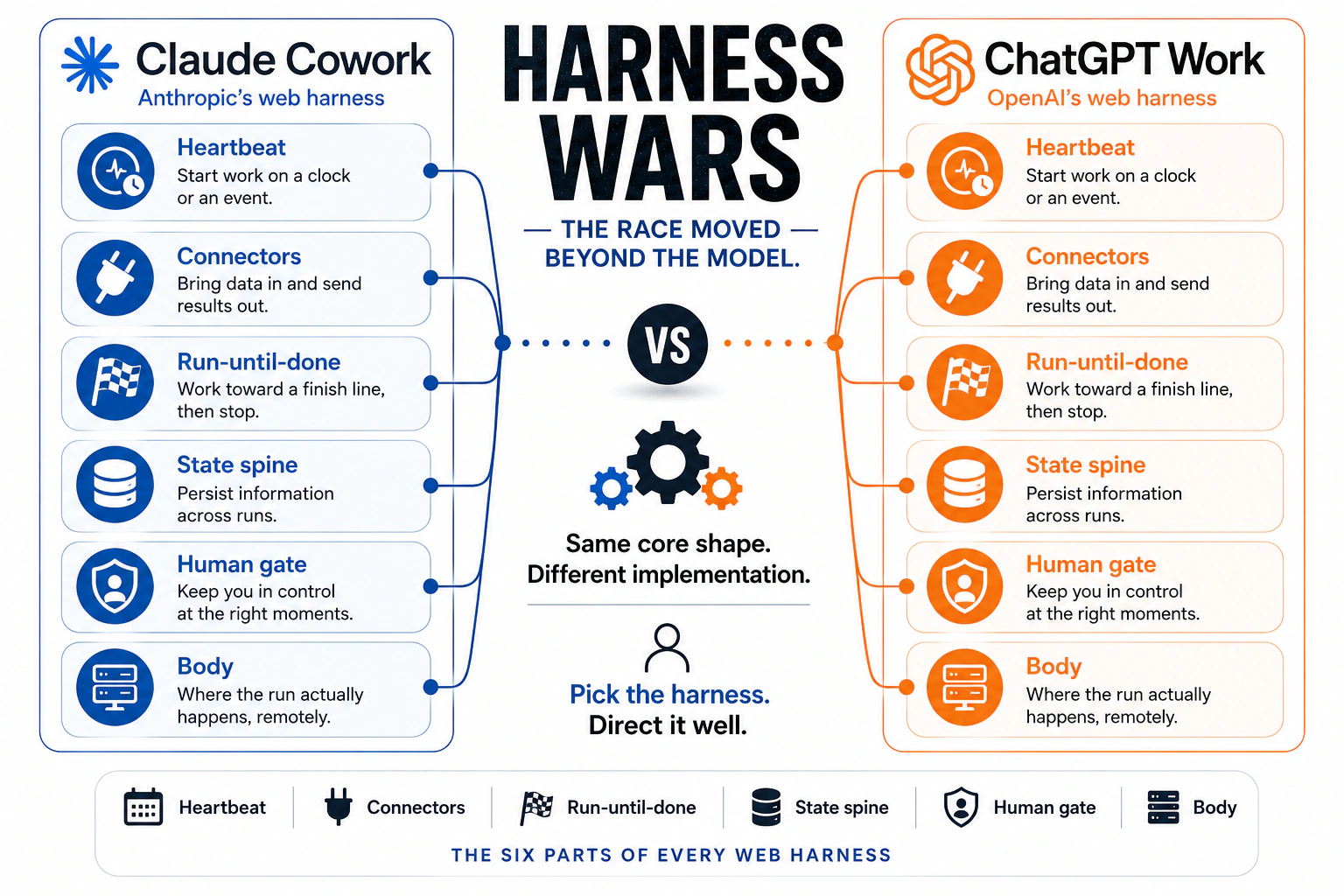
Two companies make the comparison useful. Claude Cowork and ChatGPT Work ship different products, and they keep building the same anatomy. It has a heartbeat, ways to reach systems, a run-until-done loop, persistent state, a human gate, and a body where work executes. This book calls that wrapper the harness. The model is the trained AI that writes the answer. The harness is everything built around it.
That gives you the durable skill of this course. Learn the shape, then inspect the implementation. Product names, plan tiers, and approval labels will move. The shape moves much more slowly.
Who this course is for. Knowledge workers first. People whose day is documents, spreadsheets, email, dashboards, portals, and team chat. It is also the gentlest entry point for engineers before the desktop and terminal courses.
What you will be able to do by the end. Tell chat apart from delegated work. Explain cloud and local execution without a false split. Choose among connector, browser, and local reach. Place every file in the right custody tier. Match the approval mode to the stakes. Brief work you will not watch. Schedule only proven workflows.
Do this first: the Foundations, and above all AI Prompting in 2026 and Skills & Connectors. This course expects three things. You can brief a model clearly. You know what context is. You know what a Skill and a Connector are. If any of that is new, do those two courses first.
How long this takes. The core route is Parts 1 to 3. Expect about 2 to 2½ hours of careful beginner reading, especially if English is not your first language. Part 4 adds 30 to 45 minutes. The seven appendices are reference material. The projects add hands-on time, including one week for the scheduling exercise.
New here? A 2-minute recap of what you should already know
- Briefing means describing a task in full. The outcome, the limits, the reader, and the reason. A vague prompt gets a vague result. (Foundations Course 2.)
- Context is everything the model sees in one turn. More is not better. The right context, chosen on purpose, is better. (Foundations Course 2.)
- A Skill is a task you teach once. It lives in a
SKILL.mdfile. The AI loads it only when your request matches. (Foundations Course 5.) - A Connector gives the AI safe, limited access to a real service like Drive, Gmail, or Slack. It works over MCP, the Model Context Protocol, which is the open standard for plugging AI tools into services. You grant the permissions. The AI works inside them. (Foundations Course 5.)
- A chatbot vs an agent. A chatbot answers. An agent plans, uses tools, and finishes steps. This course is where you direct one for the first time.
If any of these are new, read the two Foundations courses first. This course uses all of them on real work.
📚 Teaching Aid
View Full Presentation, General Agents on the Web
For instructors and self-learners. Teach one transferable idea. Every serious agent surface can be read as the same small set of parts, and Concept 3 names and explains them. Teach the course in three passes. Concepts 1 to 3 are the shift from chat to delegated work. Concepts 4 to 7 are the surface. Concepts 8 and 9 are working unwatched. Concepts 10 to 12 are routing and limits. The six projects are the assessment. Two habits to leave students with: finished work exits the platform, and high-consequence work earns tighter gates.
Key words in plain English
Read this list once now, then come back whenever the product words start moving faster than the idea under them. You may also skip it and read it later.Quick glossary
Term Plain-English meaning Chat box A conversation that waits for your next turn. A long answer does not make it an unattended workflow. Agent surface A place where you assign an outcome and the system can plan, use tools, and keep working across steps. Agent loop The part that decides what to do next until the assignment is finished, blocked, or stopped. Cloud session A session whose agent loop runs on the vendor's servers. Your tab or phone is a window onto it. Local session A session whose agent loop runs on your own machine. If that machine sleeps or disconnects, the run cannot continue normally. Desktop bridge A controlled path that lets a cloud session call selected tools on your computer, such as connected folders or a browser, while the desktop component is online. Tool execution location Where an action actually happens. A cloud agent loop can call a cloud connector, a browser on your computer, or a local file tool. Do not assume the tool sits where the loop sits. Connector Permission-scoped, usually structured access to a service such as Drive, Gmail, or Slack. Prefer it over screen-driving. Browser agent An agent using a browser to read pages and, where permitted, click, type, navigate, and fill forms. It raises capability and injection risk together. Task filesystem Temporary working space used while a remote task runs. Treat it as scratch, never permanent storage. Platform storage Files and session state saved to your vendor account. They survive the task, but stay in the vendor's custody and format. The exit (Tier 3) The deliverable enters a system you control. Your Drive, records system, local folder, repository, or inbox. Session history What happened in one task or conversation. It is not the same thing as semantic memory. Project A workspace that groups related tasks, files, links, instructions, and, where supported, project-specific memory. Semantic memory Facts or preferences the assistant carries across sessions. You should be able to inspect and control it. It is not the same as an old session. Standing instructions Rules or preferences that apply again and again, such as global, organization, project, or folder instructions. State spine The whole persistence stack that lets today's run build on yesterday. Sessions, projects, memory, instructions, files, or state you own. Human gate A control that keeps a person in the loop at the right risk boundary. It can be a per-action approval, a screened auto mode, a policy rule, or an escalation. Approval mode How often the agent pauses for permission. Products use different labels. Cowork currently offers Manual, Auto, and Skip. Scheduled task Work that starts on a clock or another supported trigger. A true cloud schedule does not need your laptop awake, unless a bridged local tool is required. Custody Who holds your data and deliverables, on whose machines, under whose retention and access rules. Metered usage The plan or compute budget that agent runs consume. Long unattended work costs more than a short chat. In Cowork, Auto uses more than Manual or Skip, because each action gets an extra check. Harness Everything built around the AI model. What starts a run, what it can reach, how it keeps going, what persists, where it stops, and where it runs. Heartbeat What starts a run. A clock, a supported event, or you. Reach What a run can read and act on. Run-until-done loop How an agent keeps moving toward an outcome until it finishes, is blocked, or is stopped. Body Where the work actually executes. Prompt injection Hidden instructions in a page, email, or document, written to redirect the agent. Blast radius The worst damage a wrong action can do. Workflow discovery Letting the agent interview you to find a procedure you cannot yet describe. Model The trained AI that writes the answer. The harness is everything built around it. MCP The Model Context Protocol. The open standard connectors use to plug an AI tool into a service. Sub-agents Helper workers the main agent hands a smaller job to. Hooks Small rules that run automatically at set points in a task, such as before a tool is used. Sandbox A sealed work area on the vendor's servers where a run executes without touching anything else. Safety classifiers Automatic checkers that read a proposed action and block or escalate the unsafe ones. CLAUDE.mdA plain markdown file of standing instructions that some Claude tools read at the start of a task. Codex OpenAI's separate coding agent, its sibling to Claude Code. A desktop experience, not a web one. HIPAA The US health privacy law. PHI Protected health information, such as a patient name attached to a diagnosis. BAA A business associate agreement. The contract a vendor signs before it may handle PHI for you. CI Continuous integration. The automatic system that tests code changes and merges them. Dogfooding Using your own product on your own real work.
Preview: the twelve ideas in one line each
- Chat waits for you. An agent surface keeps working after you stop typing.
- A cloud session runs on the vendor's servers. Your tab is only a window onto it.
- Every serious agent product is built from the same six parts.
- Persistent context is a stack of layers, not one thing called memory.
- Every file sits in one of three tiers, and only the third tier is yours.
- A connector is the cleanest way for an agent to reach a real system.
- The human gate is the rule for when the agent must stop and ask you.
- Brief the work, read the plan, approve it, then review the result.
- A schedule starts the work on a clock, and it runs without your device only if every tool does too.
- Route each task by what the work touches and who may hold the data.
- The open path gives you custody, and asks you to build the spine yourself.
- The surface makes weak work faster, not better.
Where this came from
The dates matter because the mechanical layer of this course is moving unusually fast.
Before 2026. Web agents already existed in pieces. ChatGPT had scheduled tasks, deep research, and an agent mode with its own computer. Claude had cloud coding sessions. Delegated work that survives your next chat turn was already real.
July 2026. The pieces became easier to reach from the everyday assistant. Claude expanded Cowork onto web and mobile cloud sessions, while OpenAI shipped ChatGPT Work as a work mode beside chat. Sessions, files, connectors, schedules, and approvals began to look like one work surface.
August 12. Anthropic made the Claude in Chrome side panel a Cowork session, tightening the connection between browser work and the wider Cowork task history.
August 25. Cowork gained the same semantic memory used by Claude chat for cloud sessions. Memory became inspectable topic by topic, and editable. So "saved sessions" and "memory" are now different things.
August 26. Cowork gained a separate built-in browser in Claude Desktop. It can navigate pages, read, click, type, and fill forms. The same day, Claude in Chrome became generally available across paid Claude plans and gained autonomous browser actions with safety screening. Claude's own browser handles delegated web work. Your Chrome profile handles the page in front of you.
These changes are why this edition no longer teaches a clean "web equals remote, desktop equals local" split. Inspect agent-loop location, tool-execution location, custody, and gate separately.
Why this happened, and what it lets you do that you could not before
The web did not suddenly learn to "do work" in July. The change was assembly. Capabilities that had lived in separate menus arrived in one daily surface. August added memory, wider browser reach, and hybrid execution. Parts 1 to 3 teach what that gives you, one idea at a time. Every item here gets a full concept later, with examples. Open this only if you want the map before the lesson.The six practical changes, in one list
There is also a business consequence. The same persistence that makes these products convenient creates switching cost, which means the price of moving to another product later. The safest response is not to reject persistence. It is to separate working continuity from system-of-record custody. Use the vendor's spine for active work. Put finished work and portable instructions in places you control.
And there is a security consequence. The more ways the agent can read and act, the more carefully you must design the trust boundary. A connector can expose email. A browser can read an untrusted page and act in a signed-in session. So the question is never only, "Can the agent do this?" It is also, "What can it read, what can it change, and what stops it when the content is hostile?"
The gift is not that AI got smarter overnight. It is that a capable worker, its files, its tools, its memory, its schedule, and its gate now sit together. The cost is that more of your work sits in somebody else's system. Use the convenience, and keep custody deliberate.
The mindset shift, in one picture
Facts checked: 31 August 2026. Cowork changed a lot on August 12, 25, and 26. Chrome became a Cowork surface, cloud Cowork gained shared memory, and Cowork gained a built-in browser through Claude Desktop. Rollouts, plan access, permission defaults, and button names still change quickly. Check the live product pages before you depend on any mechanical detail.
What this course covers
| Part | Topic | What you learn |
|---|---|---|
| 1 | The Shift | Chat versus delegated work, cloud versus local execution, desktop bridges, and the six-part harness lens |
| 2 | The Surface | Sessions, Projects, memory, instructions, file custody, connectors, browsers, and approval modes |
| 3 | Working Unwatched | Discovering a workflow, briefing it, reviewing the plan, and scheduling only proven work |
| 4 | Choosing, and the Open Path | Cloud-only, cloud plus bridge, local desktop, coding agents, open paths, and the practical limits of each |
Two ways to read this course. First time: read Why this happened, then Parts 1 to 3 in order, then Projects 1 to 3. That makes you an agent user with nothing installed. Second read: Part 4, the deeper notes, and Projects 4 to 6.
What to remember, and what to look up. Remember the architecture, which Parts 1 to 4 build one concept at a time. Look up the mechanics: plan tiers, run limits, model names, permission labels, browser availability, and rollout status.
One boundary, stated up front. This course teaches the surface and the delegation loop. It does not teach the runtime decision. Where proven unattended work should live long-term, what travels in a move, and how trust is re-earned belong to Leaving the Laptop. Read that one before you depend on anything behind it.
Part 1: The Shift
1. Same address, two different things
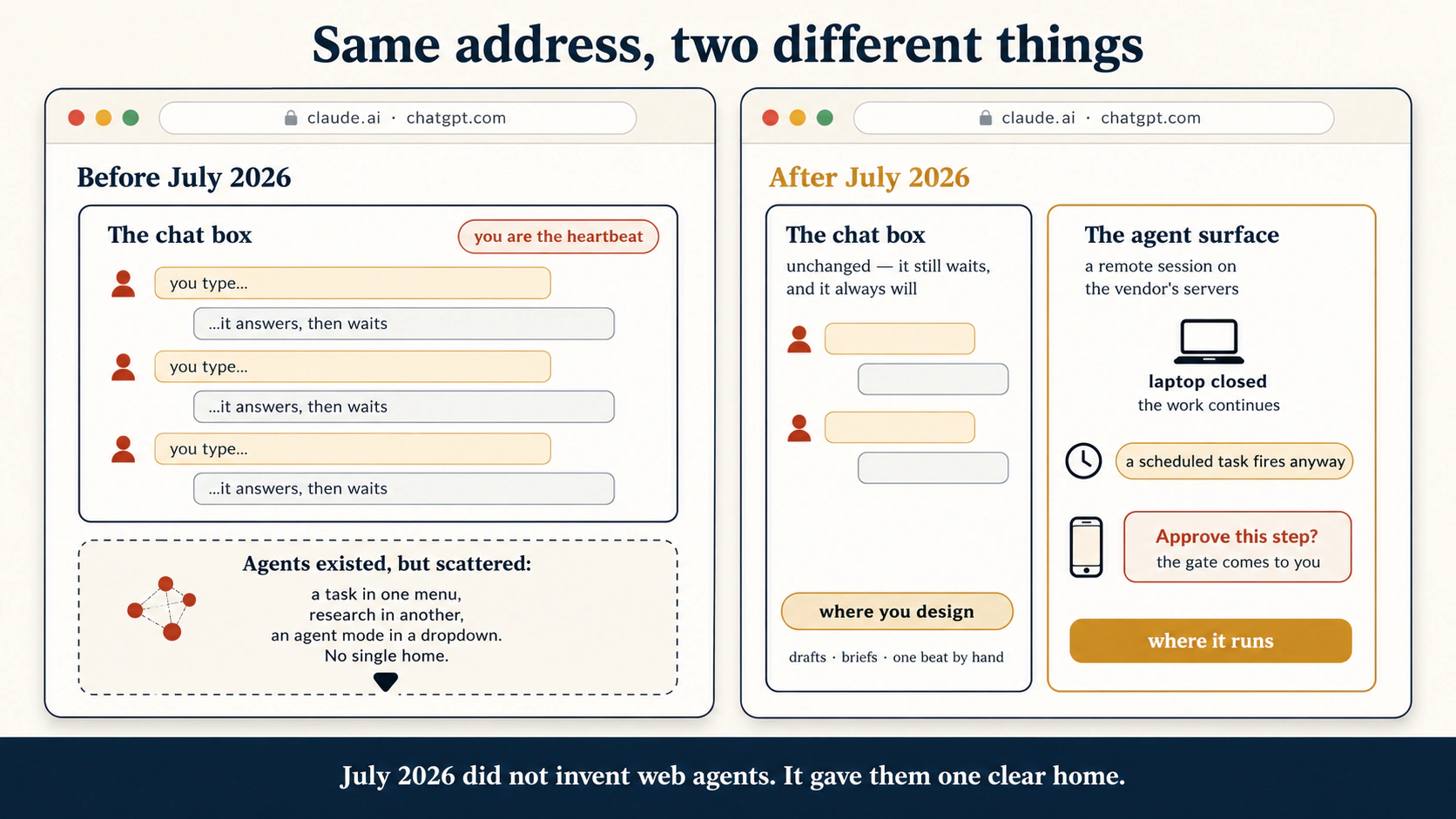
Open claude.ai or chatgpt.com today, and two different products sit at the same address. On ChatGPT the split is on screen: Chat mode and Work mode, side by side. (Codex is OpenAI's separate coding agent, its sibling to Claude Code. It stays a desktop experience and is not selectable on web or mobile, although supported desktop Codex sessions open from the Remote tab in the ChatGPT mobile app.) Telling the two apart is the first skill of this course.
The chat box is the conversation you know from Foundations. It waits for you every turn. You type, it answers, it waits again. It cannot start on a schedule, react to an event, or continue after you close the tab. That is what a conversation is. It is where you think, draft, and design.
The agent surface sits next to it. You give it an assignment, not a message. It plans, uses tools, works through steps, and produces a deliverable. It pauses only where a decision needs you, and it keeps working when you stop watching.
One test tells the two apart at any address, from any company:
If I stop typing, does the work stop?
Chat box: yes. Agent surface: no.
The deeper version is worth having. A plain chat turn is synchronous, which means it runs while you wait, then waits for your next turn. An agent run is delegated. Once you start it, it keeps moving toward an outcome. It can run later, or watch for a change. Buttons will change. That line will not.
One caution. You often start a delegated run from the chat box, in plain words. "Every Monday, summarize these emails." The words go in the chat, but what you set up is a delegated task, not a normal reply. So watch what the work does, not where you typed it.
The chat box also kept its job. Designing a task, drafting a brief, testing an idea by hand: that is chat work, and every assignment here begins there. The agent surface moved in next door.
One window, two rooms. In the first room, nothing happens until you speak. In the second room, a worker keeps working after you leave. You will keep using the first room to prepare what you hand over.
Chat waits for your next turn. An agent surface keeps working without it. One question separates them. If I stop typing, does the work stop?
Check yourself
A colleague says: "I already use claude.ai every day, so I already use agents." Correct them in two sentences.
Show answer
They use the chat box, which means work that stops the moment they stop typing, so they still start every turn by hand. The agent surface is the product next to it. Assign it work, and it plans, acts, and continues after the tab is closed.
2. The remote session: the tab is a window, not the runtime
The first edition taught a simple split. The agent is either on your machine or on the vendor's servers. That is a useful first picture, and it is no longer enough. Use two axes instead.
Axis 1: where does the loop run?
The agent loop is the part that decides what to do next until the assignment is finished, blocked, or stopped.
- In a cloud session, planning, tool selection, code execution, and task state all run on vendor infrastructure.
- In a local session, the agent loop runs on your own machine.
Axis 2: where does the tool execute?
A cloud session may call a connector, which means permission-scoped access to a service such as Drive, Gmail, or Slack. Through a bridge, it may also call a browser or a file tool on your computer. So the loop can be remote while one action is local.
That gives you three common runtime patterns:
| Pattern | Agent loop | Tools | What happens if your laptop closes? |
|---|---|---|---|
| Cloud-only | Vendor cloud | Cloud files, connectors, web tools | The run keeps going. |
| Cloud plus desktop bridge | Vendor cloud | Cloud tools, plus selected browser or file tools through desktop | The cloud run continues, but bridged tools vanish when the desktop goes offline. |
| Local | Your machine | Local files, apps, and tools | The run depends on your machine staying available. |
A Cowork session in the cloud runs its agent loop and code execution on Anthropic's servers. Sessions and files live with your Claude account and reopen across supported surfaces. If the session needs a connected local folder or certain browser capabilities, it calls them through Claude Desktop while that component is online.
That bridge does not turn the cloud session into a local session. If the desktop goes offline, the cloud session continues with cloud-reachable tools, but loses the tools it was borrowing. And if it opens a local file through the bridge, the contents are processed in the cloud. That matters for custody.
Cowork access and feature rollout vary by plan and organization policy. Treat the live help pages as the source of truth for availability.
ChatGPT Work makes the same difference concrete. Work started on web or mobile runs in OpenAI's cloud, and cloud Work conversations continue across supported surfaces. In the desktop app, Work can also use local folders and desktop apps when you grant permission. Local Work conversations and their files stay on that computer.
OpenAI also exposes Work Cloud and Work Local as separate enterprise controls. An administrator can enable Work Local without Work Cloud, so members work locally and cannot start cloud tasks.
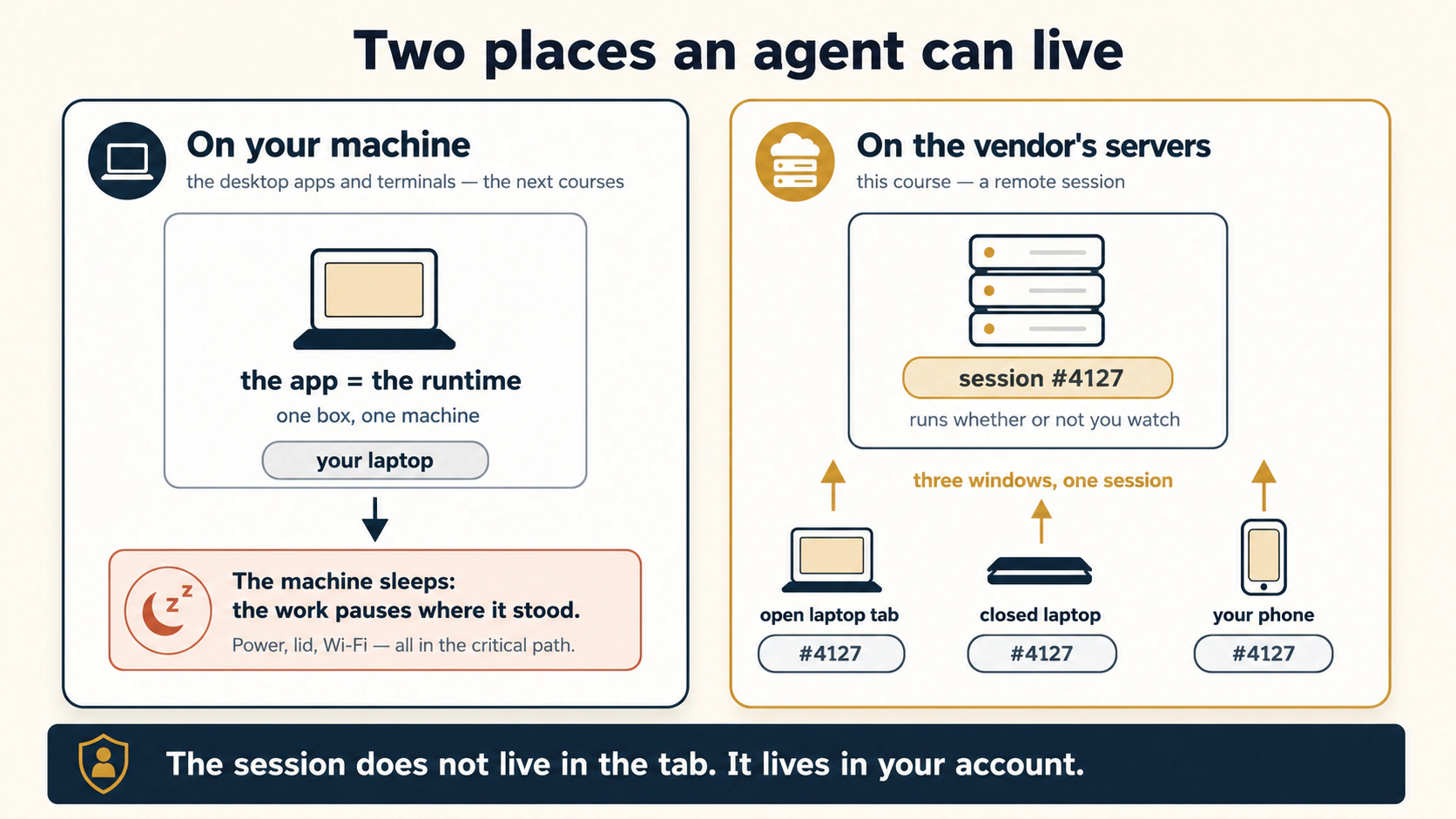
The picture shows the two endpoints correctly. Local runtime on one side, cloud runtime on the other. August added a bridge. So do not replace the picture. Add a cable. A remote worker can borrow a tool in your house without moving in. The picture stops being exact at one point. The tool stays in your house, but what it reads travels out. A local file opened this way is processed in the vendor's cloud.
Four consequences follow, and they are worth memorizing:
- Closing a tab is not the same as stopping a cloud run. The tab is a window.
- Closing the laptop can remove a bridged tool without killing the cloud session. The runtime and the tool are separate.
- A local file can be processed in the cloud. "The file came from my laptop" does not mean "the file stayed on my laptop."
- Scheduling is device-independent only when the workflow is. A schedule that secretly needs your desktop browser is not truly laptop-free.
Ask two questions. Where is the worker? Where is the tool? A worker in the vendor's office may use a tool there, or, through a controlled bridge, a tool in your office. If your office closes, the worker keeps working but loses that borrowed tool.
The tab is a window, not the runtime. Ask where the agent loop runs, then ask where each tool executes. The two answers are often different.
Check yourself
Ayesha starts a Cowork cloud task that summarizes Drive documents and also needs one file in a folder connected through Claude Desktop. Her laptop goes offline halfway through. What continues, and what breaks?
Show answer
The cloud session continues, because its agent loop is on Anthropic's servers. The Drive work continues if Drive is cloud-reachable. The connected local-folder tool is unavailable while the bridge is offline. The diagnosis is not "Cowork stopped". It is "one tool disappeared from a live cloud session."
3. Two vendors, one shape
Product features keep changing, but serious agent surfaces keep rebuilding the same anatomy. That anatomy is the reading lens for the rest of the course.
This book names six parts:
- Heartbeat: what starts a run.
- Reach: what the run can read and act on.
- Run-until-done loop: how it keeps moving toward an outcome.
- State spine: what persists, so the next run does not start from zero.
- Human gate: where autonomy stops or gets screened.
- Body: where the work actually executes.
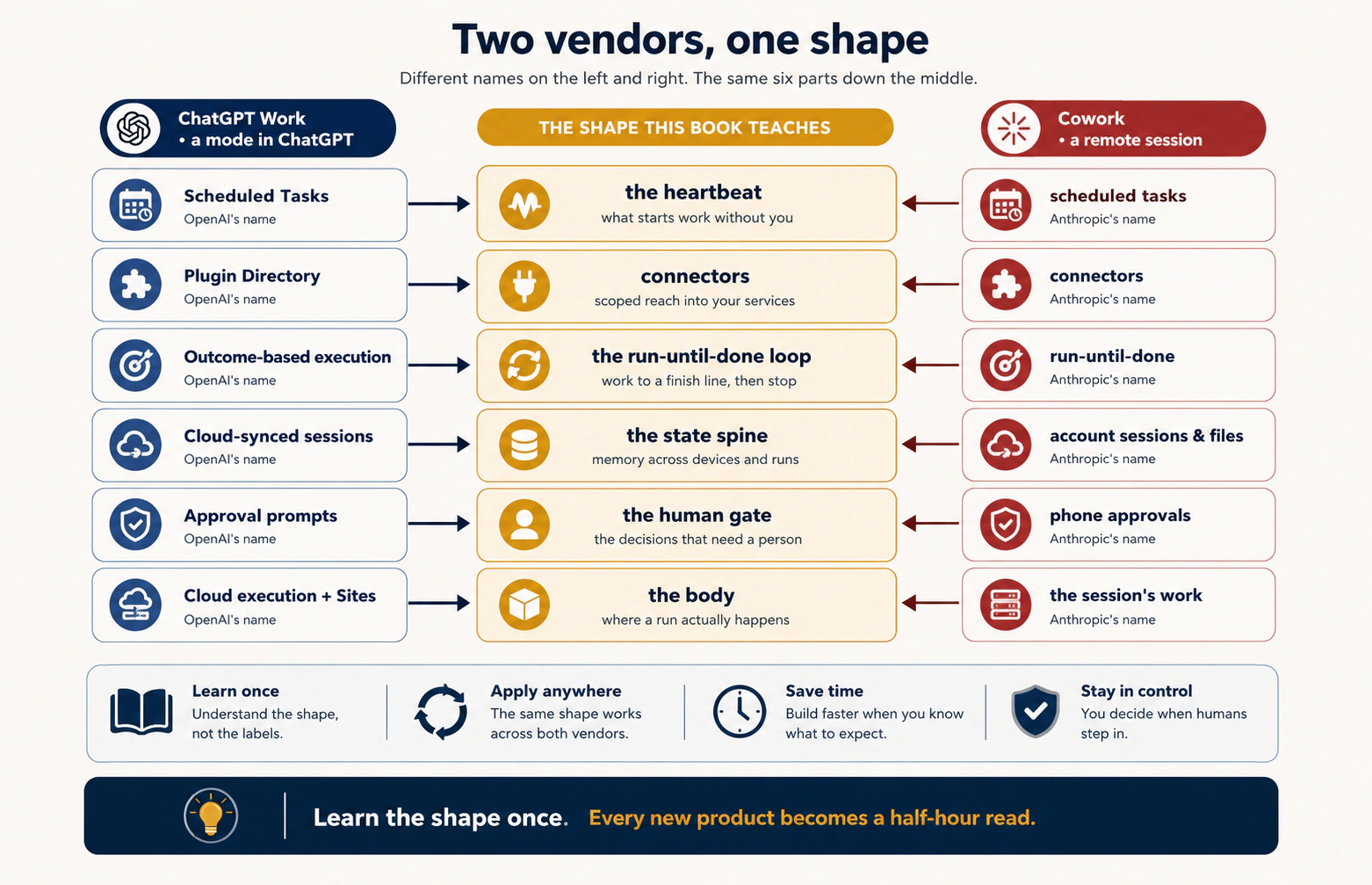
The image above is a July snapshot of vendor labels. Keep the center column. Expect the outer columns to drift. Cowork's August changes show why. Its state spine now includes memory shared across surfaces, its reach includes two browser paths, its gate has several modes, and its body can bridge selected tools through desktop.
A current, product-neutral comparison looks like this:
| Part | ChatGPT Work example | Claude Cowork example | What you should learn |
|---|---|---|---|
| Heartbeat | Scheduled Tasks and other supported triggers | Scheduled tasks and on-demand runs | Work can start without another chat turn. |
| Reach | Plugins and connected apps, cloud browser, desktop built-in browser and local tools where available | Connectors, plugins, web tools, built-in browser, Claude in Chrome, optional local tools | Prefer the most structured, least risky tool. |
| Run-until-done | Outcome-oriented multi-step work, with Plan mode to gather context and propose an approach first | Multi-step task execution and sub-agent coordination | Brief an outcome, inspect the approach, then let it work. |
| State spine | Sessions, Projects, files, memory and instructions where supported | Sessions, Projects, cloud Cowork memory, three levels of instructions, files | Persistence has layers. Do not call all of them "memory." |
| Human gate | Approval prompts and product policy | Manual, Auto, Skip, connector permissions, organization controls | Autonomy is a control setting, not an all-or-nothing property. |
| Body | Cloud Work, cloud browser, desktop execution or local tools where available | A cloud sandbox, which means a sealed work area on vendor servers, plus an optional local session and bridged desktop or browser tools | Ask where the loop runs and where each tool executes. |
Run the lens over any new agent product. Do not start with the marketing name. Find the six parts. If one is missing, ask how the product makes up for it. If a part is hidden, ask who controls it.
ChatGPT Work Plan mode is a current example. It gathers context, asks questions, creates a step-by-step plan, and lets you approve it before execution. That is not a seventh part. It is Concept 8 built into a product.
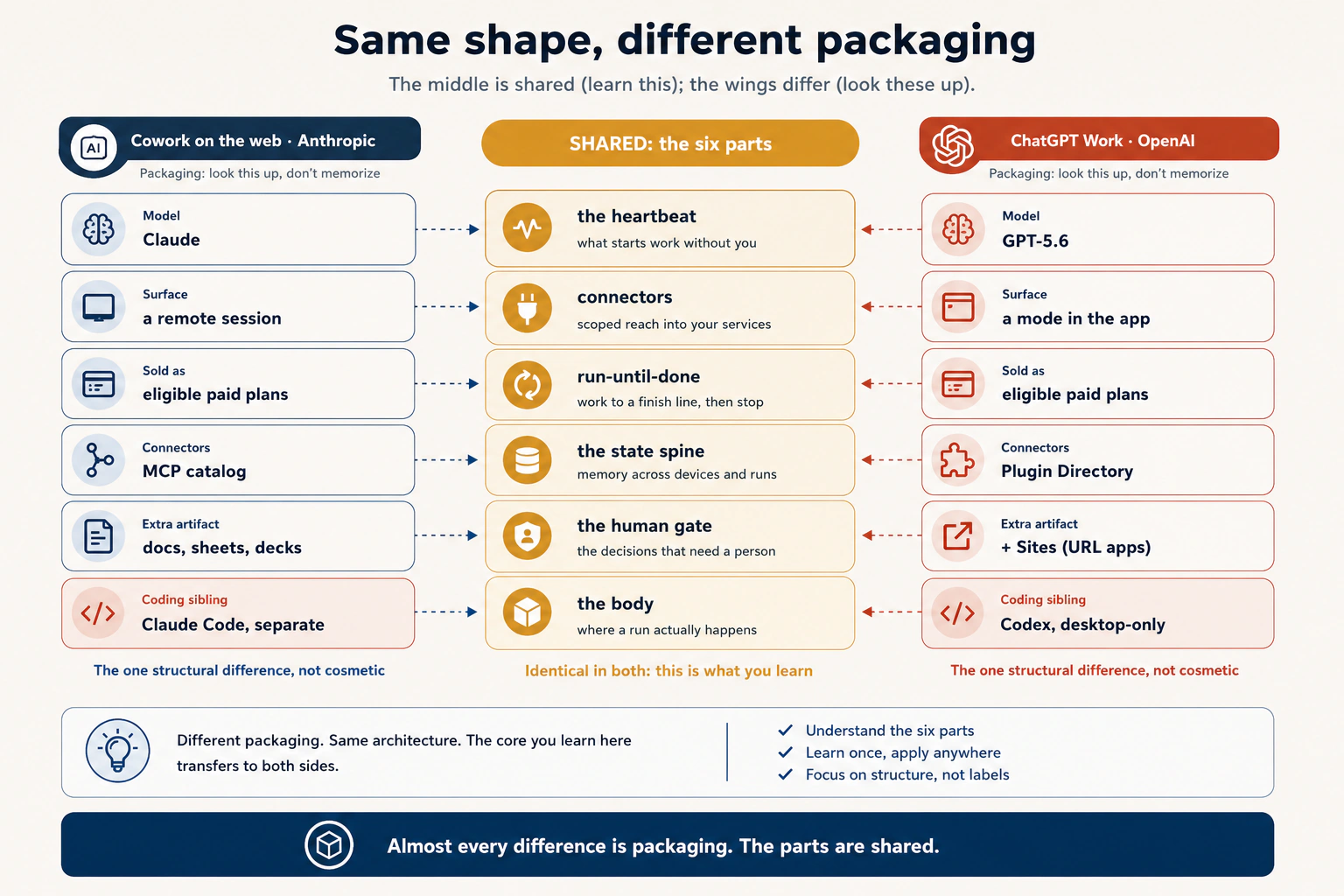
A managed agent surface gives you the state spine for free: saved sessions, sync, permissions, schedules, and tools. The open or local path gives you more control over runtime and custody, and more of that spine to build yourself.
Two warnings keep the six-part lens useful.
Same shape does not mean same trust. A connector call and a browser click can reach the same business system with different permissions, visibility, and exposure to hidden instructions. A cloud session and a bridged browser may belong to one Cowork task and still differ in availability and custody.
Same label does not mean same implementation. "Memory," "plugin," "approval," and even "browser" can mean different mechanisms across vendors. Use the name to find the part. Then inspect the implementation.
Cars from different companies still have steering, brakes, power, storage, controls, and a seat for the driver. The buttons move. The parts do not. Learn the parts, then learn where this vendor put the buttons.
Every serious agent product is built from the same six parts. Find the parts first, then inspect how this vendor built each one. Names change. The shape does not.
Check yourself
A new agent product launches tomorrow. Its website says: "persistent workspace, autonomous browsing, recurring runs, safe actions, parallel workers." Map those claims to the six parts before you read any review.
Show answer
Persistent workspace maps to the state spine. Autonomous browsing maps to reach plus body. Recurring runs map to the heartbeat. Safe actions map to the human gate. Parallel workers map to the loop and the body. Then ask what is unclear: where files live, what the browser can see, and where the runtime executes.
Part 2: The Surface
Now inspect what the surface gives the worker: persistence, files, reach, and gates. Concept 5, the three file tiers, is the custody discipline to memorize. Concept 6 carries the largest August update.
4. The account spine: sessions and files you did not have to build
The first edition used "account spine" as shorthand for saved sessions and files that follow you around. Keep the idea, and make it sharper. Persistent context is a stack of layers, not one thing called memory.
Five layers do different jobs. Session history is the record of what happened in one task. A Project is a workspace that groups a continuing body of work with its own files and instructions. Semantic memory is the facts and preferences the assistant carries from one cloud session to the next. Standing instructions are rules that apply again and again. A user-owned context file is your own copy of the important rules, portable and readable outside any vendor.
| Layer | The question it answers | Typical lifetime |
|---|---|---|
| Session history | What happened in this particular task? | One workstream or task history |
| Project | What belongs to this continuing body of work? | Weeks, months, or longer |
| Semantic memory | What facts or preferences should carry across cloud sessions? | Across sessions, until edited, reset, or turned off |
| Standing instructions | How should the assistant generally behave here? | Until you or an admin changes them |
| User-owned context file | What do I want portable, readable, and vendor-neutral? | As long as you maintain the file |
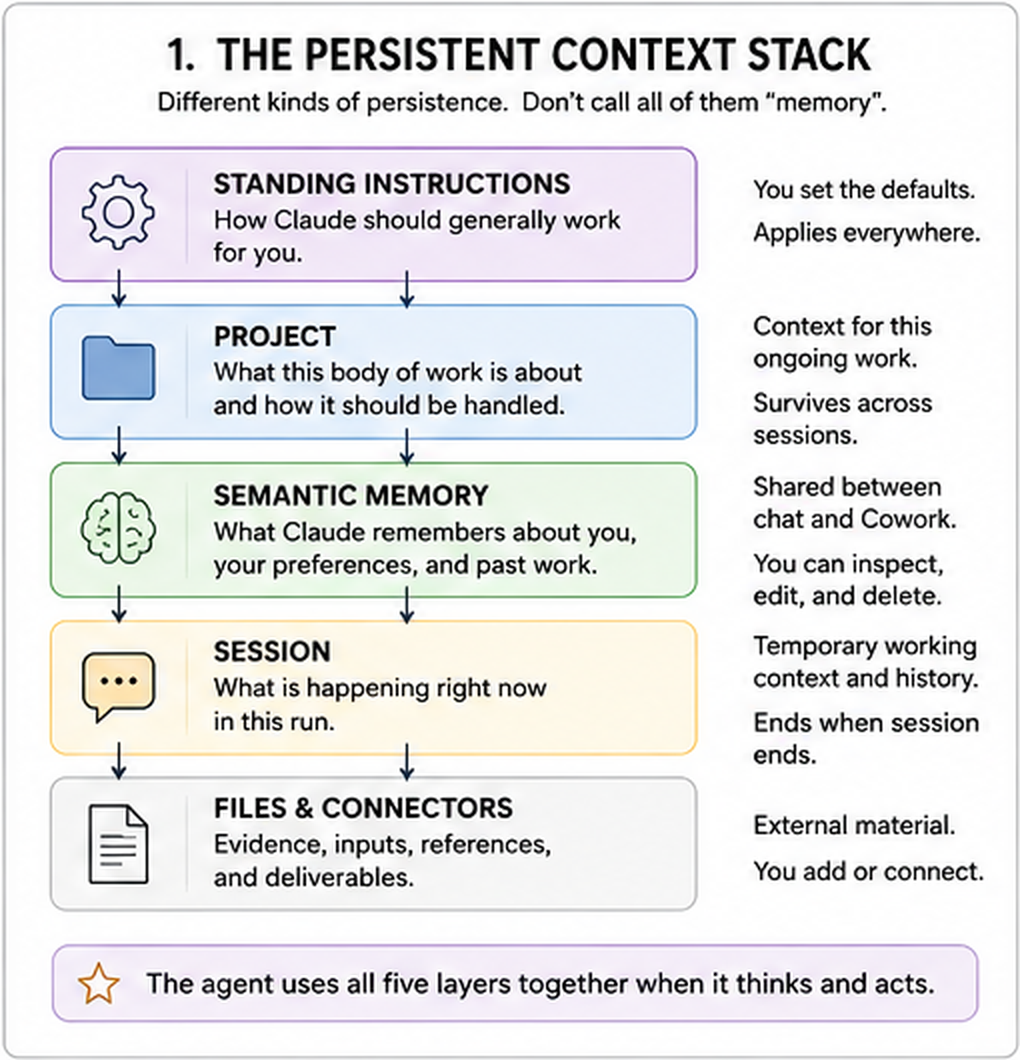
The important August change is memory inside Cowork. Cloud Cowork tasks now use the same memory as Claude chat, so what Claude remembers from chat can reach a cloud Cowork task, and what matters in Cowork can carry back. You can inspect memory topic by topic and edit or delete it. Project memory stays inside that Project. Local Cowork sessions do not use this cloud memory.
That fixes a common beginner mistake. An old session is not memory. A Project is not memory either. A global instruction is not memory. They all persist, for different reasons.
For current Cowork, read the state spine in this order: sessions, then Projects, then cloud memory, then instructions, then files.
- Sessions preserve the task history and outputs.
- Projects group related tasks with their own files, links, instructions, and memory.
- Cloud memory is shared with Claude chat where enabled and can be reviewed topic by topic.
- Global instructions apply across Cowork sessions. Desktop local folders can also carry folder instructions.
- Files remain part of the working state, but their custody depends on which tier they occupy.
Do not replace this stack with a magic CLAUDE.md story. CLAUDE.md is a plain markdown file of standing instructions that some Claude tools read at the start of a task. It makes an excellent portable context file. But native memory and instructions are first-class mechanisms now. Use the file for portability.
ChatGPT Work also benefits from a layered state model: cloud-synced sessions and files, Projects for continuing work, saved instructions, and ChatGPT memory where enabled. The product mechanics differ, but the discipline is the same. Know whether a fact lives in this session, this Project, cross-session memory, or an instruction you control.
The convenience has a price, and the price is custody and dependency. Vendor-managed memory, Projects, sessions, plugins, and files are useful because they pile up, which also makes the account sticky. So keep operational state in the vendor spine while work is active, and give critical state a portable source of truth you control.
Three habits keep the spine clean. Name sessions like work products. Keep one workstream per session or Project. Put durable instructions in the right layer instead of repeating them in every prompt.
Think of a workplace. A session is today's meeting notes. A Project is the client room. Memory is what your colleague has learned about how you work. Instructions are the standing office rules. Your own context file is the copy you keep in your briefcase.
Persistence is a stack, not one thing called memory. Put each durable fact in the narrowest layer that reliably applies, and keep a portable copy of anything critical.
Check yourself
You want Claude to remember that a client prefers one-page updates, but only inside that client's work. Where should the rule live: global instruction, cross-session personal memory, Project context, or one old session?
Show answer
Project context and instructions are the cleanest home, because the preference belongs to that client's work, not to every client and not to one old session. Persistent information belongs in the narrowest layer that applies.
5. The three file tiers: where does the deliverable actually live?
This is the signature concept of this course. Every file your agent touches lives in one of three tiers. For every deliverable you make one decision. Which tier does it land in?
Tier 1 is the task filesystem. While a remote session works, it uses a temporary working space on the vendor's servers for drafts, half-finished calculations, and part-built files. It is cleaned up when the work is done, and its exact retention rules vary by vendor, so never treat it as storage. It is never the home of anything you need tomorrow.
Tier 2 is platform storage, which means files saved permanently to your account on the vendor's platform. They survive the task, the tab, and the week. This is the account spine from Concept 4, applied to files, and it is the natural default. Work lands here unless you send it somewhere. Tier 2 is safe, and it is also the vendor's custody, in the vendor's format, behind the vendor's login.
Tier 3 is the exit. The file leaves the platform and lands in a place you control. A connector save to your Drive. An email or Slack post. A download. A write to a local folder. A commit to a repository. The door does not matter. Tier 3 is the only tier where the deliverable enters your system of record, the place your firm or your future self will look for it.
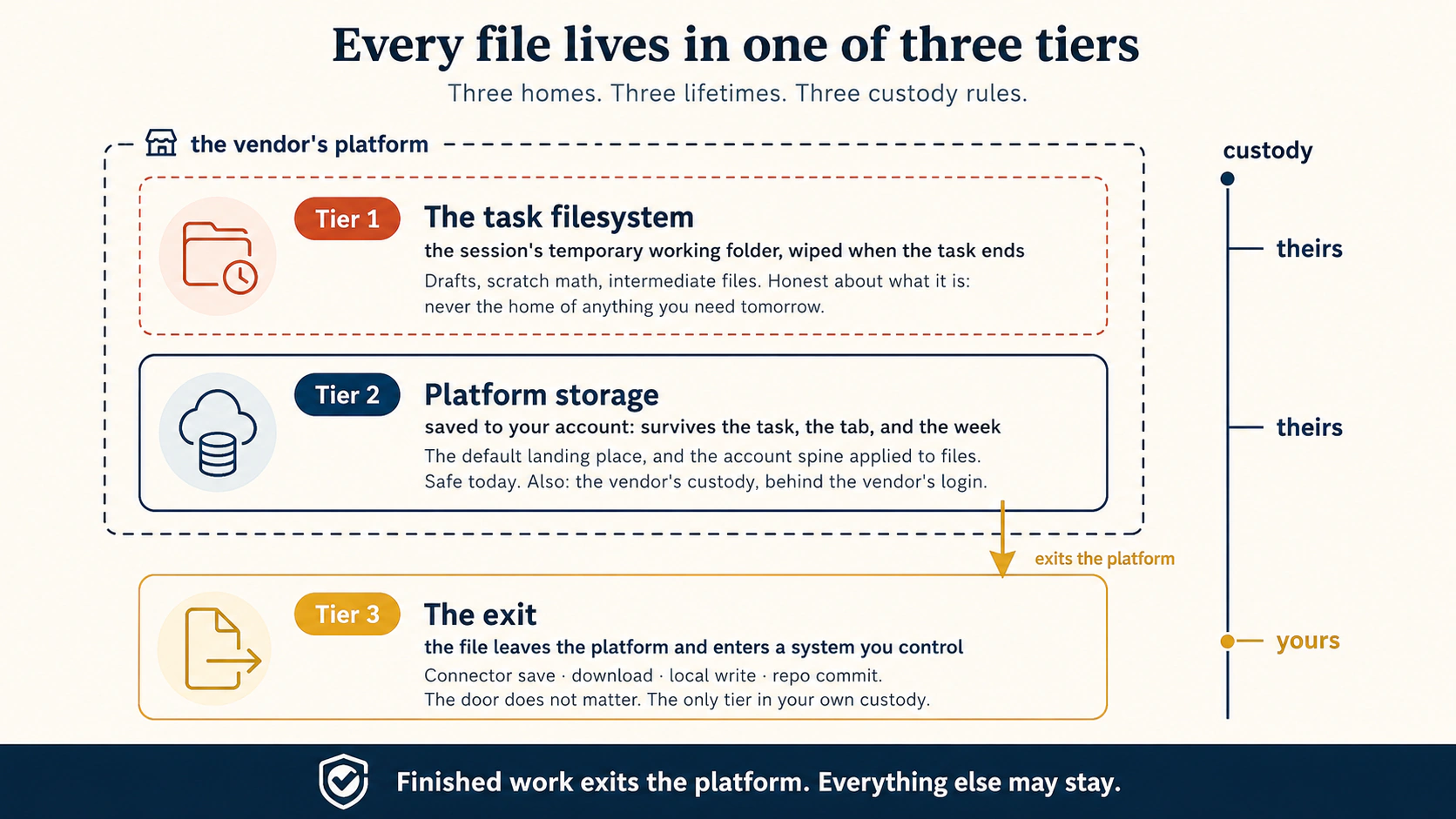
The discipline is one line, and it is the line to memorize from this whole course:
Finished work exits the platform. Everything else may stay.
Read the tiers as a risk ladder. A deliverable that exists only in tier 1 is already lost, because the wipe is the tier's definition. A deliverable that exists only in tier 2 is safe today and hostage tomorrow, because it survives only in someone else's custody. A deliverable in tier 3 is yours, under your retention rules, and still there if the vendor's product changes shape.
A Cowork cloud session works in temporary remote space, which is tier 1. It keeps task and session outputs in your Claude account, which is tier 2. It can push finished work into systems you control, which is tier 3. The doors are connectors, downloads, or a write to an allowed local folder. That last door opens only when a desktop bridge is deliberately connected. One detail matters. If a cloud session opens a local file through Claude Desktop, its contents are processed in the cloud. The final destination can still be tier 3.
The same three tiers. Tier 1 is the isolated working environment a Work task uses while it runs, with its own file system, started just for the job. OpenAI manages it, and you do not control it. Tier 2 is the finished files it makes: docs, sheets, decks, dashboards, and Sites, kept with your cloud-synced session and Projects. Tier 3 is the exit. Here the main automatic exit is a connector save through the Plugin Directory, to Drive, Gmail, or Slack. A download is the manual exit, and a connected desktop bridge can add a local write. One note in OpenAI's favor. Sites can publish a finished web app or dashboard to a shareable URL. But a Site hosted on the platform is still tier 2 with a public door, not tier 3 in your own custody. The keep-and-export rules are weeks old, so check the live docs.
A worked example. Ayesha runs her monthly invoicing for a client. The draft numbers live in tier 1: the agent's scratch math, the temporary CSV. They live and die there, and that is correct. The invoice template she will reuse, so she saves it to tier 2, attached to a session she reopens in thirty days. The finished invoice PDF goes to tier 3 twice: saved to the firm's Drive folder, and emailed through the mail connector. Why twice? Because one day someone will ask, "where is the March invoice?" The answer must be the firm's records, and tier 3 is the only tier that reaches them.
End every deliverable-producing brief with one instruction, and the tier decision takes care of itself:
End by listing every file you created and where each one landed:
temporary working space, platform storage, or a system I control (connector save, download, local write, or repo commit).
That one line turns an invisible default into a visible decision, and Project 2 makes you run it on real work.
Three places a paper can be. On the worker's scratch pad, thrown away when the day ends. In the worker's own drawer, safe, but in their desk, not yours. In your filing cabinet, where your rules apply. Anything finished goes into your filing cabinet.
Tier 1 is scratch and gets wiped. Tier 2 is safe but in the vendor's custody. Tier 3 is your own system of record. Finished work exits the platform.
Going deeper: this discipline has a future
Two courses ahead hand this concept back to you, grown up. Loop Engineering teaches the state spine, the memory a loop keeps between runs, and where that memory lives is a tier decision. Leaving the Laptop teaches the suitcase test, and its rule, the repo holds the truth, is tier 3 in engineering clothes. Project 6 here is the beginner's version of that course's vanishing-home drill.
Check yourself
A lawyer builds a comparison memo in a web session and shares the platform link with the client. Name the two things wrong with stopping there.
Show answer
First, custody. The memo exists only in tier 2, outside the firm's matter folder and retention system, so the firm's record has a hole in it. Second, access. The link's sharing rules are the platform's, not the firm's, and the firm cannot govern what it does not hold. The fix is tier 3. Save the memo into the document management system, then share from there.
6. Connectors on the web: reach and exit door in one
A connector is still the cleanest way for an agent to reach many business systems. It gives structured, permission-scoped access to a service instead of making the agent imitate a human clicking through screens.
But a connector is no longer the whole reach story. Current Cowork makes four paths worth telling apart:
| Reach path | Best for | Main advantage | Main risk or limit |
|---|---|---|---|
| Connector | Gmail, Drive, Slack, DocuSign, CRMs, databases with supported integrations | Structured permissions and actions | Scope can be too broad. Outside content can carry hidden instructions |
| Built-in Cowork browser | Portals, forms, dashboards, sites with no connector | Claude gets its own browser for delegated web work | Needs Claude Desktop online. Signed-in browsing raises action risk |
| Claude in Chrome | The page in front of you, using your existing Chrome logins | Works in your own browser context | It inherits the sensitivity of your signed-in session |
| Computer use and desktop tools | Apps with no connector or browser-friendly interface | Reaches the screen directly | Highest risk. Taught separately in the desktop course |
The default rule is simple:
Use the most structured tool that can do the job. Connector before browser. Browser before full computer use.
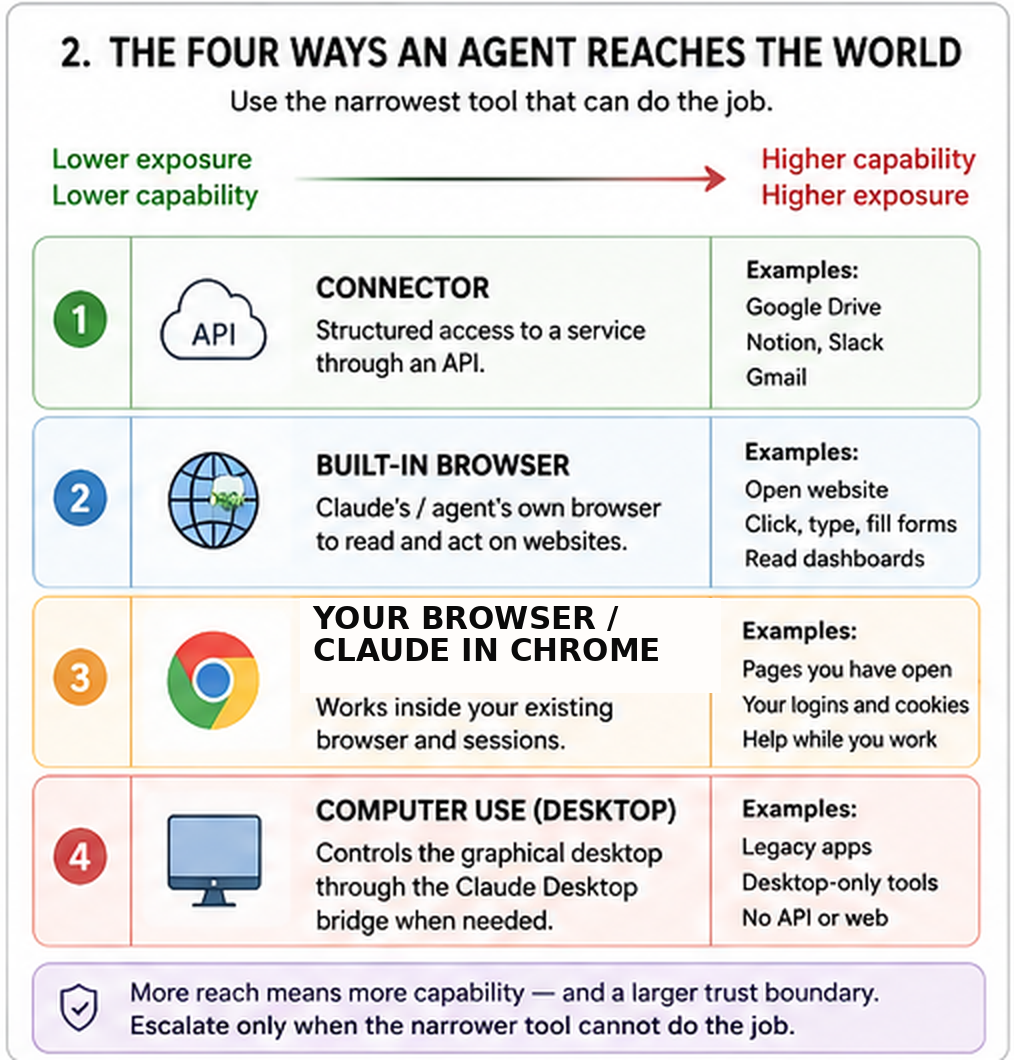
That is not because connectors are magically safe. The ladder ranks exposure, not safety. Rung one is still a real door. As the table above says, a connector scope can be too wide, and content arriving through it can carry hidden instructions. Connectors come first because structure gives you clearer permissions, clearer actions, and less ambiguity than screen-driving.
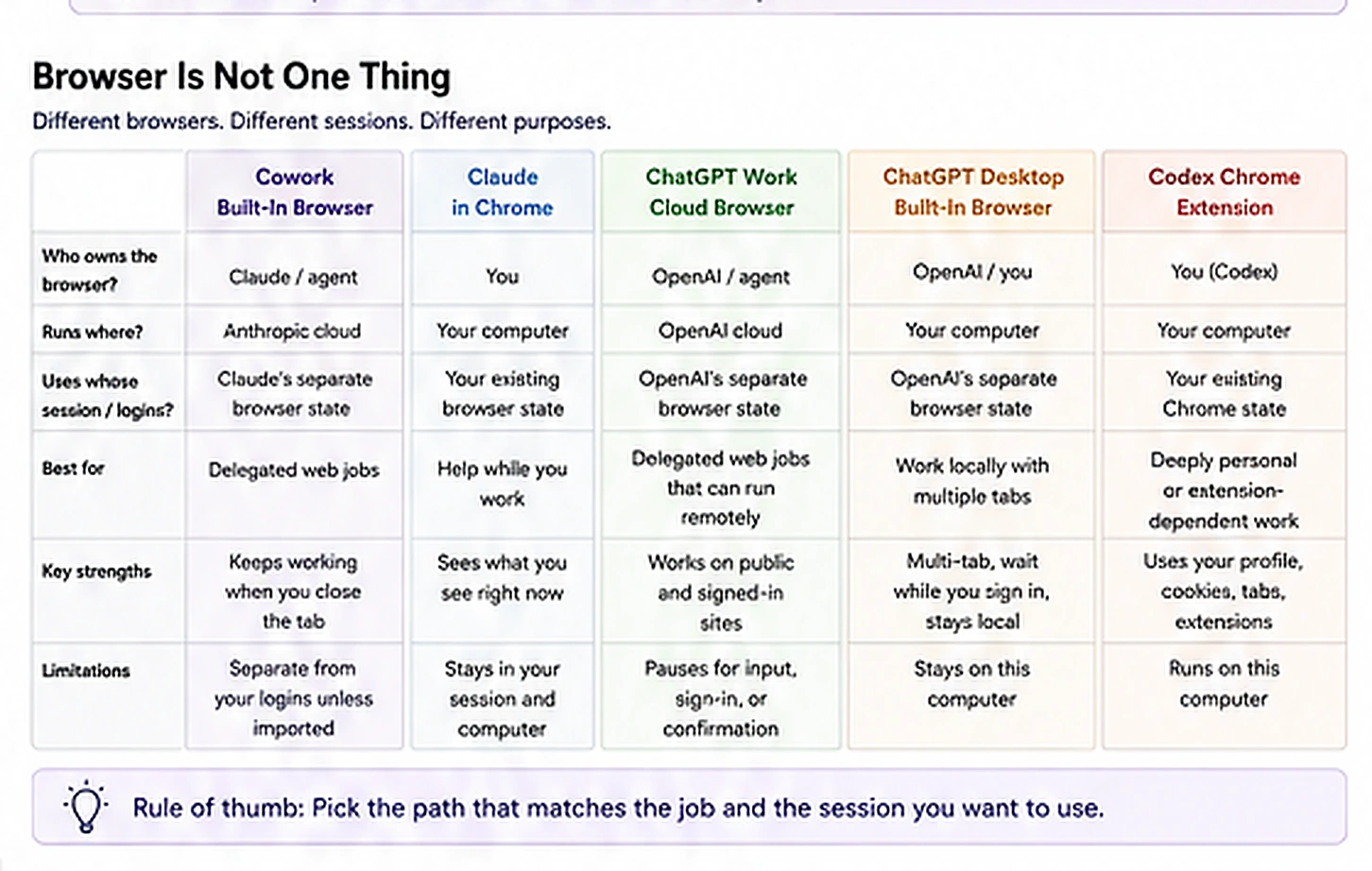
Cowork now has a browser inside Claude Desktop, separate from your normal browser. Claude can open sites, read pages, click, type, and fill forms. It is meant for delegated web tasks, such as pulling numbers from a dashboard or working through a vendor portal with no connector. From web or mobile, a Cowork cloud session can steer that browser while the desktop app is online.
The built-in browser starts separate from your personal browser state. You can sign in as needed, and current Cowork can import selected site logins from supported browsers. That creates a new trust boundary. Anything you sign into inside Claude's browser can reach future Cowork sessions on that computer. Treat browser login state as a permission.
Claude in Chrome is different. It works in your Chrome browser, on the page and accounts you already have open. Since August 12, the Chrome side panel is part of Cowork's session story, and the task can continue across supported Claude surfaces. Use it when the work is "help me with this page." Use the built-in browser when the work is "go handle this website task for me."
ChatGPT now has three browser paths worth telling apart across Work and Codex.
Work cloud browser. Work can use its own browser on a remote computer. It can read pages, click, enter information into forms, and work on supported public or signed-in sites. Because the browser is remote, a delegated task continues after you close your computer. It pauses when it needs your input, sign-in, or confirmation. Its signed-in sessions are separate from the accounts open on your device.
Desktop built-in browser. In the ChatGPT desktop app, Work or Codex can open an in-app browser with its own state and several tabs. You can watch the page, sign in there, and work beside the agent. On desktop, Work can also use approved local files and desktop apps where your plan allows it.
Codex Chrome extension. OpenAI points you here when the task needs your existing Chrome profile, cookies, signed-in session, open tabs, or extensions. It is the closest OpenAI equivalent to Claude in Chrome. It belongs to Codex rather than Work, so do not confuse it with Work's remote cloud browser.
The same routing rule applies on both vendors. Use a connector or plugin when a structured interface covers the job. Use a browser when the work lives behind pages, forms, or portals. If the task needs your existing browser identity and tabs, choose the path designed for that. Treat signed-in browser control as a larger trust boundary than reading a public page.
The security model changes when the agent can both read and act
Two conditions together create the biggest risk:
- the agent can read content outside your trusted boundary, and
- the agent can take a consequential action.
Prompt injection means hidden instructions placed in a webpage, email, document, or connector result, written to redirect the agent. Vendors answer with safety classifiers, which means automatic checkers that read each proposed action and block or escalate the unsafe ones. That screening reduces the risk. It does not erase it.
Anthropic goes further for Claude's browser surfaces. Following instructions found inside emails or web content is prohibited in every permission mode. Your brief is authority. Outside content is evidence, never a new boss.
So carry five rules:
- Start with trusted sites and low-stakes accounts.
- Do not casually import or reuse logins for banking, medical, identity, or other highly sensitive systems.
- Use Manual approval for unfamiliar sites, new plugins or connectors, and actions that send, spend, delete, publish, or change important records.
- Give each workflow only the connectors and browser reach it actually needs.
- Use connectors as both an entry and an exit. If the finished report belongs in Drive or the client system, make that destination part of the brief.
A permission label is not a formality. Read is not send, draft is not publish, and view is not edit. If a mail connector can read threads, that does not mean it should send as you. Write access is a separate increase in blast radius, which means the worst damage a wrong action can do. Grant the smallest scope that completes the workflow.
Plugins enter the web story here. A Claude plugin can bundle skills, connectors, and sub-agents, which means helper workers the main agent hands a smaller job to. It can also bundle hooks, which means small rules that run automatically at set points in a task, such as before a tool is used. Both run in Cowork. So a plugin can be a role-specific mini-harness. Install only trusted plugins.
A connector is a service entrance with a badge reader. A browser is the front door and the hallways. Computer use is giving the worker your mouse and keyboard. Use the narrowest entrance that reaches the room you need.
Use the most structured tool that can do the job. Connector before browser, browser before full computer use. Grant the smallest scope that finishes the work.
Check yourself
You need monthly numbers from a vendor portal. There is no connector. The portal account can download invoices but cannot send money or change bank details. Which reach path would you try, and what approval mode would you start with?
Show answer
A browser is right, because the work lives in a portal with no connector. Start with Manual approval while you learn the site and how the agent behaves. After several clean runs you may move to a safer automatic mode.
7. The gate in your pocket
The first beginner story was simple. The agent works, then an approval reaches your phone. Keep the human gate idea, and fix one thing in that picture. The phone is only one place a gate can reach you. The gate itself is the whole rule for what may happen without you.
A modern agent surface can have several gate layers at once:
- the connector's own permission scope,
- an organization policy,
- a per-task approval mode, which means how often the agent pauses for permission,
- safety screening on actions,
- explicit approval for a particularly destructive action,
- an escalation to your phone or another surface.
Cowork currently makes the autonomy choice unusually visible with three modes:
| Cowork mode | What it means | Good beginner use |
|---|---|---|
| Manual | Claude pauses for actions that need approval. You allow or deny them. | New workflows, unfamiliar sites or tools, sensitive or hard-to-reverse actions |
| Auto | Claude keeps moving and screens each action for safety, blocking or escalating unsafe ones. The side panel starts here by default, and the extra checks consume more usage. | Proven, bounded workflows where interruptions are costly and the consequences stay manageable |
| Skip | Claude does not pause for ordinary approvals and does not apply the Auto action check. | Rarely right for beginners. Only tightly trusted, bounded work |
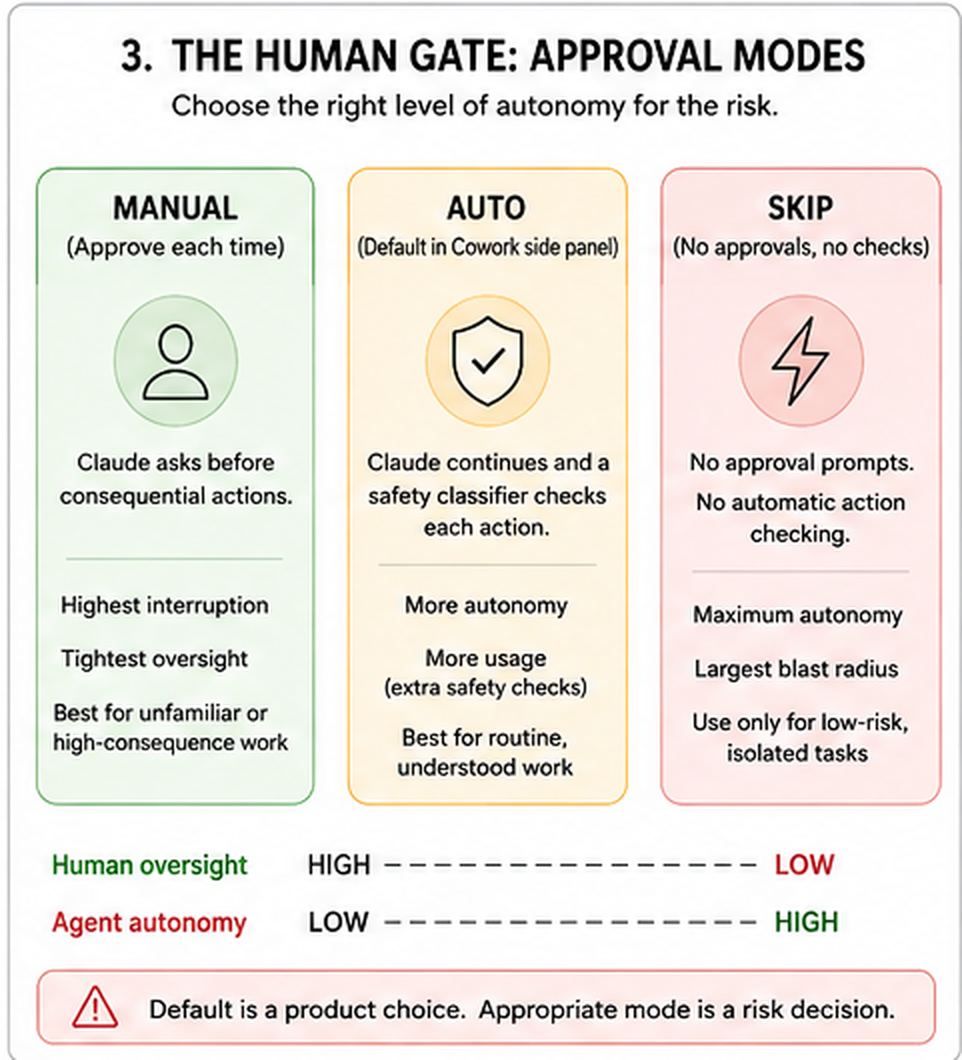
Anthropic warns openly that no automated defense is perfect. For work with real consequences, such as money, messages sent as you, or important files, stay close or use Manual. Cowork keeps explicit protection for permanent deletion.
The current Cowork side panel defaults to Automatically approve. That is a product default, not a recommendation for every first run. For unfamiliar tools, signed-in sites, new plugins, or high-consequence actions, switch to Manual while you learn the workflow. Once a bounded workflow earns trust, Auto reduces interruptions at the cost of more usage.
So the mental model moves from "Where will the approval pop up?" to two better questions:
What is allowed to happen without me?
What mechanism stops or screens the action before it counts?
The phone still matters. Cloud sessions can notify you when they finish or need input, so the gate can travel with you.
Match the gate to blast radius
A practical autonomy ladder:
- Read and summarize. Low consequence. Automatic execution is often reasonable once permissions are understood.
- Draft but do not send. Medium consequence. The output is reviewable before it leaves the system.
- Write to reversible records. Higher consequence. Use a stronger gate until the workflow is proven.
- Send, publish, purchase, delete, or change critical data. High consequence. Use Manual or another explicit human control unless you have a mature governed workflow.
The ladder answers one question: what can this action do to the world? Anthropic's certification material asks a second question with its own set of four, the review thresholds: stakes, reversibility, audience, and regulatory exposure. Those decide whether a person must look at the output before it counts, whatever rung the action sits on. A rung-one summary can still need review if it goes to a client, or if the source data is regulated. Keep the two sets apart. The rung picks the gate on the action. The four thresholds pick the review on the result. Just Delegate It teaches the thresholds as part of verification.
The important habit is not "always click approve." It is to choose the gate before the run. If you decide autonomy when the prompt appears, you are designing the safety system too late.
Before you trust an unattended workflow, ring the gate on purpose. Create one harmless step that should need your input, start the task, walk away, and confirm the request reaches a surface you actually watch. Then deny or approve it and confirm the run responds correctly. An untested escalation path is only an assumption.
The gate is not one doorbell. It is the whole rule for when the worker must stop, when a safety check may clear an action, and when the worker may keep moving. Choose the rule before you hand over the keys.
Autonomy is a setting you choose before the run, not a prompt you answer during it. Match the gate to the worst damage a wrong action can do, and test the escalation path once.
Check yourself
You have a tested weekly research workflow that reads public sites and writes a draft into a test folder. You also have a new workflow that will send renewal notices to customers. Which should get more autonomy?
Show answer
The tested research workflow can use more automation, because its inputs and consequences are bounded and reversible. The customer-notice workflow should begin with Manual, because a wrong action leaves the system as you.
Part 3: Working Unwatched
Now the skill that makes the surface useful: handing over work you will not watch. This part teaches the delegation loop, then work that starts on a clock.
8. The delegation loop: brief, plan, approve, review
The product can work without you. That makes the quality of the handoff more important, not less.
A common beginner mistake is to reach for a longer prompt. Often the better first move is workflow discovery, which means letting the agent help you find the procedure you cannot yet describe.
"Every Monday I spend an hour checking three places and still miss something. Interview me until you understand what I am trying to accomplish, what sources matter, what I never want changed, and what a good finished brief looks like. Then propose the workflow before doing it."
That move comes from experienced Cowork users. It works because the agent helps you discover the procedure instead of waiting for you to already be an automation designer.
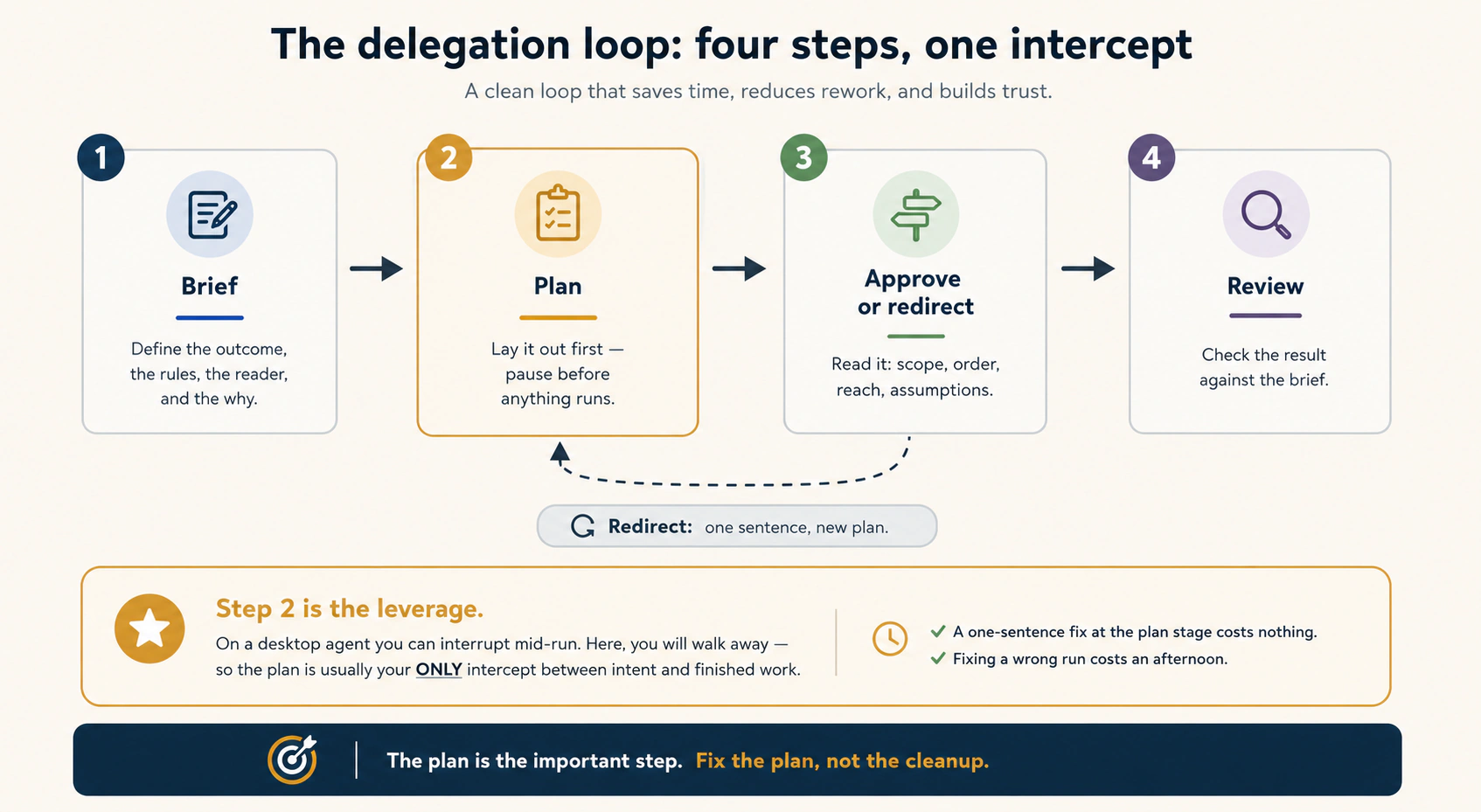
Once the workflow is understood, use the four-step delegation loop:
- Brief. State the outcome, audience, sources, constraints, permissions, file destinations, and definition of done.
- Plan. Ask the agent to show how it intends to get there before consequential work begins.
- Approve or redirect. Fix the plan while changes are cheap. Set the permission mode to match the stakes.
- Review. Inspect the finished deliverable, the actions that mattered, and where every file landed.
In the current Cowork side panel, Manual mode does not automatically create a plan for you to approve before starting. Claude may ask clarifying questions, then begins work and asks before individual actions. If you want the Concept 8 safety intercept, put it in the brief: "Show me your plan first and wait for my approval before taking consequential actions."
ChatGPT Work's Plan mode makes the same discipline explicit. It gathers context, asks questions, produces a plan, and waits for your approval. The button may change. Inspect intent before expensive execution.
What changed in August is that "Approve" can mean more than clicking a per-action prompt. It also means choosing an autonomy mode, approving a site or connector, or judging a workflow mature enough for screened automatic actions.
A brief for work you will not watch
Use this template in plain language:
- Outcome: what finished thing should exist?
- Audience: who will use it, and for what decision?
- Sources: which files, Projects, connectors, sites, or accounts may the agent use?
- Boundaries: what must it not read, change, send, purchase, delete, or publish?
- Method: required format, calculations, citations, date window, or business rules.
- Escalation: what uncertainty should stop the run and come back to you?
- Destination: where should the final deliverable live? Name the tier-3 system.
- Done: what observable conditions prove the task is complete?
Then add one line beginners routinely leave out:
If the necessary evidence is missing, say what is missing and stop rather than inventing it.
That line matters more in unattended work, because a confident invention can otherwise travel through several steps before you see it.
Review the plan, not every click
If the workflow has twenty steps, you do not want to supervise twenty clicks forever. Check whether the plan points at the right sources, accounts, output, and gate. A bad plan executed perfectly is still a bad run.
Use four checks when you read the plan:
- Scope: is it touching only the work and data you named, or has the job grown?
- Order: does it verify before it acts, or is it about to change something before the evidence is settled?
- Reach: is it proposing a connector, browser account, send, publish, write, or delete action that you did not intend?
- Assumptions: is it deciding the audience, format, business rule, or a missing fact for you?
If one of those is wrong, redirect the plan with one sentence. Fixing direction before execution is cheaper than cleaning up a flawless run of the wrong plan.
For a new browser or connector workflow, stay close the first few times. Watch where it reads, what it tries to write, and which approvals appear. Trust is earned by repeated bounded runs.
Do not tell a capable colleague every keystroke. First explain the job. If you are not sure what the job is, let the colleague interview you. Then review the plan before the expensive work begins. That is management.
Brief, plan, approve, review. The plan is your cheapest intercept, because you will not be watching the run. Fix the plan, not the cleanup.
Check yourself
You know you dislike preparing a weekly client update, but you cannot yet describe the workflow cleanly. What is the best first prompt: a 40-line guessed procedure, or a short description of the frustration plus a request for an interview?
Show answer
Start with the frustration and ask the agent to interview you. The goal is to discover the real workflow, its sources, exceptions, and definition of done. Then turn those into a durable brief and test it by hand.
9. Scheduled tasks with no device online
A schedule is the heartbeat. Something other than your next chat turn starts the work.
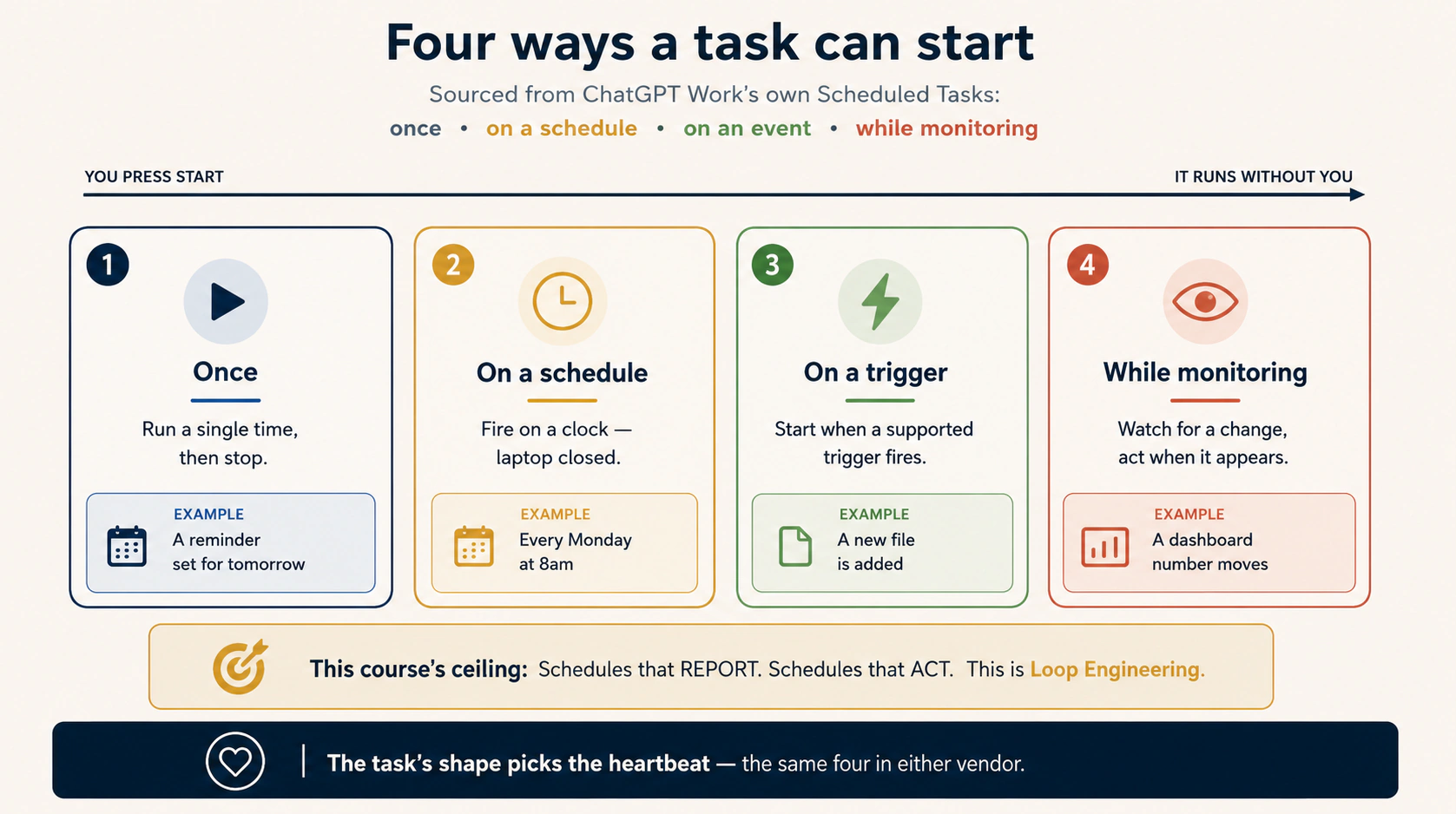
The four useful heartbeat patterns are once, on a schedule, on a supported event, and monitoring, which means checking repeatedly and reporting only when a condition becomes true.
OpenAI now gives the event heartbeat a concrete implementation. Eligible ChatGPT Work users can create event-triggered tasks from supported Gmail messages, Slack channel messages, or GitHub pull request activity, reviewing Trigger, Condition, and Prompt first.
The important 2026 lesson is not the labels. It is the runtime requirement:
A schedule is truly device-independent only if every required tool is also reachable without your device.
A Cowork scheduled task runs in the cloud and can use what regular Cowork tasks use, including connected tools, skills, and plugins. But local file access and some browser capabilities depend on a desktop bridge. If your Monday brief needs a file on your sleeping laptop, you have rebuilt the laptop as a hidden dependency.
The four answers before you schedule
Write these down:
- What starts the run? A clock, an event, or a watch condition.
- What does it touch? Every connector, file source, website, plugin, and destination.
- Can it reach all of that with your devices off? If not, move the source to a cloud-reachable system or accept that the schedule depends on the bridge.
- How will you know it succeeded? A finished file, a dated report, a notification, or another observable signal.
Then add two safety questions:
- What may it do without approval? Set the gate before the first unattended run.
- What happens on the empty or unclear case? "No new items" must be a valid result, not an invitation to invent work.
Ran is not the same as worked
A scheduler can tell you that a run started or completed. That does not prove the output was correct, complete, or delivered. Give every recurring workflow an observable success signal: items processed, a dated file created, the tier-3 destination used, or an explicit "no new items" result.
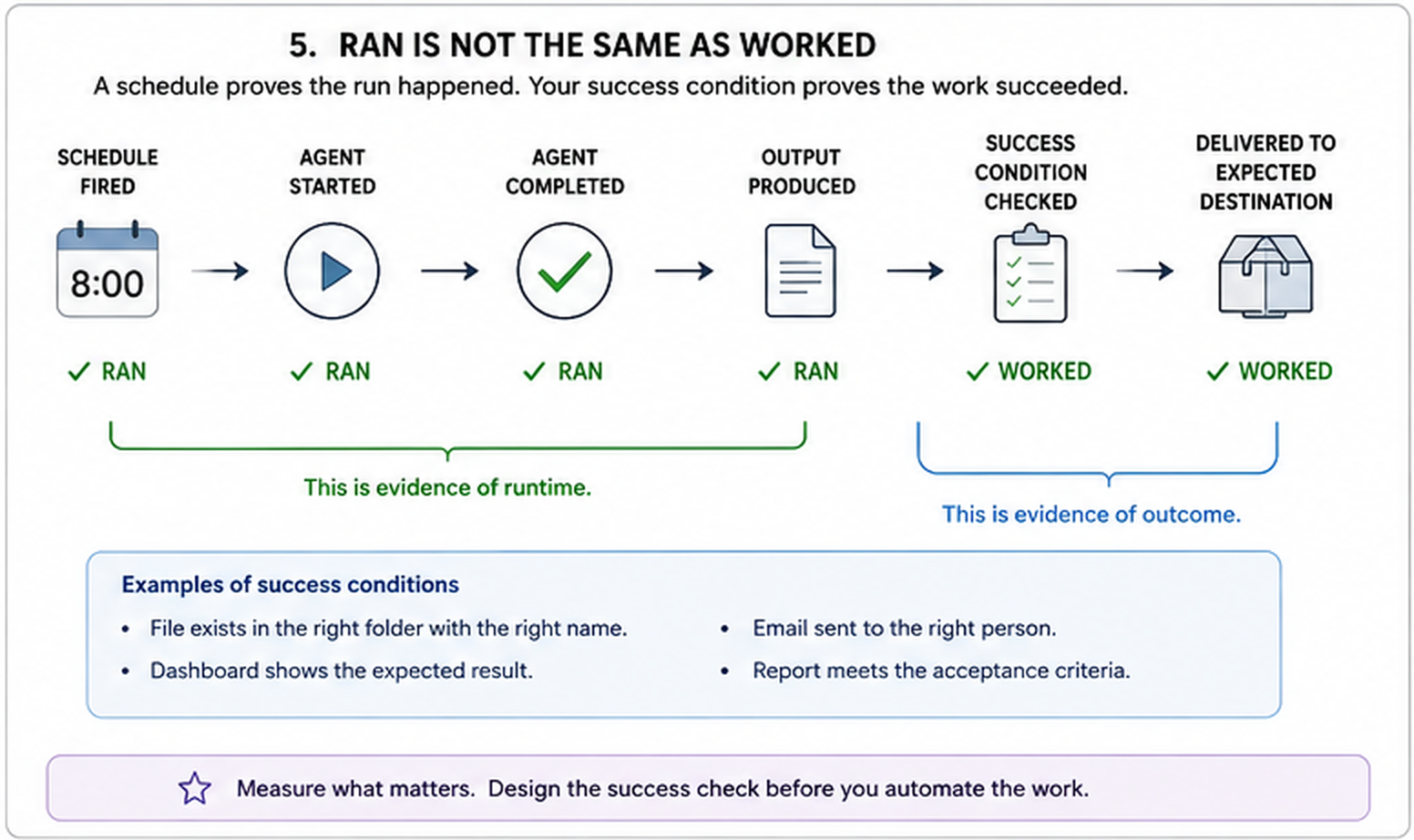
If an expected output is missing, silence is unclear. First check whether the run is waiting for input. Then check usage limits, permissions, connector or browser availability, and the destination. Do not rewrite the prompt or switch products until you know whether the workflow failed to start, failed to reach a tool, paused at a gate, or produced the wrong result.
Start with reporting, then graduate carefully
For beginners, the safest scheduled agent reads, analyzes, and reports, so it changes nothing while you sleep. Once a workflow has clean runs, a clear checker, bounded permissions, and reversible actions, later courses take you toward schedules that act. This is a teaching ceiling, not a claim that the products cannot act. Capability and readiness are different things.
Walk it before you schedule it
Run the workflow by hand at least twice. Inspect the sources, plan, permissions, output, empty case, and tier-3 destination. Only then attach a heartbeat. Scheduling is photocopying the workflow into the future. A mistake inside it is not diluted. It is reproduced.
A schedule is an alarm clock for a worker. The alarm rings in the cloud even while your laptop sleeps, so the worker does start. But if one key is locked inside that sleeping laptop, the worker keeps going without it and hands back an incomplete job. Schedule work whose tools are awake when the alarm is.
A cloud clock is not enough. A schedule is device-independent only when every tool it needs is reachable with your devices off. And a run that finished is not the same as a run that worked.
Check yourself
Your weekly brief reads Gmail and Drive through cloud connectors, writes a PDF to Drive, and sends you a completion notification. Does it need your laptop online? What if you add "also read C:\Clients\notes.md through the desktop bridge"?
Show answer
The first version is cloud-reachable end to end and runs with your laptop off. The second introduces a desktop dependency. The cloud task may start, but the bridged local file is unavailable when the desktop is offline. Move that source to a cloud-reachable system, or accept the dependency.
Part 4: Choosing, and the Open Path
You can now direct an agent, land its files in the right tier, and put a reporting task on a clock. Three questions remain. When is this surface the wrong choice? What does the open path look like? What can it never do?
10. Web, desktop, or terminal: pick by what the work touches
The old router had two buckets. Cloud documents and connectors went to the web. Local files and apps went to the desktop. August turned the middle into a spectrum.
Keep the original deciding question:
What does the work touch?
Then add two more:
Must it run while my device is off?
Who is allowed to hold and process the data?
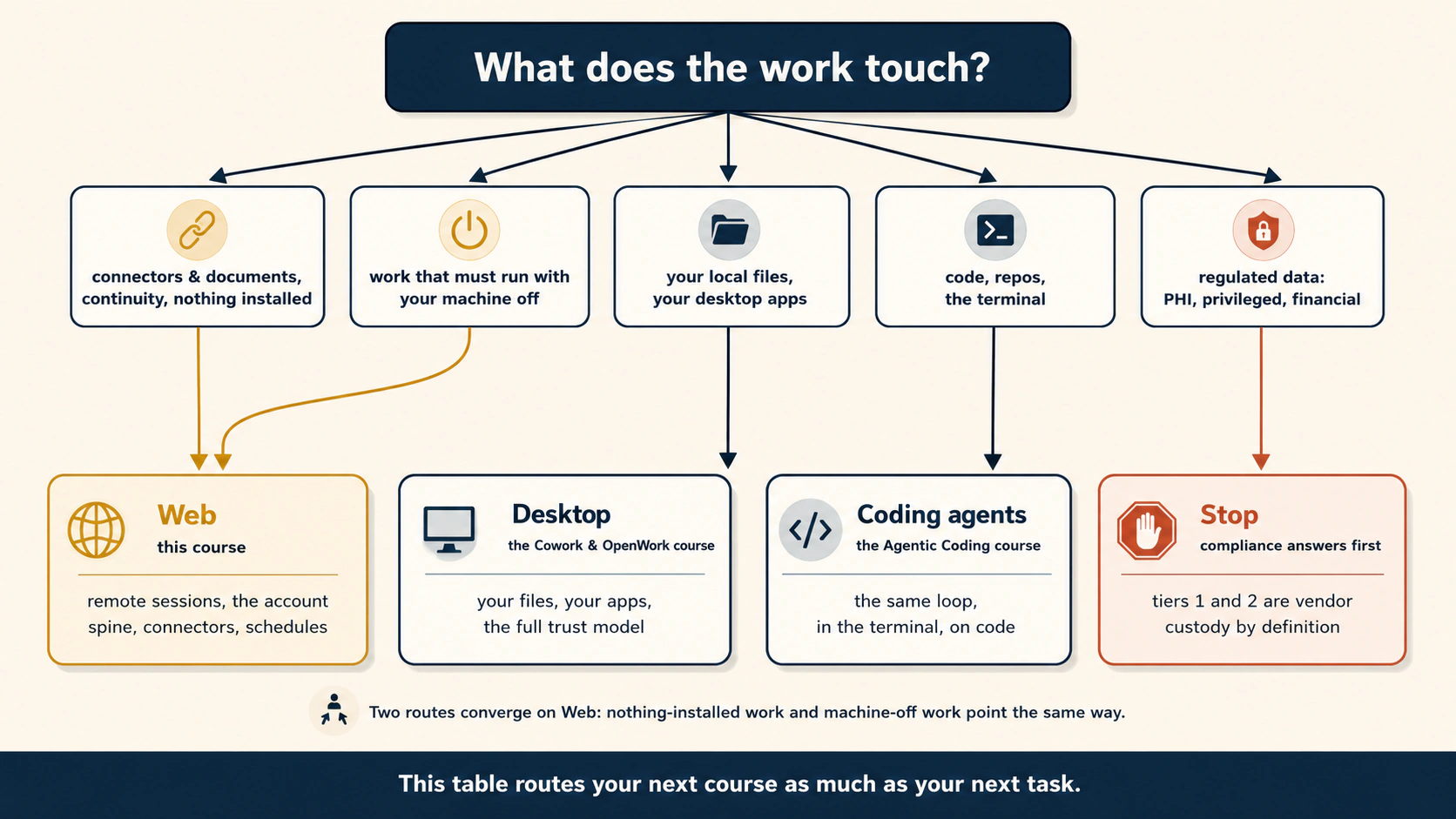
The diagram is a good first router. Use the table below when the edge case matters:
| Work pattern | Best starting surface | Why |
|---|---|---|
| One-off thinking, drafting, designing a workflow | Chat | No need to delegate a run that has no multi-step execution. |
| Cloud files and connectors, and it must keep working with the device off | Cloud-only Cowork or Work | No local dependency. Strongest unattended continuity. |
| A cloud session needs one approved local folder or browser while you are online | Cloud plus desktop bridge | Keeps cloud continuity while borrowing local tools. |
| Work is fundamentally local files and apps, and local custody matters | Local desktop agent | The machine and data are the execution surface. |
| Work is a repository, terminal, tests, codebase, or CI, which means continuous integration, the automatic system that tests code changes and merges them | Coding agent or terminal | The repository and toolchain are the system of record. |
| Work needs a website with no connector | Browser path | Built-in browser for delegated work. Claude in Chrome for the page already open. |
| Regulated or contractually restricted data | Stop and verify | Availability is not permission. Get the written compliance answer for the exact surface. |
Two compliance examples show why the last row cannot be waved away. Three short terms first. HIPAA is the US health privacy law. PHI means protected health information, such as a patient name attached to a diagnosis. A BAA, or business associate agreement, is the contract a vendor signs before it may handle PHI for you.
Anthropic now exposes Cowork activity to Enterprise compliance tooling, including Compliance API coverage. That approves no regulated workload by itself. As of this fact check, Anthropic states that Cowork is not covered under its BAA for HIPAA use. OpenAI makes the same point. Event-triggered Work tasks in ChatGPT for Healthcare are not BAA-covered and must not process PHI.
The row stands as written. When the work really does need the identifiers, product availability is not permission, and the written answer comes before the upload. What the row leaves out is a branch. Ask what the task needs: the identifiers, or only the pattern. A spending-trend analysis rarely needs customer names. Remove them, check what is left against your organization's standard, and you may not be routing regulated data at all. Removing what the task does not need is a route, not an evasion. The Claude Certified Associate, Foundations exam guide (v1.0, July 2026) states the safeguard as removing or masking regulated identifiers before use. Stripping identifiers can also fail in two ways that are hard to see. Governance, Risk & Responsible Use owns the full treatment, including both of them.
A bridge is a convenience, not a custody loophole
If a cloud Cowork session reads a local file through Claude Desktop, its contents are processed in Anthropic's cloud. So do not route sensitive work to "local file" and assume local custody. The first question is where the processing happens, not where the file was sitting five seconds earlier.
Browser choice is also routing
- Built-in Cowork browser: "Go handle this website task for me." Separate browser state, desktop component required.
- Claude in Chrome: "Work with me on this page or account I already have open." Uses your Chrome context.
- Connector: "Use the service's structured interface." Prefer this when it covers the workflow.
The route can change inside one assignment. A cloud session may read Drive through a connector, visit a portal through a bridged browser, then save the file back to Drive. What matters is knowing which boundary each step crosses.
Do not choose a tool because it is newer. Choose it because it fits where the work lives, whether it must continue without your device, and who may process the data. A bridge reaches into your computer. It does not move the cloud into it.
Route by what the work touches, whether it must run with your device off, and who may hold the data. Regulated work needs a written answer before the upload, not after.
Check yourself
Route three tasks. First, a weekly Slack and Drive brief while you travel. Second, reorganizing 200 local client files. Third, pulling invoice PDFs from a vendor portal with no connector while your desktop is online.
Show answer
The first is a cloud-only agent surface, because all sources are cloud-reachable and the task must survive your device being off. The second is a local desktop agent, if the job is on-device and custody matters. The third fits a browser path through the desktop bridge. Start with a tight gate.
11. The open path: no vendor cloud
Every co-worker course in this book pairs a vendor tool with an open-source twin: Claude Code with OpenCode, Cowork with OpenWork. This course broke that pattern, because its tabs pair two closed products. That was on purpose. Two rivals shipped the same shape within days, one as a remote session, the other as a mode inside its chat app. That is the evidence for this book's thesis. But a pattern broken in silence becomes a bias. So: can you have this surface with no vendor cloud at all?
Yes, with work. Two open paths exist today. Some words in them, such as self-hosted and cron, are the engineer's. You do not need them yet, only the fact that these paths exist.
OpenWork, remote and shared workspaces. OpenWork is the open-source desktop co-worker you meet in the next course. It can connect to a worker running somewhere other than your laptop: a self-hosted OpenWork worker you reach by URL and access token, or your organization's shared cloud workers. That is this course's core idea, on infrastructure you or your organization control. The window is yours. So is the building.
OpenCode, with a scheduler you own. For repository work, the open answer to Concept 9 is a coding agent fired by your own clock: cron on a machine you run, or a scheduled GitHub Actions job. Loop Engineering teaches the full pattern. Know today that it exists and is not exotic.
Now the trade, said plainly. The companies sell you a spine. The open path makes you build one. On the vendor surface, everything is handed to you and working on day one: sessions, files, sync, the phone gate, the scheduler. But it lives in their custody, in their format, at their price. On the open path, each of those is yours to set up, run, and fix. In exchange you get two things no vendor sells. First, custody, meaning your data on machines you control. Second, choice, meaning which model sees your prompts. Neither side is the noble one. Concept 10's regulated-data row is a case where custody wins. A solo consultant shipping briefs by Friday is a case where the spine wins. Most readers hold both answers, one per task.
The vendor's surface is a furnished office. Desk, drawers, doorbell, all working on day one, inside their building. The open path is an empty room you furnish yourself. More work, but your building, your rules, and your choice of who sees what. Sensitive work often needs your building. Fast work often needs the furnished office.
The vendor sells you a working spine and holds your data. The open path gives you custody and choice, and asks you to build and operate the spine. Pick per task, not once.
Check yourself
An NGO asks you to set up weekly donor-report automation. Their data policy forbids donor records on third-party consumer platforms, but the team has no engineer. Which path does the policy force, what does the team lose, and what practical warning do you owe them before they commit?
Show answer
The policy forces the open path. Donor records cannot land in tiers 1 and 2 of a consumer vendor platform, and those tiers are the vendor surface's foundation. What they lose is the free spine: sync, the phone gate, and the managed scheduler, which someone must now build and keep running. The warning: "This path trades a subscription fee for an operator. Someone here must own the setup, the updates, and the morning it breaks." Custody is paid for in operations.
12. What this surface cannot do, and where this goes
The web surface still does not make weak work good. Memory can preserve a bad assumption. A browser can execute a bad plan faster. Auto approval can reduce interruptions without making the underlying judgment correct. Scheduling can repeat an error every Monday. Your durable controls remain the brief, the plan review, the permission boundary, the checker, and the exit.
The vendor still owns important parts of the harness. On a managed surface you do not fully control the runtime, sandbox, lifecycle, model routing, or enforcement machinery. Cowork plugins can now bring hooks and sub-agents into Cowork. That is still different from owning a local coding harness where you write and run the guardrails yourself.
A cloud-to-desktop bridge is not the same as a local runtime. It can lend a remote task selected access to local folders, browsers, or computer use while the desktop side is available. It does not remove cloud processing.
Browser agents have a security ceiling. What makes them useful, reading arbitrary pages while signed in and taking actions, also creates a path for hidden instructions. Screening reduces risk. It cannot make untrusted content trusted.
Persistent context creates both power and lock-in. Sessions, Projects, memory, instructions, plugins, and browser logins make the assistant easier to use over time. Keep critical instructions and finished work portable.
And some work belongs elsewhere:
- Cowork & OpenWork goes deeper into desktop and local work, folders, browser and computer use, live artifacts, trust levers, and regulated workloads.
- Agentic Coding teaches repository work and coding agents.
- Spec-Driven Development turns a good brief into a checkable specification.
- Loop Engineering builds recurring loops with explicit stopping conditions, state, and checkers.
- Harness Engineering and Trusting the Checker move from rented controls to controls you design and evaluate.
- Leaving the Laptop makes the runtime decision explicit: what belongs on a managed surface, a managed runtime, your infrastructure, or a fully owned stack.
Chat is where you often design. The agent surface is where delegated work runs. The agent loop and its tools may live in different places. The discipline is to know the shape, the boundaries, and the custody at every step.
The product became more capable in August, not less dependent on judgment. More memory, more browser reach, more plugins, more autonomy. That makes the old disciplines more valuable: clear briefs, explicit boundaries, checks, and your own system of record.
More capability does not make weak work good. The brief, the plan review, the permission boundary, the checker, and the exit are still the controls that decide the result.
Check yourself
A colleague says, "Cowork can now use local files and browsers from a cloud session, so the difference between cloud and local no longer matters." Correct them.
Show answer
The bridge makes the boundary more flexible, not irrelevant. A cloud session still processes work in the vendor cloud, and bridged local tools still depend on the required desktop component being available. Runtime location, tool location, and custody remain separate decisions.
Where this book uses this surface (dogfooding)
Dogfooding means using your own product on your own real work. As of 31 August 2026, this book's own unattended loops do not run on this surface, and the reason is Concept 10 doing its job. The book is a repository, and its loops are attached to it. Its review gate lives beside its merge gate in CI. Leaving the Laptop explains that choice. What the work touches routed it to a different surface.
This surface still earns its keep in two ways. First, the chat-side design work before every loop: drafting briefs, testing reviewer prompts, running one beat by hand. Second, connector and document tasks around the book, which is the reporting work Concept 9 called this course's ceiling. Design in the chat box, run on the surface the work touches.
🚀 Projects
Six projects, easy to hard. Use real but low-stakes work. Do not practice on banking, medical, identity, privileged, or other regulated data simply because a tool can reach it.
📱 Project 1 · 20 min · The worker and tool location test. Difficulty: easy. Uses Concept 2. Do. Start a cloud task using only a cloud-reachable source. Close the tab and reopen the same task from another surface. Then, if you have Claude Desktop, try a harmless task that uses one connected local folder, and watch what changes when the desktop goes offline. Done when you can explain, without product names, the difference between agent-loop location and tool-execution location.
🗂️ Project 2 · 30 min · The three-tier audit. Difficulty: easy. Uses Concepts 4 to 6 and 8. Do. Run one task that produces a real deliverable. Name the state layer holding the work and the file tier of every output. Done when the final deliverable exists in tier 3 and you can say which context would be lost if the vendor account disappeared.
🔔 Project 3 · 30 min · The gate lab. Difficulty: easy to medium. Uses Concept 7. Do. Use a harmless test folder or a draft-only connector action. Run the workflow in Manual mode first and note every interruption. If your plan offers a safety-screened automatic mode, rerun the same bounded workflow and compare. Do not use Skip mode for purchases, sending, deletion, or sensitive accounts. Done when you can state what was allowed automatically, what escalated, and which mode you would choose for real.
⏰ Project 4 · 30 min, plus one week · The first cloud schedule. Difficulty: medium. Uses Concept 9. Do. Build a Monday brief from cloud-reachable sources only. Write the six answers first: trigger, touch, device independence, success signal, autonomy, empty case. Walk it twice before scheduling. Done when it has fired twice with your computer off and each run left a verifiable signal in tier 3.
🔁 Project 5 · 45 min · One task, two harnesses. Difficulty: medium. Optional, because it needs both products. Uses Concept 3. Do. Give the same low-stakes assignment to Cowork and ChatGPT Work. Map what you observe to heartbeat, reach, loop, spine, gate, and body. Done when your one-page comparison names one implementation difference in each of three parts and still shows the same six-part shape.
🧳 Project 6 · 60 min · The portability drill. Difficulty: capstone. Uses Concepts 4, 5, 10, and 11. Do. Pretend your preferred vendor disappears tomorrow. Using only tier-3 files and context you own, rebuild one working workflow: instructions, source locations, definition of done, and last deliverable. Done when you have a written list of what you could not rebuild. That list is your lock-in exposure.
Appendices: the later courses, on the web
The rest of the General Agents section goes deeper into desktop and coding surfaces. This course stays browser-first, and August 2026 erased several old boundaries. A cloud Cowork task can borrow selected desktop tools. Plugins can carry sub-agents and hooks. So these appendices ask three precise questions instead of "Can the web do this?"
- Can a browser-only cloud session do it with nothing installed?
- Can a cloud session do it only when a desktop bridge is available?
- Does the job require a truly local or user-owned runtime?
One rule still holds. On the managed surface, you rent most of the harness. In the later engineering courses, you increasingly build, inspect, and own it. A managed Cowork plugin hook is real automation, and it is not the same as owning the runtime, repository, hook runner, sandbox policy, and CI system.
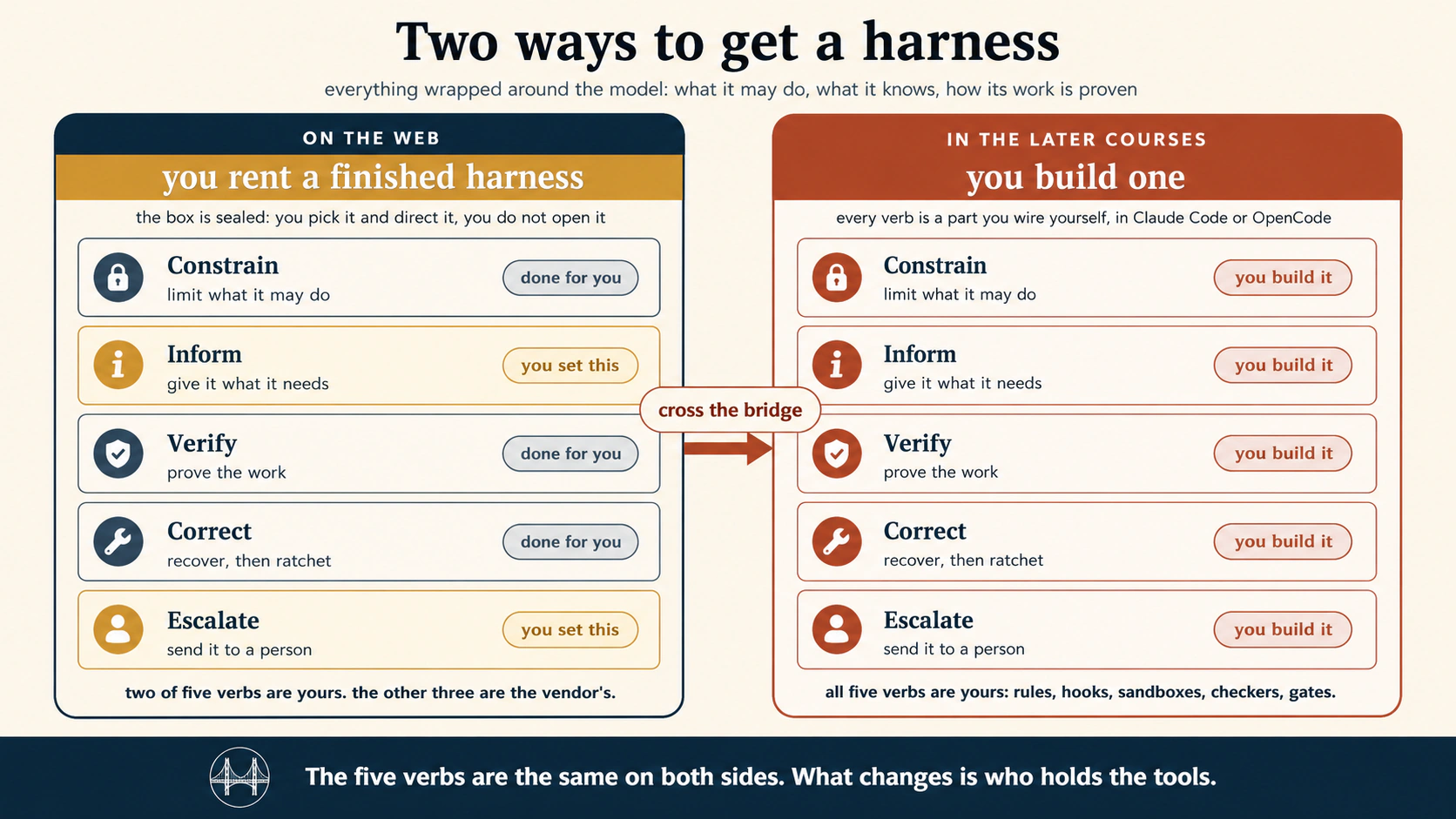
Current Cowork gives you more shaping power than the artwork suggests. You can influence all five verbs through instructions, permissions, approval modes, plugins, hooks, sub-agents, and review policies. The boundary that still matters is ownership and reproducibility. The vendor owns the managed runtime and safety layer. In the later courses, you own and can reproduce far more.
Read every "does not transfer" row below with that in mind. The durable boundary is managed harness against owned harness, cloud custody against local custody, and optional bridge against required runtime.
Appendix A · Agentic Coding, on the web
The Agentic Coding course teaches Claude Code and OpenCode through the filesystem, terminal, repositories, and coding harnesses. Its deepest subject is context engineering plus enforceable execution: what the agent sees, what it may change, and how its work is checked.
Much of that discipline transfers to Cowork. Some of the packaging now transfers too. What does not transfer is ownership of the coding runtime.
Transfers cleanly:
| That course teaches | On this surface |
|---|---|
| Plan before action | Concept 8. Ask for the plan while changes are cheap, then choose the gate the work deserves. |
| Persistent project instructions | Concept 4. Use Project instructions, global and folder instructions where supported, and your own portable context file for durable rules. |
| Context discipline | Start a fresh session when the old conversation is noise. Continue when the history is part of the job. Memory does not replace deliberate context. |
| MCP and connected systems | Concept 6. Managed connectors are the web-friendly version of giving an agent structured access to real systems. |
| Skills | Packaged know-how transfers directly. Skills can be reused across tasks without turning every prompt into a procedure manual. |
| Prompt-injection discipline | Same principle, wider attack surface. Untrusted content stays untrusted whether it arrives through a connector, browser, document, or repository. |
Now transfers partly through Cowork plugins. Current Cowork plugins can package skills, connectors, sub-agents, and hooks. The July version of this course drew too hard a line here. But managed extension points are not the same as owning the coding harness.
| Capability | Cowork plugin version | Coding-agent version |
|---|---|---|
| Sub-agents | A plugin can package specialist workers that Cowork coordinates inside Anthropic's managed environment. | You design workers around your repository, tools, models, context, and orchestration code. |
| Hooks | Plugins can attach hooks that run in Cowork at supported lifecycle points. | Your hook code runs in the harness you operate, tied to local tools, repository state, tests, and CI. |
| Reusable role bundles | A plugin can combine know-how and access into a role. | A coding harness combines roles with filesystem rules, commands, branches, tests, and sandboxes you own. |
Still belongs to the coding surface:
| That course teaches | Why it remains different |
|---|---|
| A real local repository and terminal | A cloud session can borrow local-file or browser access through Desktop. That is not attaching a coding agent to your repository and shell as its native environment. |
| Git-native isolation and recovery | Worktrees, branches, commits, diffs, and git-backed rollback require the repository to be the execution surface. |
| Command and runtime policy you own | You decide how commands run, which paths are writable, and what tools exist. Cowork still supplies the managed runtime underneath. |
| Model and runtime routing you control | Coding tools and APIs expose model selection, headless runs, and CI integration that a managed surface may hide. |
| Repository-enforced verification | Tests, linters, schema validators, type checks, and CI gates can make “done” machine-verifiable before a change lands. |
The boundary is managed Cowork extension against a coding harness you own. Move to the coding course when the repository, terminal, git history, tests, or CI must become the agent's native operating environment.
Appendix B · Cowork and OpenWork, on the web
The Cowork & OpenWork course is no longer simply "the local version of this course." Cowork now spans cloud sessions, local sessions, web and mobile steering, Chrome, a built-in desktop browser, connected folders, plugins, sub-agents, and optional computer use. The cleaner split is browser-first managed Cowork against desktop capability and local custody.
Transfers cleanly to browser-first Cowork:
| That course teaches | Here, on the managed cloud surface |
|---|---|
| Outcome-based delegation | Concept 8. The same handoff: outcome, constraints, plan, gate, review. |
| Projects and persistent context | Concept 4. Sessions, Projects, semantic memory, instructions, and files form a real cloud state spine. |
| Connectors and Skills | Concept 6. First-class managed capabilities, with no local setup for cloud-reachable services. |
| Plugins and role bundles | Current Cowork plugins can bundle skills, connectors, and sub-agents. Hooks and sub-agents run in Cowork. |
| Scheduled work | Concept 9. Cloud schedules run without your device when the workflow is cloud-reachable. |
| Approval and autonomy modes | Concept 7. Manual, Auto, and Skip expose the autonomy ladder directly. |
Transfers only with a desktop bridge:
| Desktop capability | What changes when the agent loop stays in the cloud |
|---|---|
| Connected local folders | A cloud session can reach only folders explicitly connected through Claude Desktop, while the bridge is available. The data is processed in the cloud. |
| Built-in Cowork browser | The browser lives in Claude Desktop. Web and mobile can steer it while the desktop app is online. |
| Claude in Chrome | Uses your Chrome context and logins. It is a Cowork surface, and it depends on the extension and desktop connection rather than a pure cloud connector. |
| Local connectors and plugins | They can widen Cowork's reach, and they create a device dependency and a larger trust boundary. |
| Computer use | Cloud Cowork can call desktop computer use where supported, and the screen becomes a high-risk execution surface. The desktop course teaches it. |
Still a different subject in the desktop course:
| That course teaches | Why it remains a different subject |
|---|---|
| Local execution and local custody | A local session runs the agent loop on your machine. A cloud session reading a local file through a bridge still processes it in the cloud. |
| Live artifacts | Current Cowork live artifacts are a desktop capability, useful for lasting interactive dashboards. They are not a reason to bloat this browser-first core. |
| Backup and recovery through your filesystem | Time Machine, git, Drive history, or other local recovery belongs to the environment that owns the files, not to platform session history. |
| OpenWork and the own-model path | The open-source twin is about controlling the runtime, model path, and custody. Different goals from reaching a local folder. |
| Regulated-workload configuration | Governance depends on the exact surface and configuration. Enterprise visibility does not automatically make a surface approved for every regulated data class. |
Carry Concept 10's compliance rule into the desktop course. Enterprise controls do not by themselves approve a regulated workload. Verify the exact surface, configuration, and contract coverage before use.
Cowork looks less like two products called "web" and "desktop" and more like one managed system with several execution surfaces. That is why Concept 2's two-axis model matters. The desktop course teaches the trust, custody, and local-runtime consequences beneath it.
Appendix C · Loop Engineering, on the web
The Loop Engineering course teaches a system that starts work, carries state forward, checks the result, retries or stops under explicit rules, and escalates when a person is needed. This course borrowed its six-part lens.
The August Cowork changes strengthen the overlap. Scheduled tasks, cloud memory, Projects, plugins, sub-agents, and hooks let Cowork host workflows much closer to real loops.
What transfers well:
| Loop concept | Managed-web version |
|---|---|
| Heartbeat | Concept 9. Once, on a schedule, or another supported trigger or watch pattern. |
| Persistent state | Sessions, Projects, cloud memory, instructions, files, and plugin-managed state where applicable. |
| Reusable procedure | Skills and plugins keep recurring work from starting from zero. |
| Worker decomposition | Cowork plugins can include sub-agents, so a managed task can divide work among specialist workers. |
| Lifecycle automation | Cowork plugin hooks can run at supported points in the managed workflow. |
| Human escalation | Concept 7. Permission modes, blocked actions, and explicit review points provide the gate. |
What still makes Loop Engineering a separate course. A managed surface gives you a loop. Loop Engineering teaches you to own the loop's contract.
| Loop Engineering capability | Why the engineering surface is still different |
|---|---|
| Explicit stopping and retry logic | You write the exact cap, no-progress rule, and failure path rather than inheriting the product's run-until-done behavior. |
| A spine you own | A repository-owned progress.md, rules file, or database can be inspected, versioned, migrated, and read the same way by every run. Native memory stays vendor-managed state. |
| Independent maker and checker design | Cowork can coordinate sub-agents, including review roles. An engineered loop lets you define the checker with its own rubric, model, inputs, and acceptance contract. |
| Isolation | Worktrees, containers, branches, locks, and per-run sandboxes are engineering controls around shared state. |
| Re-runnable orchestration | Scripts and workflows can reproduce the same sequence headlessly in CI or another runtime you operate. |
| Portable unattended runtime | The same loop definition can move from a laptop to CI, a managed runtime, or your own infrastructure with its state and checks written down. |
Cowork is no longer merely a scheduler that reports. With plugins, sub-agents, hooks, and persistent state it runs real managed loops. Move to Loop Engineering when the heartbeat, state, checker, stopping rules, and recovery must be assets you own.
Appendix D · Harness Engineering, on the web
The Harness Engineering course teaches the layer around the model that turns intelligence into dependable work: rules, tools, isolation, verification, recovery, and escalation.
This course began with a phrase. On the web, you rent a finished harness. Keep the phrase, and update what "rent" means. Modern Cowork is not a sealed box. Plugins can add skills, connectors, sub-agents, and hooks. Approval modes expose part of the autonomy policy. Enterprise controls add administration and visibility.
The deeper distinction is who owns the enforcement layer.
| Harness verb | What you can shape on managed Cowork | What remains vendor-owned |
|---|---|---|
| Constrain | Connector and site permissions, folder access, approval mode, plugin behavior, task boundaries | Core sandbox, platform policy, supported hook points, underlying tool and runtime enforcement |
| Inform | Global, Project and folder instructions, memory, Skills, plugin resources, files and connectors | Context assembly rules and product internals you cannot fully inspect or replace |
| Verify | Review steps, specialist sub-agents, plugin hooks, explicit check instructions | The underlying runtime, product safety classifiers, and enforcement semantics |
| Correct | Retry and redirection, versioned tier-3 files, workflow and plugin changes | Platform rollback and lifecycle behavior beyond the controls the product exposes |
| Escalate | Manual, Auto or Skip choice, approval prompts, blocked-action escalation, notifications | Which events exist, how safety decisions are implemented, and infrastructure logs unless exposed |
That table is more accurate than saying "you cannot add a hook on the web." Sometimes you can. What you cannot do is treat a managed hook as identical to a guardrail enforced in a runtime you control.
When Harness Engineering becomes necessary:
- A rule must be enforced even if the model's instructions say otherwise.
- A path, network destination, branch, command, or data class must be fenced by infrastructure you control.
- Verification must run as code and block acceptance automatically.
- Every failure must turn into a version-controlled rule, test, hook, or policy.
- You need to inspect or replace the runtime component implementing the control.
- Governance requires evidence from your own logs, CI, policy engine, or deployment environment rather than only the vendor's product surface.
Cowork plugins are a valuable intermediate step, because they teach the same idea. Move repeated behavior out of one-off prompting into a reusable harness layer. Harness Engineering keeps going until the critical control is yours, inspectable, testable, and portable.
Rented enforcement against owned enforcement. The updated boundary is not "web equals prompts, desktop equals harness." Managed Cowork now exposes real harness extension points. The boundary is who enforces the rule. Use the managed surface while its controls match the consequence of the work. Build your own harness when a control must be provable on your terms.
Appendix E · Trusting the Checker, on the web
The Trusting the Checker course asks the question the loop and harness courses postponed. How do you know the checker is any good? When an agent grades its own work, that verdict is a model's opinion. The course teaches evals, which means testing the tester, so "the checker said PASS" becomes a number you can defend. It builds a golden set of case files, runs them headlessly, calibrates the judge, and gates every change on the result.
You can prototype cases, repeated checks, and reviewer roles on a managed surface. The course's dependable form is a version-controlled case set, a repeatable runner, calibrated judges, baselines, and CI.
Transfers, as judgment. This is the real value on the web:
| That course teaches | On the web, it becomes a habit of mind |
|---|---|
| An agent is a distribution, not a function. Grade the rate, not the run. | The most useful idea to carry. A scheduled report that ran well once is one run, not proof. If it matters, check it across several runs. |
| The judge is a model too. A PASS is an opinion that needs calibration. | When a web agent says "done" or "I checked it," that is a claim, not a proof. Review sub-agents still need evidence. Spot-check early. |
| Read which failed before how many. A rate hides severity. | When you review a batch of agent work, the wrong three items matter more than a high overall count. This reading habit works on any output, from any surface. |
| The bar is a decision, not a discovery. | How good is good enough, and for which tasks, is your call as the person directing the agent. It is Concept 8's plan review, applied to results. |
| Demos are the weakest evidence. | "It worked when I tried it" is one run, on a task chosen because it works, watched by someone hoping it does. |
Does not transfer in the course's engineered form:
| That course teaches | What the managed surface is missing |
|---|---|
| The golden set, a version-controlled folder of case files | Cases are JSON files in a repository, reviewed and dated like code. A managed web task is not a substitute for an eval repository you own. |
The runner, claude -p or opencode run in a shell loop with jq | Headless command-line execution and shell grading. A managed task may run code, and that is not operating your own runner. |
| Calibrating the judge, the blind 20-item protocol and the four-cell table | You can do the thinking by hand. The course measures a model judge you can inspect and swap, run repeatedly under controlled conditions. |
| The regression suite and CI gate, re-run on every change, failing below baseline | An eval job wired into CI with a committed baseline. The reproducible gate belongs in the system that owns the release decision. |
| Drift watching on a schedule, nightly runs with an alert on a drop | The course runs the full suite against a committed baseline and alerts on a meaningful drop. Keep that baseline in a system you own. |
| Goodhart's law defenses, sealed hold-outs the agent never sees | Sealed hold-outs need a boundary the system under test cannot inspect. Easiest in a repository you control. |
You can practice evaluation on the managed surface: build test cases, run repeated trials, add a review sub-agent, and record failures. It becomes a separate engineering course when those checks must be reproducible, calibrated, version-controlled, and able to block a release. Grade a rate, not a demo. Read severity before volume. Calibrate the judge.
Appendix F · Leaving the Laptop, on the web
Leaving the Laptop asks the final runtime question. Where should a proven workflow live, and who operates it? The August architecture makes that more interesting, because cloud and desktop now cooperate in one task.
Do not classify a workflow by the screen you started it from. Classify it by four facts:
- Where does the agent loop run?
- Which tools are required, and where do they execute?
- Who must keep a device or service alive?
- Who holds and processes the data?
A cloud Cowork session controlled from a laptop is still a cloud session. One that borrows a local folder through Desktop is a cloud loop with a device dependency. A local session is different again.
How the web course maps to the runtime journey:
| Pattern | What it means | Good fit |
|---|---|---|
| Interactive cloud session | The vendor runs the agent loop. You start and review it from web, desktop, or mobile | One-off delegated knowledge work |
| Cloud scheduled task | The vendor starts and runs the loop on a clock. Every required tool must be cloud-reachable for true device independence | Personal recurring reports |
| Cloud loop plus desktop bridge | The vendor runs the loop, and one or more tools depend on Claude Desktop, the browser, or local folders being online | Hybrid work, not a device-independent schedule |
| Local agent session | The agent loop and local tools run on your machine | Local custody, local apps and files, workstation-centered workflows |
| Managed runtime or CI | A platform operates a headless workflow defined through code or configuration | Team workflows, repository automation, service integration |
| Your infrastructure | You operate the runtime and harness | Strongest control, highest operational responsibility |
What travels when you move. Your best assets are not vendor buttons. They are the outcome definition, portable instructions, source-of-truth locations, schema, checks, failure rules, permission boundaries, and examples of good output. Keep those written down and a move becomes a re-platforming exercise rather than rediscovering the workflow from memory.
What does not automatically travel. Native memory, session history, Projects, plugin implementations, browser login state, approval labels, and vendor-specific schedule mechanics. Treat these as conveniences around the workflow, not the workflow's only copy.
The web surface no longer has one clean ceiling. It has several runtime patterns, including a hybrid bridge. Leaving the Laptop teaches you to stop asking "web or desktop?" and make the operational decision. What must stay awake, where does state live, what is the blast radius, and who is responsible when the loop fails at 3 a.m.?
Appendix G · The harness war, industry-wide
The six appendices look inward. This one looks outward. The durable market signal is not a model ranking. It is that major vendors compete on the whole agent system: memory, tools, browser reach, schedules, plugins, approvals, runtime, identity, and governance. That is the harness war.
Industry snapshot, facts checked 31 August 2026. This appendix is deliberately less product-specific, because names age faster than the architecture. Verify every live product before a purchase or curriculum decision.
Three fronts are useful.
Front 1 · The everyday work surface, where you rent a finished harness. This is the layer you learned here. OpenAI's ChatGPT Work and Anthropic's Claude Cowork are direct examples. Google, Microsoft, and Meta are pushing agent capabilities into the surfaces where their users already work. The advantage is distribution plus state plus tools plus permissioned action.
Use the six-part lens when any new product appears:
- Heartbeat: can it start later, recur, or react to a supported event?
- Reach: which connectors, browsers, local tools, or computer surfaces can it use?
- Loop: how long can it work, and who decides it is done?
- Spine: what persists? Sessions, Projects, memory, instructions, files?
- Gate: what needs a person, and what safety policy runs automatically?
- Body: where does the agent loop run, and where do its tools execute?
Front 2 · The managed agent platform, where you rent the runtime. Cloud and enterprise platforms increasingly provide agent runtimes, identity, connectors, observability, policy, state services, and deployment controls. Here a team defines an agent that other people or systems may depend on. The differentiator shifts to governance and operations: identity, least privilege, auditability, isolation, evaluation, deployment, cost control, and failure handling.
Front 3 · The open and self-hosted stack, where you build and operate the harness. Open-weight model families such as Qwen, DeepSeek, and Llama can be components in systems you host yourself. But "open weights" is not "you own the whole agent." Full control arrives only when you also own the runtime, tool layer, state, sandbox, policy, and checker. Calling an open model through somebody else's hosted API is still hosted processing.
The larger lesson. The market will keep renaming the pieces. One company calls it a task, another a routine, another an agent, another a plugin. Do not chase the noun. Ask the six questions. Then ask the two August questions from Concept 2. Where does the loop run, and where does each tool execute?
Answer those eight questions and you can read a new agent product before the marketing page finishes loading. That is why this course teaches the shape rather than a screenshot.
Sources & further reading
Inside this book
- Skills & Connectors. The structured reach layer this course assumes.
- Cowork & OpenWork. Desktop and local work: folders, browsers, computer use, trust levers, custody, and open alternatives.
- Agentic Coding. Repository work and user-owned runtime controls.
- Loop Engineering. The heartbeat, state, checker, and stopping-condition system behind safe recurring work.
- Leaving the Laptop. The full runtime and custody decision after a workflow proves itself.
Claude Cowork, current primary sources
- Get started with Claude Cowork. Availability, cloud tasks, Projects, Manual, Auto and Skip, global and folder instructions, plugins, and scheduling.
- Claude Cowork architecture overview. Cloud versus local sessions, and the desktop bridge for local files and browser tools.
- Use Claude Cowork on web, desktop, and mobile. Which capabilities require desktop, and how one cloud session moves across surfaces.
- Claude's memory works everywhere, and you decide what's in it (Aug. 25, 2026). Shared chat and Cowork memory, and editable memory topics.
- Use Claude's chat search and memory to build on previous context. Cloud Cowork memory, workspace memory, controls, and the local-session limit.
- Claude gets its own browser in Cowork (Aug. 26, 2026). Built-in browser launch, and how it differs from Claude in Chrome.
- Use the built-in browser in Claude Cowork. Login handling, web and mobile steering, browser choice, and safety.
- Claude in Chrome is generally available (Aug. 26, 2026). Autonomous browser actions and action safety screening.
- Claude in Chrome permissions guide. Current Cowork side-panel approval defaults and the Auto-mode usage trade-off.
- Use Claude Cowork safely. Hidden instructions, trust boundaries, approval guidance, and computer-use cautions.
- Use plugins in Claude. Plugins as skills plus connectors plus sub-agents. Hooks and sub-agents in Cowork.
- Schedule recurring tasks in Claude Cowork. Cloud schedules and capability inheritance.
- Compliance API coverage extends to Claude Cowork and Claude Code. Enterprise session visibility. Updated Aug. 26 to general availability for the Cowork and Claude Code surfaces listed there.
- HIPAA-ready Enterprise plans and Covered Models under a BAA. Why surface-specific compliance checks matter. Cowork is not currently BAA-covered.
ChatGPT Work, live product references
- ChatGPT is now a partner for your most ambitious work. Work launch and product framing.
- ChatGPT Work and Codex. The Work and Codex relationship, cloud versus local Work, local-file custody, and surface-specific availability.
- ChatGPT Work. Current product overview, built-in desktop browser, and Plan mode.
- Using cloud browser in ChatGPT. Remote browser behavior for delegated Work tasks.
- Using the built-in browser in the ChatGPT desktop app. Desktop browser state, tabs, sign-in, website access, and when to use the Codex Chrome extension for an existing Chrome profile.
- Scheduled Tasks in ChatGPT. Current scheduling mechanics, including event-triggered Gmail, Slack, and GitHub tasks, and the Trigger, Condition and Prompt model.
- HIPAA eligible products and functionality. Why event-triggered Work tasks in ChatGPT for Healthcare are not BAA-covered and must not process PHI.
- Plugins in ChatGPT and Codex. The connected-app layer.
- Skills in ChatGPT. Packaged Skills and current access rules.
The open path
- OpenWork. Open-source Cowork-style desktop alternative powered by OpenCode.
Independent and practitioner reading supplied for this update
- TechCrunch, Claude Cowork finally remembers what you told the app in chat. Independent coverage of the Aug. 25 memory change.
- Vellum, Official Claude Cowork Breakdown. Useful competitive framing. Parts of it aged immediately around the changes of Aug. 25 and 26, so use Anthropic's live docs for product facts.
- YouTube, Everything You Need to Know About Claude Cowork, in the Right Order. Useful teaching for "start with the frustration, then let Cowork interview you."
- YouTube, NEW Claude Cowork Update is CRAZY GOOD. Practical explanation of the built-in browser and the warning about hidden instructions. Product facts here were checked against Anthropic's primary docs.
Freshness rule. Everything mechanical on this page was checked on 31 August 2026. The lasting concepts are the six-part harness, the two-axis runtime model, the persistence stack, the three file tiers, the reach ladder, the human gate, the delegation loop, and the routing questions. Recheck the rest before relying on it.
The one-line summary
Chat is where you converse. The agent surface is where you delegate. A cloud agent keeps working after you leave, and it may borrow tools through a desktop bridge. Reach the world through the narrowest tool and the tightest gate the job requires.
The habits, in one place
Start with the frustration when the workflow is unclear, then let the agent interview you. Brief the discovered workflow in full. Catch problems at the plan. Prefer connector over browser, and browser over full computer use. Match the gate to blast radius. Send finished work to tier 3. Schedule only workflows you have walked. Ask where the loop runs and where each tool executes. Read every new product through the six parts.