General Agents
The tools that don't just talk — they do. Learn to drive one; everything else in the book builds on it.
Foundations taught you what AI is and how to keep your own judgment while using it. This section is where you pick up the tool you will use for the rest of the book: a general agent, an AI that does not just answer, it acts. It opens your files, reads them, writes and runs code, and uses other apps to get a task done.
You do not have to install anything to begin. Your first step in this section happens in the same browser tab where Foundations ran:
- General Agents on the Web — the front door to the whole section. Direct your first real agent from a browser tab, with nothing installed: what a remote session is, where your files actually live, how an approval reaches your phone, and how to read any new agent product through one shared shape. Everyone starts here, on day one, whether or not you can code.
When you are ready to bring an agent onto your own machine, there are two doors into the rest of the section, and which you take depends only on who you are:
- Claude Code and OpenCode — for people who work with code.
- Cowork and OpenWork — for everyone else: the same power in a desktop app, aimed at professional and knowledge work.
Same idea, different audience: an AI you direct to do real work, rather than one you only chat with.
This is the hinge of the whole book. Almost everything after it assumes you can drive a general agent. Mode 1 (solve a problem once) and Mode 2 (manufacture a permanent worker) are both, at heart, "you and a general agent." Even the optional Personal Agent Harnesses bridge installs and runs its harness through one of these tools. So this is the single most-reused skill you will learn. And later, the same general agent you drive here becomes the tool you use to build workers. Same tool, bigger job.
The section in three stages
The courses here move you along one line: from holding the tool every second, to directing it precisely, to designing a loop that runs it for you, hardening the harness that loop runs in, giving many loops one shared memory, then measuring whether the checker at its center can be trusted.
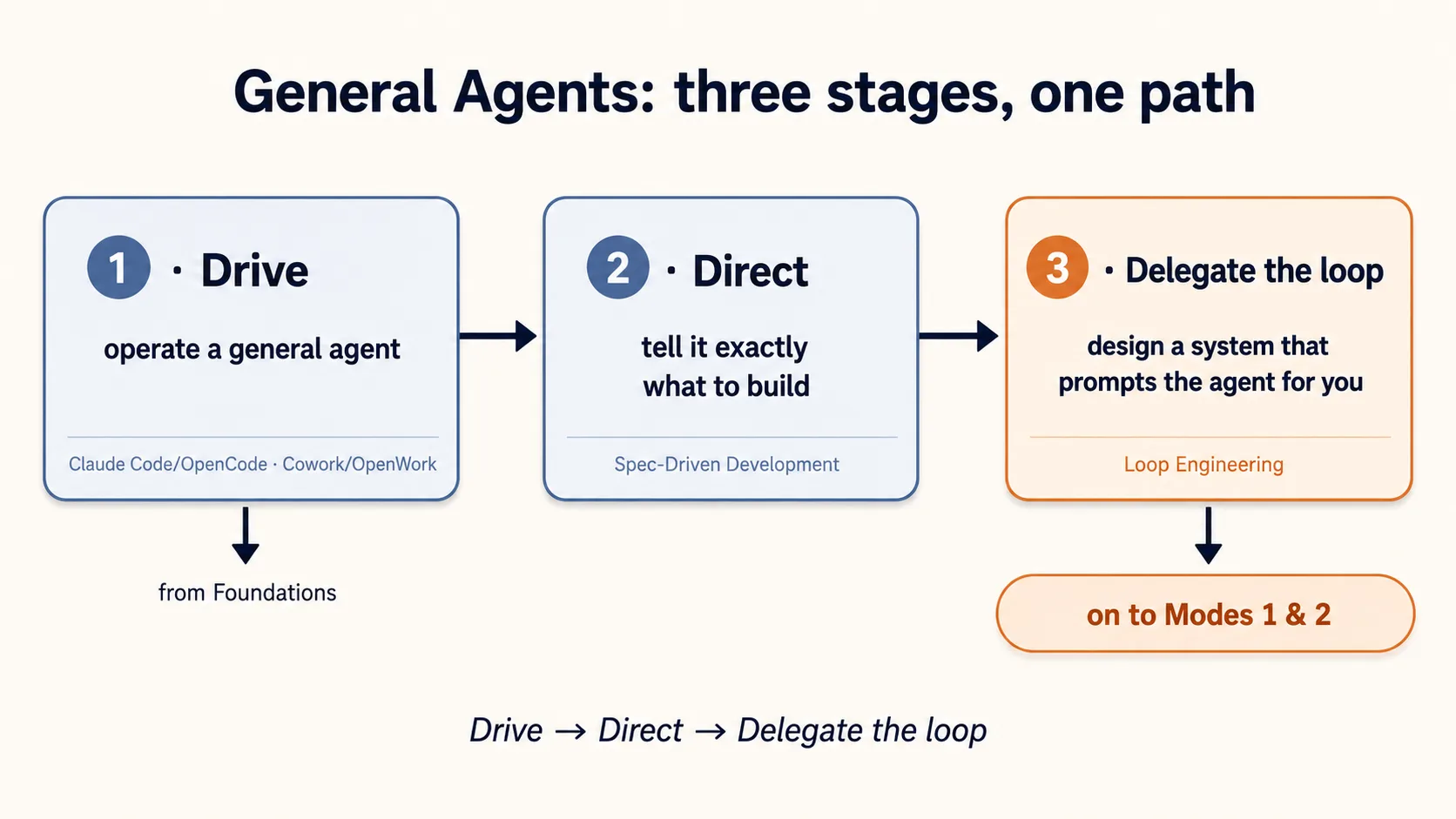
Stage 1 — Drive
Learn to operate a general agent well. Everyone starts on the web with nothing installed; then do the installed-tool course that matches you, and pick up the others later.
- General Agents on the Web — start here, in a browser, with nothing installed. Direct your first agent on the July 2026 web work surfaces (Claude Cowork on the web and ChatGPT Work): remote sessions, where your files live, the approval that reaches your phone, and the six-part lens for reading any agent product. Everyone takes this first, whether or not you can code; then pick an installed tool below.
- Cowork & OpenWork for Professionals — for everyone else. The same kind of agent in a desktop app built for professional work (documents, spreadsheets, slides, research), so you do not need to touch a terminal to put one to work.
- Open Source LLMs: Your Laptop, Your Server/Cluster, the Cloud — the coding track's first stop. Open models are free to download, so the real question is where you run them, and this course answers it at all three scales: on your own laptop with Ollama, on a GPU machine you control with vLLM serving fifty people at once, and in the cloud through OpenRouter, where the frontier open models nobody can self-host live. One idea ties it together, and it is the one to carry: your agent is a harness plus a swappable brain, and the brain is just an address. Part 1 stands alone and needs nothing but a free install. It helps to have driven a coding agent already, but if you have not, its one-command install stands one up for you. Knowledge workers who have already taken Cowork can still do Part 1 for a private AI of their own.
- Agentic Coding: Claude Code & OpenCode — for people who work with code. Plan mode, context management, the rules file, skills, subagents, and connectors (MCP): how to drive a coding agent so it reads your files, proposes a plan, makes the edits, and lets you check the result.
- Website Design — the course where you stop learning about the machine and point it at something real. One website for one client, from an empty folder to a live address someone else can open on their phone: a story planned before any pixels, a client's brand treated as a rule rather than a mood, real photographs and video, a phone version that is not an afterthought, and screenshots used as tests so "does this look right" becomes something you can actually check. Its one idea is the one Stage 2 and Stage 3 keep spending: taste is now a file — the judgment that separates a made page from a generated one can be written down, and any model can load it. Take it once you can drive either tool above; it is far easier to care about specs and loops after you have shipped something and felt where the work goes wrong.
Stage 2 — Direct
Driving gets you results; directing gets you the right result, every time.
- Spec-Driven Development — stop giving the agent vague instructions and start handing it a written spec: exactly what to do, on what, and what "done" means. A clear spec is the difference between an agent that guesses and one that hits the target, and it is the very first thing you carry forward when you cross into Mode 2.
Stage 3 — Delegate the loop
This stage opens with a map and then builds what the map names: design the loop, harden the harness it runs in, give many loops one shared memory, then prove the checker at its center with evals. A last course answers the question they all raise: once a loop is trusted, where should it live?
- The Four Layers — read this first, and read it in under an hour. It is the map for everything that follows: prompt, context, harness, and loop are not four skills you pick between but four containers, each one inside the next, each with its own unit of work. The payoff is a habit rather than a technique. When an agent burns forty minutes and fifty dollars repeating itself, you stop rewriting the prompt (the layer you can edit in ten seconds) and start asking which layer actually broke. It also settles where graphs fit, which is not as a fifth layer. Nothing to install; a chat tab and one agent you have already driven is the whole setup.
- Loop Engineering — the leap from holding the tool to designing a system that prompts the agent for you. You build a small loop that wakes up, looks at what changed, decides what is worth doing, hands each job to an agent, checks the result, and calls you only for the decisions that really need a person. The valuable skill moves from the prompt you write to the loop you design. It is the natural doorway to everything that comes next.
- Harness Engineering — the trust half of the same leap. A loop that runs while you sleep needs a layer that decides what the agent may do, what it must know, how its work is proven, and what happens when it goes wrong. That layer is the harness — Claude Code and OpenCode each ship one — and this course teaches you to engineer it on purpose: permission walls, sandboxes, automatic checks, and the habit of turning every caught mistake into a rule that makes repeating it impossible.
- Graph Engineering — the width half, and the course to take when a job is wider than one loop. Ask for forty file reviews and most people write "review 1, then 2, then 3," which runs correctly and takes the time of all forty added together, even though no review needs another. That list is already a graph, the saddest one, and most of its arrows carry nothing. The course teaches the one test that finds those fake arrows, the one shape that replaces them (fan out, reduce with code, verify with a checker that has not seen the work, merge with a count), the three quiet ways a graph fails, and the anchors that stop a ring of agents from grading each other's homework. The model was never the bottleneck; the line you drew was. It ends with one real run in both tools, and it tells you honestly when a loop was the right answer all along.
- Trusting the Checker — the loop runs, the harness proves the work, and at the center sits a checker that says PASS or FAIL. But how do you know the checker is any good? This course teaches evals: you build a small folder of test cases from real failures, grade the reviewer several times instead of once, calibrate it against your own judgment, and gate every change on the result. It turns "the checker said PASS" into a number you can defend, using only files, shell, and jq.
- Leaving the Laptop — the runtime decision. A loop proven on your laptop is trapped on one machine; this course moves it to where it runs for real (a cloud schedule, a managed runtime, or your own process) without losing the track record it earned. It closes Stage 3: the loop runs, the harness guards it, the checker is trusted, and now it lives somewhere that does not sleep when you do.
Four words, one inside the next
The three stages above use four words that the industry mixes up constantly: prompt, context, harness, and loop. Here is the shape of them, so you can see which course owns which. The Four Layers is the course that teaches this properly, in about fifty minutes, and it is the first thing to read in Stage 3.
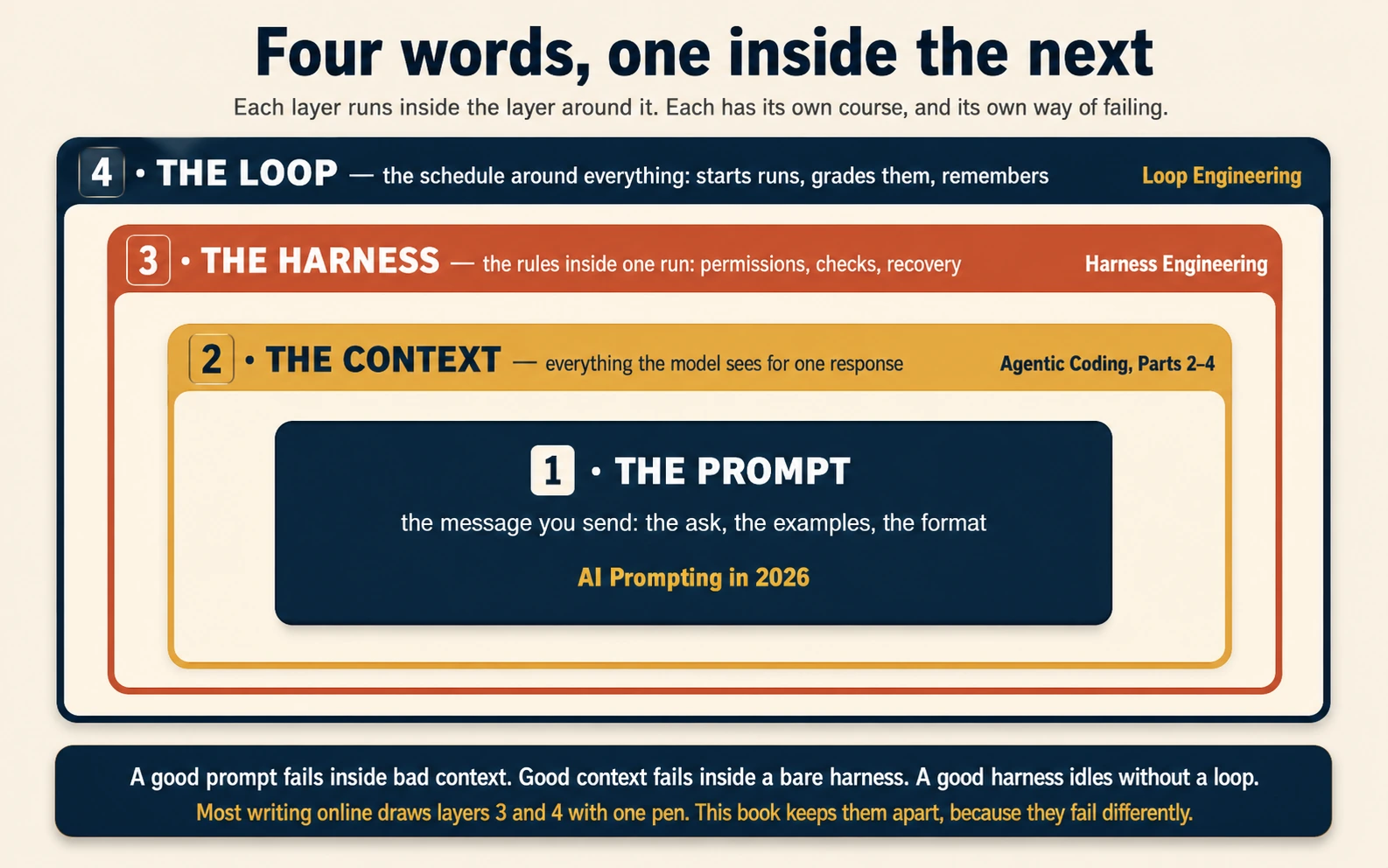
| Word | What it is | Unit of work | The course that owns it |
|---|---|---|---|
| Prompt | The message you send: the ask, the examples, the format. | One message | AI Prompting in 2026 |
| Context | Everything the model sees for one response: files, history, rules, tool results. | What stays in the window, step by step | Agentic Coding, Parts 2–4 |
| Harness | The rules inside one run: what the agent may do, how its work is proven, what happens when it fails. | One run | Harness Engineering |
| Loop | The schedule around everything: starts runs, grades them, remembers between them. | Many runs, over days | Loop Engineering |
The four are not steps in a line. They are layers, one inside the next. A good prompt fails inside bad context. Good context fails inside a bare harness. A good harness sits idle without a loop to run it. This is why an agent that works in a demo so often dies in production: the demo needed only the inner layers, and the outer layers were never built. The model was not the problem. The layers around it were missing.
One course in this section owns none of the four, and that is deliberate. Graph Engineering is not a fifth layer at all but a topology: the drawing between the stacks, which jobs run side by side, which have to wait, and where a checker with a clean context sits between them. It stays out of the table because the drawing buys you nothing until the work is wider than one loop, which is exactly why it comes after all four.
A good prompt gets you a clever answer. The four layers together get you something you can ship. The Four Layers takes each one apart, gives you the failure signature of each, and turns "my agent is broken" into a question with an address.
What you need first
Do the Foundations section first, especially How to Think in the AI Era (keeping your judgment) and Skills & Connectors (the plugins a general agent uses to reach your tools and data). You do not need to be a programmer: if you are not, take the Cowork & OpenWork door and you will be fine.
Where it leads
Once you can drive, direct, loop, and harden a general agent, the rest of the book opens up. The optional Personal Agent Harnesses section sits just ahead, if you want to own a worker that runs on your own infrastructure. Then comes the fork the whole book turns on: Mode 1 — Problem-Solving, where you use a general agent to solve a problem once, and Mode 2 — Manufacturing, where you build a permanent worker that solves it forever.
The book's arc in one line: Foundations to understand, General Agents to drive, the two modes to put to work.
Start in the browser with General Agents on the Web — everyone can, on day one, with nothing installed. Then, when you bring an agent onto your own machine, pick the door that fits you: Claude Code & OpenCode if you work with code, Cowork & OpenWork if you do not.